

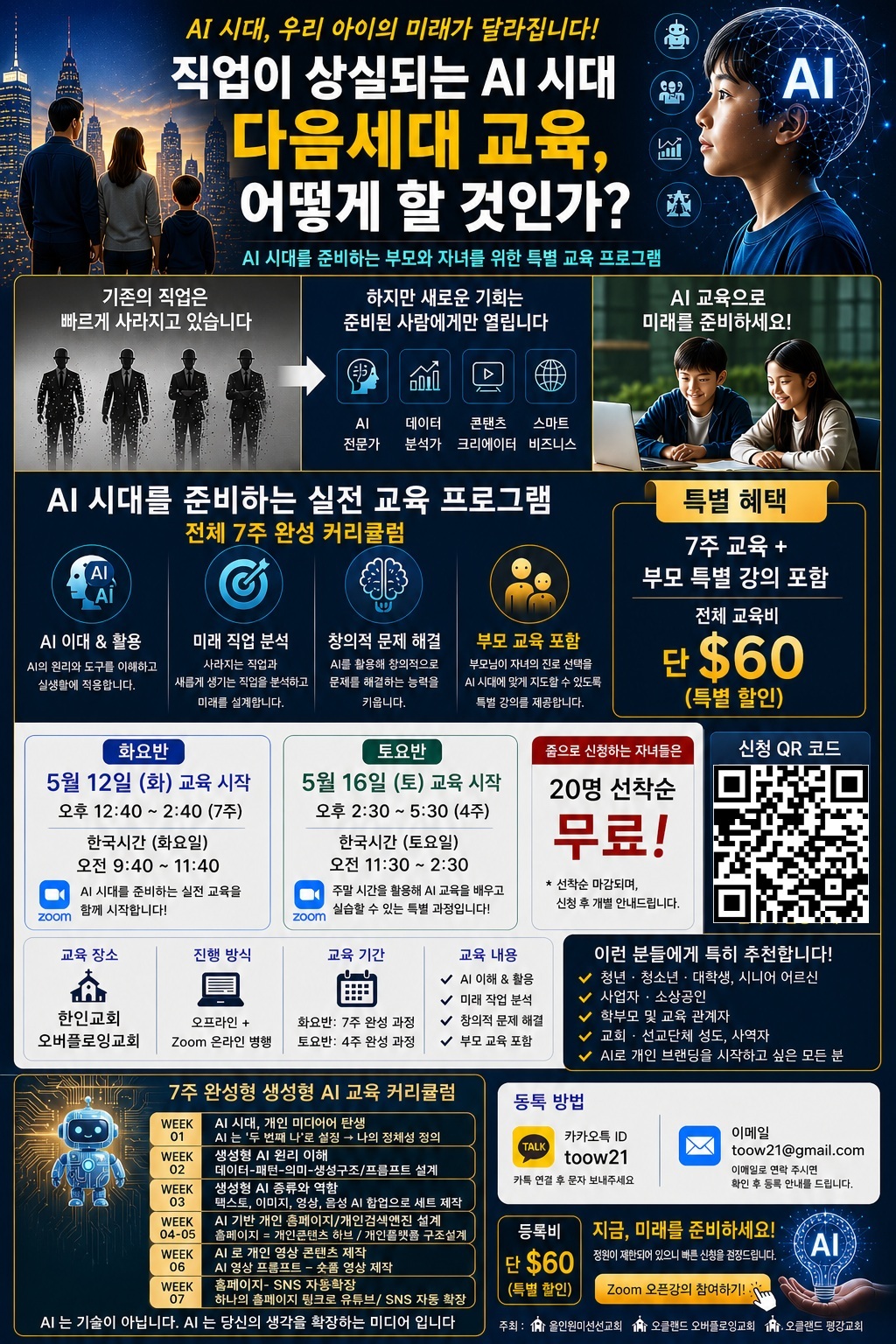
본 교육은 생성형 AI를 활용해 개인 미디어와 콘텐츠 플랫폼을 직접 완성하는 8주 집중 교육 과정입니다. 많은 분들의 성원에 힘입어 세 그룹으로 오프라인과 줌으로 가능하며 AI의 기본 개념부터 의미 기반 생성형 AI 이해, 텍스트·이미지·영상·음성 AI 활용, 개인 홈페이지 구축, 유튜브·인스타 콘텐츠 확장까지 이론과 실습을 통해 실제 결과물을 만드는 것이 목표입니다. 이번에는 특별하게 원래 7주교육인데 학부모님들이 아이들에게 어떻게 직업을 선택해야 하는 지 자녀 AI 교육에 대한 교육 시간을 1주 더 진행합니다. 그리고 학부모님들에게 좀 더 많은 기회를 드리기 위해 전체 수강료를 60불로 할인하여 진행합니다.
AI에 관심 있는 청년, 청소년, 학생, 일반인, 직장인, 소상공인, 사업자, 교회성도, 직분자, 사역자 누구나 줌이나 오프라인으로 참여 가능하며, 비전공자도 쉽게 이해할 수 있도록 구성되었습니다.
8주 후, AI를 '쓰는 사람'을 넘어 AI 기반 개인 플랫폼을 가진 사람으로 성장하게 됩니다. 참고로 교육을 받으시는 분은 저희가 1년 동안 USD $60 가치의 메타큐빅 개인 플랫폼 무료 사용권을 드립니다.
7주만에 AI를 '쓰는 사람'을 넘어 AI 기반 개인 플랫폼을 가진 사람으로 성장하세요!
교육 일정- 오프라인 (노트북 지참), 줌으로 교육 가능
오픈 줌 강의 2026년 5월 5일(화) 뉴질랜드 시간 오후 12:40-2:40, 오픈 중강의줌 시간 한국시간 5월 5 일 화요일 오전 9:40-11:40 정식 교육 시작 강의 2026년 5월 12일(화) 뉴질랜드 시간 오후 12:40-2:40, 오픈 중강의줌 시간 한국시간 5월 12 일 화요일 오전 9:40-11:40 매주 같은 시간 7주
장 소: 오클랜드 한인 교회 -22 Edmonton Rd, Henderson, Auckland, New Zealand
교육비: 총 $60 -
주 최: 글로벌리즈 / 메타큐빅(스마트큐빅 그룹 )www.smartcubic.net)
협 력: 오클랜드 한인교회/ 올인원 미션 선교회
문 의: +64-9-441-3311, toow21@gmail.com
은행: BANK OF NEW ZEALAND (BNZ)
계좌번호: 02-0272-0164025-000
예금주: GLOBALIZ LIMITED
해외 송금 시 SWIFT CODE (BIC): BKNZNZ22
한국내 은행 송금 방법: 글로발 리즈-한국 개인 에이전트 : 기업은행 /예금주- 심경식/ 계좌 번호: 01093024842
AI 교육강사 소개- AI 시대, 기술과 사람을 연결하는 교육 전문가
AI·시맨틱 AI·디지털 플랫폼 교육 강사 | 심성식 Vincent Sim
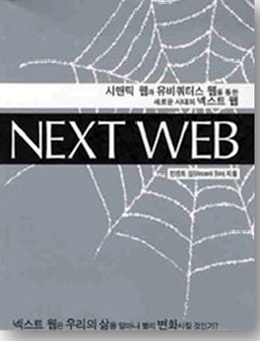
국민대학교 정보과학 대학원 석사졸업, 'NEXT WEB' 저자,
뉴질랜드 알파쿠르시스 학사 졸업
미국 통계 IT 회사 SAS SOFTWARE 교육팀장 경력 교육분야 전문가로 30년 이상 IT·ERP·ESG, AI·디지털 플랫폼 분야에서 실무와 리더십을 동시에 경험한 전문가로, 복잡한 기술을 누구나 이해하고 활용할 수 있도록 전문 IT 강사로 대학교와 고등학교, 컨퍼런스, 교회에서 수많은 강의와 교육으로 풀어내는 데 특화된 AI 교육강사입니다.
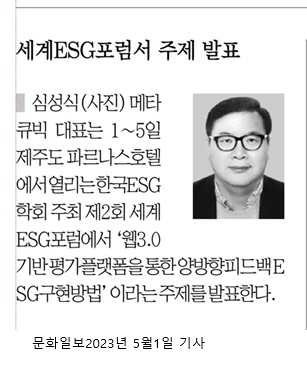
세계ESG포럼서 주제 발표
심성식(사진) 메타 큐빅 대표는 1~5일 제주도 파르나스호텔 에서열리는한국ESG 학회 주최 제2회 세계 ESG포럼에서 ‘웹3.0 기반평가플랫폼을통한 양방향피드백 ESG구현방법’이라는 주제를발표한다.
문화일보 2023년 5월 1일 기사
기업 현장의 ERP·CRM·POS·물류·유통 시스템 컨설팅 경험과 현재 진행 중인 시맨틱 AI·생성형 AI·디지털 플랫폼 기획 및 개발 경험을 바탕으로, AI를 단순한 기술이 아니라 삶과 생활 적용, 사역, 비즈니스와 교육을 변화시키는 도구로 설명합니다.
올빌더 웹사이[https://allbuilder.org/] 회원가입 및 설정
https://allbuilder.org/member/form 웹사이트 우측 상단의 '회원가입' 버튼을 클릭합니다. ID, 비밀번호, 이메일, 이름, 성별, 전화번호를 입력합니다.
회사정보 란에 회사나 교회정보를, 직책란에 직책이나 직분을 기재 후 썸네일 QR 코드와 약관동의 하시고 전송하기를 누르시면, 이메일로 확인 링크가 전송됩니다. 입력한 이메일 계정에 들어가시면 https://allbuilder.org/ 에서 온 이메일을 체크하시고 링크를 클릭하면 등록이 완성됩니다. 확인 이메일 링크를 클릭하면 등록이 완성됩니다. 만약 이메일이 확인이 안되시면 스팸폴더를 확인 부탁드립니다.
https://allbuilder.org/member/login 링크로 등록하신 아이디와 패스워드를 입력이 가능하면 등록이 완성되었습니다. 그리고 뉴질랜드 은행 송금 결제를 진행하시고 메일(toow21@gmail.com)을 보내시면 저희가 줌 링크를 이멜로 보내 드립니다.
만약에 카드로 결제를 원하시면 등록하신 https://allbuilder.org/member/login 맨위에 오른 쪽에 화살표가 있는 아이콘을 누르시고 로그인 아이디와 패스워드로 로그인을 하시면 왼쪽 상단에 바위 모양의 동근 아이콘이 나옵니다. 이 아이콘을 클릭하시고 결제 내역이라는 메뉴를 찾으시고 누르시면 결제 내역 화면이 나옵니다.
여기에서 아래 오른 쪽에 추가란 메뉴가 나오는 데 추가를 누르시면 결제 금액과 결제 내역이 나옵니다. 결제 내역에 본인 아이디와 등록비라고 적으시고 결제 금액에 등록비 금액을 입력한 후에 PAYPAL 을 클릭하시면 결제 화면이 나옵니다. PAYPAL 계정이 없으셔도 이메일을 입력하시면 카드 결제가 가능합니다. 마찬가지로 결제가 확인되면 등록하신 이메일로 줌 링크를 보내 드립니다.
“이론이 아닌, 실제로 써본 AI를 가르침니다”
ERP, POS, 물류·유통 시스템 실제 컨설팅 및 개발 경험
AI·빅데이터·클라우드를 현장 문제 해결 관점에서 교육
“AI 가 무엇인지”보다 “AI 로 무엇을 할 수 있는지”를 보여주는 강의
기술 + 교육 + 신앙 + 삶을 연결하는 강의
뉴질랜드 및 국제 교회 청소년·청년 사역 경험
청소년 디지털 성경교육 플랫폼 개발 및 교육
교회, 선교단체, 신학교, 학교, 일반인 대상 AI·디지털 리터러시 교육 진행
생성형 AI → 시맨틱 AI → 개인·그룹·지역 플랫폼까지
단순 ChatGPT 사용 교육이 아닌 의미 기반 AI(시맨틱 AI)와 디지털 플랫폼 확장 구조
설명 개인 → 그룹 → 교회 → 지역으로 AI 활용이 확장되는 구조적 이해 제공
“AI 를 아는 사람이 아니라, AI 를 삶에 쓰게 만드는 교육자”
“기술을 넘어 의미를 가르치는 AI 교육” AI 교육은 기술 설명이 아닌 ‘이해’, 도구 사용이 아닌 ‘적용’, 지식 전달이 아닌 ‘변화’를 목표로 합니다.AI 가 두려운 시대에, AI 를 함께 배우고 함께 사용하는 길을 제시하는 교육입니다
이론이 아닌 실제 적용
청년부터 사업자까지
AI 플랫폼 완성
7주 만에 생성형 AI 전문가가 되세요. 개인 미디어 플랫폼을 구축하고, 삶과 비즈니스를 혁신하세요. 무료 체험과 특별 혜택이 기다립니다!
[실습 50%] · 4주 완성 · 지역 커뮤니티 연결 + 소상공인과 함께 지역 검색 연결 시작

AI · 시맨틱 AI · 디지털 플랫폼 교육 전문 강사
Globaliz Founder & CEO
국민대학교 정보과학 대학원 석사 졸업
『NEXT WEB』 저자
뉴질랜드 Alphacrucis College 학사 졸업
미국 통계 IT 회사 SAS SOFTWARE 교육팀장 경력
30년 이상 IT·ERP·ESG·AI·디지털 플랫폼 분야 실무 및 리더십 경험
세계ESG포럼 주제 발표, 문화일보 등 다수 언론 보도
생성형 AI, 시맨틱 AI, 개인 플랫폼 개발 실전 경험을 바탕으로
"AI를 단순히 쓰는 사람이 아닌, 삶과 비즈니스·사역에 적용하는 사람"으로 키웁니다.
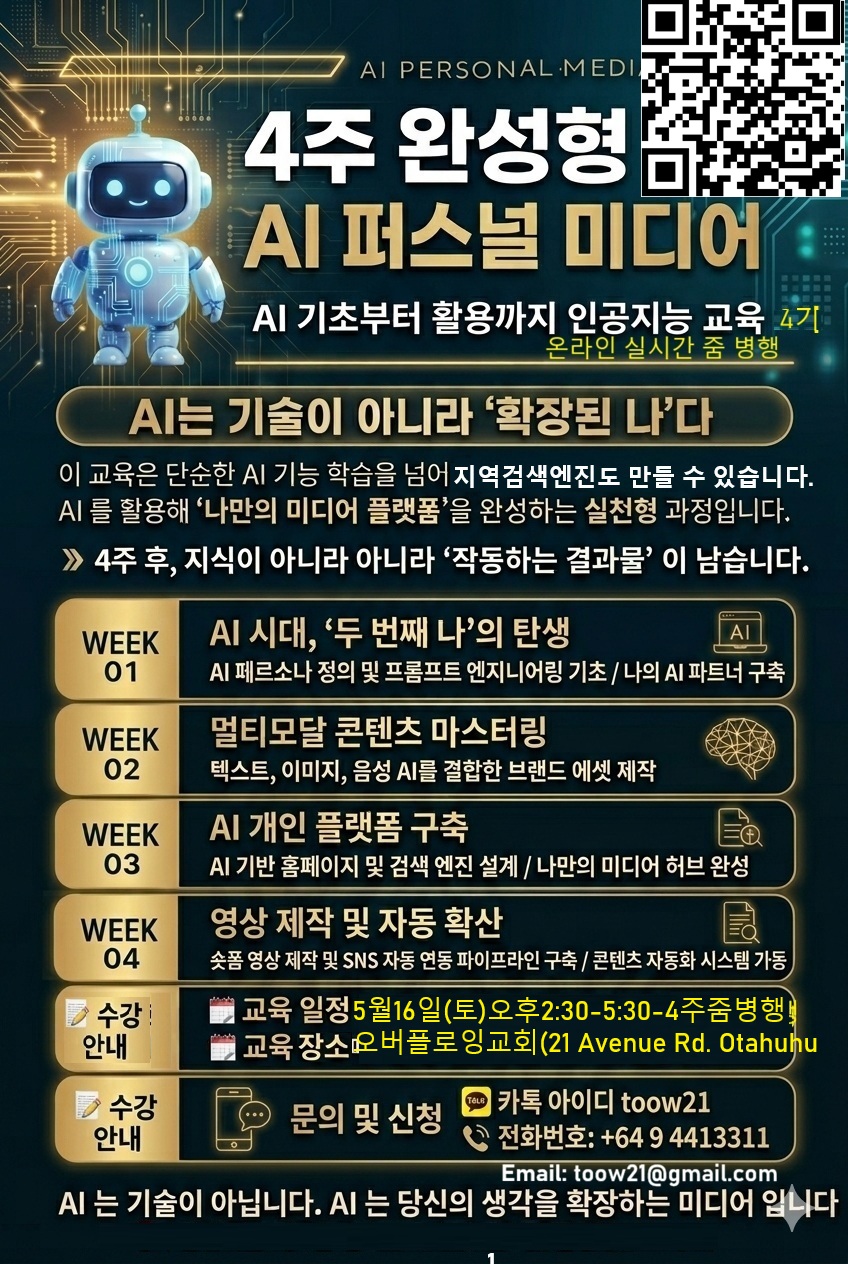
AI 시대, '두 번째 나' 탄생
프롬프트 엔지니어링 & 나만의 AI 파트너 구축
멀티모달 콘텐츠 마스터
텍스트·이미지·음성·영상 AI 결합 브랜드 콘텐츠 제작
지역 검색 AI 홈페이지 구축
나만의 홈페이지 + 지역 검색 엔진 설계 및 최적화
지역 커뮤니티 · 소상공인 협업 수익 모델 설계
자동 영상 제작 & 확산 시스템
숏폼 영상 자동 생성 + 지역 검색 연동 SNS 자동 홍보 시스템 완성
지역 기반 수익 창출 시스템 마무리
개강: 2026년 5월 16일(토) 오후 2:30 ~ 5:30 (NZ 시간)
오전 11:30 ~ 2:30 (한국시간)
매주 토요일 동일 시간 (5/16, 5/23, 5/30, 6/6)
장소: 오클랜드 오버플로잉교회 21 Avenue Rd, Otahuhu (오프라인 · 노트북 지참)
온라인 Zoom 병행 가능
교육비: $80 (4주 전체 · 단체 할인 가능)
7만원( 한국)(4주 전체 · 단체 할인 가능)
문의: +64 9 441 3311 | toow21@gmail.com
올인 오클랜드 웹사이트 https://allinauckland.com/ 뉴질랜드 회원가입 및 설정 후 결제 진행
한국은 올인 서울 웹사이트 https://allinseoul.net/ 한국 가입자 회원가입 및 설정 후 결제 진행
https://allinauckland.com/member/form 에서 뉴질랜드 가입자는 우측 상단 '회원가입' 버튼 클릭 → ID, 비밀번호, 이메일, 이름, 성별, 전화번호 입력
https://allinseoul.net/member/form 에서 한국 가입자는 우측 상단 '회원가입' 버튼 클릭 → ID, 비밀번호, 이메일, 이름, 성별, 전화번호 입력
회사정보(회사/교회), 직책(직책/직분) 기재 → 썸네일 QR 코드 생성 및 약관 동의 후 전송 → 이메일로 확인 링크 수신 (스팸폴더도 확인)
결제 완료 후 toow21@gmail.com 으로 송금 내역 메일 전송 → Zoom 링크 발송
https://allinauckland.com/member/login 뉴질랜드로그인 → 좌측 상단 아이콘 클릭 → "결제 내역" 메뉴 선택
하단 오른쪽 "추가" 클릭 → 결제 내역에 [본인 아이디 + 등록비] 입력 → 결제 금액 $80 입력 → PAYPAL 버튼 클릭
https://allinseoul.net/member/login 한국 로그인 → 좌측 상단 아이콘 클릭 → "결제 내역" 메뉴 선택
하단 오른쪽 "추가" 클릭 → 결제 내역에 [본인 아이디 + 등록비] 입력 → 결제 금액 $80 입력 → PAYPAL 버튼 클릭
PayPal 계정 없어도 이메일 입력으로 카드 결제 가능 → 결제 확인 후 Zoom 링크 이메일 발송
문의: +64 9 441 3311 | toow21@gmail.com
“이론이 아닌, 실제로 써본 AI를 가르칩니다”
“AI 를 아는 사람이 아니라, AI 를 삶에 쓰게 만드는 교육자”
“기술을 넘어 의미를 가르치는 AI 교육”
AI 교육은 기술 설명이 아닌 ‘이해’, 도구 사용이 아닌 ‘적용’, 지식 전달이 아닌 ‘변화’를 목표로 합니다.
AI 가 두려운 시대에, AI 를 함께 배우고 함께 사용하는 길을 제시하는 교육입니다.
이론이 아닌 실제 적용
청년부터 사업자까지
지역 커뮤니티 기반 수익형 플랫폼 완성
지역 커뮤니티와 소상공인과 함께 만드는 수익형 AI 홈페이지
지금 직접 만들고, 지역 검색 상위 + 자동 SNS로 지역 기반 수익을 창출하세요.
본 교육은 생성형 AI를 활용해 개인 미디어와 콘텐츠 플랫폼을 직접 완성하는 7주 집중 교육 과정입니다. AI의 기본 개념부터 의미 기반 생성형 AI 이해, 텍스트·이미지·영상·음성 AI 활용, 개인 홈페이지 구축, 유튜브·인스타 콘텐츠 확장까지 이론과 실습을 통해 실제 결과물을 만드는 것이 목표입니다.
AI에 관심 있는 청년, 청소년, 학생, 일반인, 성도, 직분자, 사역자 누구나 줌이나 오프라인으로 참여 가능하며, 비전공자도 쉽게 이해할 수 있도록 구성되었습니다.
7주 후, AI를 ‘쓰는 사람’을 넘어 AI 기반 개인 플랫폼을 가진 사람으로 성장하게 됩니다. 참고로 교육을 받으시는 분은 저희가 2년 동안 USD $120 가치의 메타큐빅 무료 사용권을 드립니다.
AI 시대, 기술과 사람을 연결하는 교육 전문가
AI · 시맨틱 AI · 디지털 플랫폼 교육 강사 | Vincent Sim
30년 이상 IT·ERP·AI·디지털 플랫폼 분야에서 실무와 리더십을 동시에 경험한 전문가로, 복잡한 기술을 누구나 이해하고 활용할 수 있도록 교육으로 풀어내는 데 특화된 AI 교육강사입니다.
기업 현장의 ERP·CRM·POS·물류·유통 시스템 컨설팅 경험과 현재 진행 중인 시맨틱 AI·생성형 AI·디지털 플랫폼 기획 및 개발 경험을 바탕으로, AI를 단순한 기술이 아니라 삶과 사역, 비즈니스와 교육을 변화시키는 도구로 설명합니다.
AI 교육은 기술 설명이 아닌 ‘이해’, 도구 사용이 아닌 ‘적용’, 지식 전달이 아닌 ‘변화’를 목표로 합니다.
AI가 두려운 시대에, AI를 함께 배우고 함께 사용하는 길을 제시하는 교육입니다.
| 항목 | 내용 |
|---|---|
| 일 시 | 2026년 2월 14일(토) 오전 10시–12시, 매주 같은 시간 7주 (2/14, 2/21, 2/28, 3/7, 3/14, 3/21, 3/28) |
| 장 소 | 5 Gladstone Road, Northcote, Auckland 0627 |
| 교육비 | 주당 $10 (총 $70 - 단체 할인 가능) |
| 주 최 | 글로벌리즈 / 올인원 미션 선교회 |
| 협 력 | 예수찬양교회 |
| 문 의 | +64-9-441-3311 toow21@gmail.com |
(1) https://allbuilder.org/member/form 웹사이트 우측 상단의 '회원가입' 버튼을 클릭합니다. ID, 비밀번호, 이메일, 이름, 성별, 전화번호를 입력합니다.
(2) 회사정보 란에 회사나 교회정보를 , 직책란에 직책이나 직분을 기재 후 썸네일 QR 코드와 약관동의 하시고 전송하기를 누르시면, 이메일로 확인 링크가 전송됩니다. 입력한 이메일 계정에 들어가시면 https://allbuilder.org/ 에서 온 이메일을 체크하시고 링크를 클릭하면 등록이 완성됩니다. 확인 이메일 링크를 클릭하면 등록이 완성됩니다. 만약 이메일이 확인이 안되시면 스팸폴더를 확인 부탁드립니다.
(3) https://allbuilder.org/member/login 링크로 등록하신 아이디와 패스워드를 입력이 가능하면 등록이 완성되었습니다. 그리고 뉴질랜드 은행 결제를 진행하시고 저희가 확인이 되면 줌 링크를 보내 드립니다.
(4) 만약에 카드로 결제를 원하시면 등록하신 https://allbuilder.org/member/login 맨위에 오른 쪽에 화살표가 있는 아이콘을 누르시고 로그인 아이디와 패스워드로 로그인을 하시면 왼쪽 상단에 바뀌 모양의 동근 아이콘이 나옵니다. 이 아이콘을 클릭하시고 결제 내역이라는 메뉴를 찾으시고 누르시면 결제 내역 화면이 나옵니다.
(5) 여기에서 아래 오른 쪽에 추가란 메뉴가 나오는 데 추가를 누르시면 결제 금액과 결제 내역이 나옵니다. 결제 내역에 본인 아이디와 등록비라고 적으시고 결제 금액에 등록비 금액을 입력한 후에 PAYPAL 을 클릭하시면 결제 화면이 나옵니다. PAYPAL 계정이 없으셔도 이메일을 입력하시면 카드 결제가 가능합니다. 마찬가지로 결제가 확인되면 등록하신 이메일로 줌 링크를 보내 드립니다.

[INPUT]
- reference_image: attached object photo
- object_category: [{argument name="object_category" default="AUTO"}] # AUTO or: cosmetic, skincare, bottle, kitchen tool, electronic, stationery, accessory, household item, personal care, container, wearable, tool
- object_view: [{argument name="object_view" default="MATCH_REFERENCE_OR_AUTO_BEST_VIEW"}] # MATCH_REFERENCE_OR_AUTO_BEST_VIEW, front view, top view, side view, 3/4 view, opened view, in-use view, close-up detail view
- object_state: [{argument name="object_state" default="MATCH_REFERENCE_OR_AUTO_MOST_USEFUL_STATE"}] # MATCH_REFERENCE_OR_AUTO_MOST_USEFUL_STATE, closed, open, opened with parts visible, ready to use, in-use, stored state
- language: [{argument name="language" default="Korean"}]
- infographic_goal: [{argument name="infographic_goal" default="HOW_TO_USE"}] # HOW_TO_USE, CARE_CLEAN, SAFETY, QUICK_TIPS, DO_DONT, TROUBLESHOOT
- output_size: 2000x2000
- palette: WHITE_BG_BLACK_INK_ONLY
[1. PURPOSE]
Create a practical everyday infographic based on the attached object photo.
Combine:
1) a photoreal studio-style presentation of the exact object from the reference image, and
2) black hand-drawn annotation overlays on top.
The result should feel like a clean quick-start card or packaging insert.
[2. CORE BRIEF]
Use the attached photo as the source of truth for the object’s identity, shape, material impression, and key parts.
Isolate the main object and present it clearly on a pure white seamless background.
Use [OBJECT_CATEGORY], [OBJECT_VIEW], [OBJECT_STATE], and [INFOGRAPHIC_GOAL] to choose the most useful instructional presentation.
Render all visible text only in [LANGUAGE].
Keep the object photoreal and the overlays as black hand-drawn ink only.
[3. MUST-HAVES]
Object:
- preserve the exact object identity from the attached photo
- one main object only
- cleanly isolate it from any distracting background
- if the reference angle/state is not ideal, keep the same object identity but show the most useful instructional view/state
- object must stay fully photoreal, clearly visible, and easy to understand
Overlay:
- use 6–10 overlays total; reduce to 5–8 if text density gets high
- prefer fewer, larger, clearer notes over many tiny notes
- overlays must be practical, everyday-use guidance only
- allowed overlays: part names, steps 1–4 with arrows, short tips, ✓/✗ do-don’t notes, short safety notes, care/cleaning notes, storage/handling notes, troubleshooting mini-box, time/temperature only if truly practical
Language:
- render ALL title, subtitle, labels, steps, callouts, and mini-box text ONLY in [LANGUAGE]
- no bilingual text, no mixed languages
- use short everyday wording only
- if text becomes unstable, simplify to very short reliable words in [LANGUAGE]
- prefer single-word or two-word labels whenever possible
Goal logic:
- HOW_TO_USE: prioritize 3–5 short steps and main actions
- CARE_CLEAN: prioritize wipe / rinse / dry / store guidance
- SAFETY: prioritize short warnings and avoid-mistake notes
- QUICK_TIPS: prioritize 4–6 compact callouts
- DO_DONT: prioritize paired ✓ / ✗ comparisons
- TROUBLESHOOT: prioritize 1–3 short “IF ___ → TRY ___” items
Title:
- infer the object name from the reference image
- place the title in a hand-drawn box in one corner
- add a short 1–3 word subtitle matching [INFOGRAPHIC_GOAL], in [LANGUAGE] only
[4. CONTEXT]
Use a pure white seamless studio background with clean even lighting and a soft natural shadow.
The mood should feel useful, calm, practical, and premium.
This should look like a real instruction insert, not an ad, blueprint, or technical manual.
[5. COMPOSITION & LAYOUT]
Use a balanced 2000×2000 square layout.
Place the object centered or slightly off-center with wide negative space for annotations.
Distribute notes evenly around the object.
Use consistent black line weight with a few thicker strokes for hierarchy.
Keep arrows clear and connected to exact touch / open / close / clean / store points.
Do not cover critical object details.
Troubleshoot layout lock:
IF [INFOGRAPHIC_GOAL]=TROUBLESHOOT:
- reserve a fixed mini-box in the BOTTOM-RIGHT corner
- give it a hand-drawn border and short [LANGUAGE]-only header
- list 1–3 short items in [LANGUAGE] using:
“IF ___ → TRY ___”
- keep the box clear of the object silhouette
[6. LIGHT, COLOR & TEXTURE]
Lighting:
- soft clean studio lighting
- even illumination
- soft natural shadow
- high micro-contrast for crisp readability
Color:
- white background only
- black annotation lines only
- black text only
- no colors, no gradients, no colored icons
Texture:
- object surface must remain materially accurate and photoreal
- overlays must look like real pen or marker ink drawn on top
- maintain clear separation between photoreal object and ink overlay layer
[7. CONSTRAINTS]
- do not stylize the object into a drawing
- do not render overlays as digital UI
- do not make the object look sketched or cartoon-like
- do not merge object and overlay into one illustration style
- no readable brand names
- no brand logos
- no watermark
- no irrelevant decorative elements
- no extra objects unless essential for explanation
- no cluttered layout
- no engineering dimensions unless truly practical
- no unnecessary numbers
- no paragraph text
- no ad slogans
- no mixed scripts unless required by [LANGUAGE]
[8. OUTPUT & FORMAT]
Output a 2000×2000 ultra-crisp square infographic optimized for social feeds.
Show:
- the exact object based on the attached photo
- white seamless studio background
- black hand-drawn ink overlay only
- practical guidance matched to [INFOGRAPHIC_GOAL]
- all visible text only in [LANGUAGE]
- the most useful view/state for instruction
Target style:
practical product infographic
reference-based object infographic
photoreal object
white studio background
black ink hand-drawn overlay
quick-start guide
clean packaging insert
minimal instructional layout
high readability
social-feed optimized