Allbuilder

7thGenerative AI 4 WEEK COURSE

7thGenerative AI 4 WEEK COURSE

  • localcubic youtube search engine
  • AI YouTube Search Engine Portal Training Course
  • 7th Term AI PersonalYoutube Portal Media Education
  • 7 th generative AI Personal media
  • Brochure
  • church brochure
  • reference
  • local media search
Churches Serving Local Communities | AI YouTube Search × LocalCubic × 7th AI Personal Media
LOCAL CHURCH
LOCALCUBIC × AI × YOUTUBE
Local MissionLocalCubicAI Search4-Week CourseGlobal CitiesKOApply / Enquire
CHURCHES SERVING CITIES & LOCAL COMMUNITIES

Instead of the church searching for the community,
help the community discover the church.

Connect an AI YouTube search engine, LocalCubic, a church website and useful local content so the church can become a digital doorway for service, discovery and real relationships.

Explore the 7th CohortUnderstand the Local Mission Model
Future SmartCubic city illustrating connected local and global digital networks
LOCAL CHURCH × LOCALCUBIC × AI × YOUTUBE
01 / MISSION REFRAMED

Before promoting the church, show how the church serves the neighbourhood.

A local resident does not first need another church advertisement. They often need a trustworthy door to useful information, help and relationships close to home.

Move from “How do we promote our church?” to “How can our church help the people who live here?”

A church sits among families, migrants, young people, older residents, small businesses, schools, clinics, welfare services and community groups. People may live nearby and still have no idea what the church contributes to local life.

This page therefore frames the church less like a billboard and more like a helpful local desk: a place that listens, points people toward good resources, tells local stories and creates pathways into genuine community.

Service comes before promotion.

When a church shares helpful local information, introduces trustworthy organisations and gives attention to the stories of its neighbours, people can discover the church naturally through usefulness and relationship.

FamiliesCare & relationship
Next GenerationYouth & children
Small BusinessLocal economy
EducationSchools & courses
HealthClinics & care
WelfareSupport services
EventsLocal programmes
CommunityPeople & groups
02 / LOCALCUBIC BRIDGE

Connect people, churches, businesses and services through one local context.

LocalCubic can be used as a local digital layer that helps people discover useful information around where they actually live. A church can become one trusted node within that larger community picture.

01

Church & Ministry

Organise worship, care, volunteering, education, youth and newcomer information in a clear local context.

02

Everyday Local Information

Connect dining, health, schools, welfare, events and other information residents actually search for.

03

Local Video Stories

Turn local people, places and events into useful YouTube content that can be searched again later.

04

Next Actions

Move beyond views toward enquiries, registrations, visits, volunteering and real community participation.

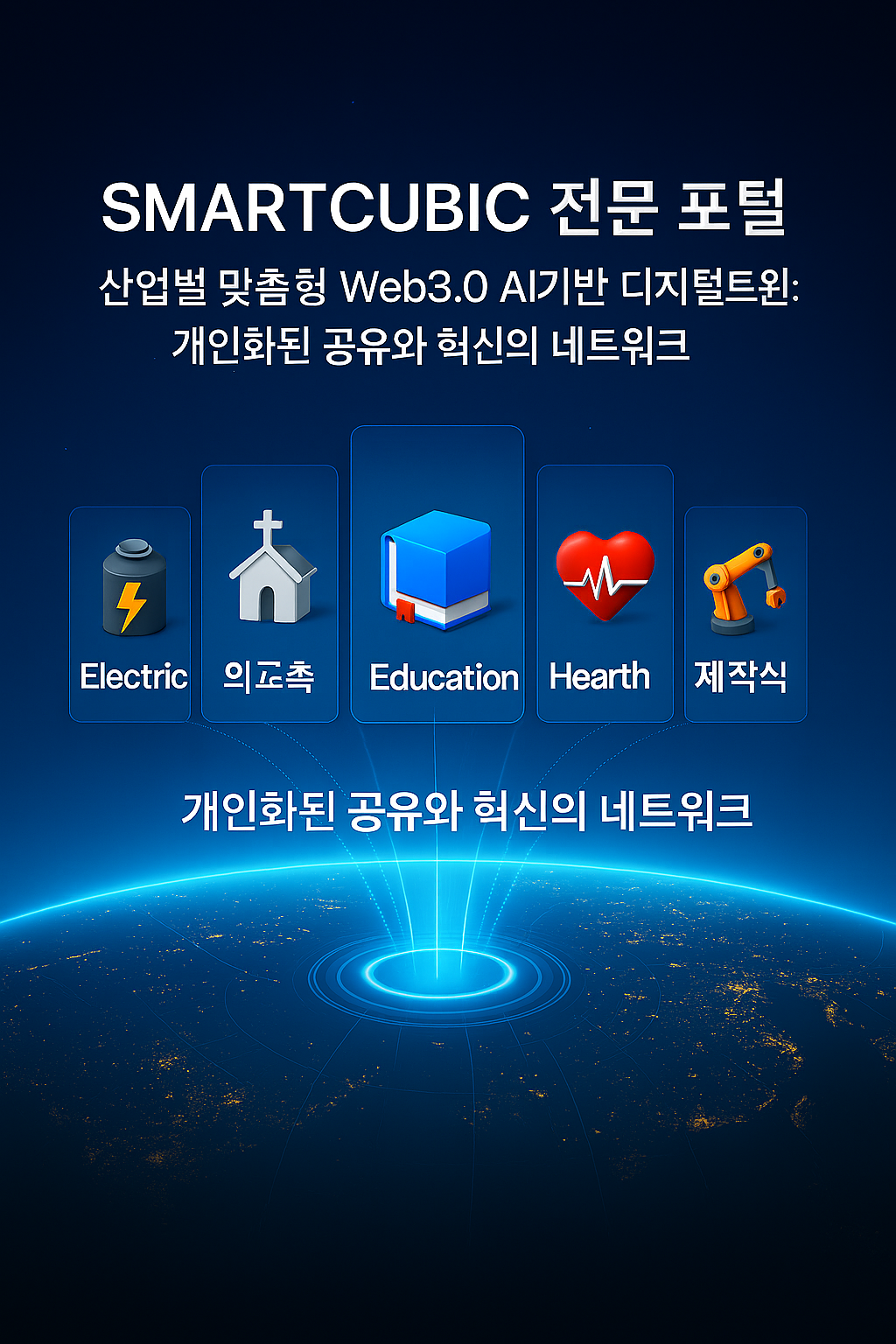
SmartCubic network linking specialised and local portals
LocalCubic can help position the church as part of a useful local discovery network rather than as an isolated page.
03 / DIGITAL DOOR

Turn the church website into a digital doorway for the neighbourhood.

Keep the essentials such as worship times, sermons and directions, then add practical local information so the site helps a resident understand both the church and the community around it.

SmartCubic local portal network visual connecting community information
A premium information structure makes church and local information understandable on the same screen.
Know Our Area

Useful local information and key places in one simple guide.

Local Events

Church and community events, seminars and programmes.

Local Business

Restaurants, cafes, shops and services worth discovering.

Local Welfare

Services and agencies that can assist people who need help.

Local Education

Schools, courses, seminars and next-generation programmes.

Local Health

Clinics, healthcare information and community health events.

Local Service

Practical opportunities for the church and residents to serve together.

Local Video

Searchable stories about people, places and events.

04 / AI YOUTUBE SEARCH

Move from a channel full of videos to a video library people can actually search.

Sermons, worship, testimonies, mission reports, events and teaching can become hard to find once they accumulate. An AI-assisted search structure organises videos around topics, audiences, questions and local needs.

Example: children's programmes near me
Church programmes for familiesFamily · Care · Local Church
Local volunteering opportunitiesVolunteer · Community · Service
Youth programmes and teachingYouth · Education · Next Generation
Faith care and newcomer informationCare · Welcome · Faith
Mobile search connecting content, websites and communication networks
Search is not about producing more video. It is about creating a path so existing content can reach the right person again.
05 / THREE CONNECTED HUBS

Do not run three disconnected sites. Build three connected entrances.

The church site builds trust, LocalCubic supports local discovery, and the AI YouTube search page supports content discovery. They have different jobs but should feel like one journey to the visitor.

CHURCH HUB

Church Website

The trusted home for worship, care, volunteering, local guides, newcomer information and next-generation ministry.

See the digital doorway
LOCALCUBIC HUB

Local Discovery Layer

A local entrance for food, health, education, events, welfare, churches and community services.

View the city network
YOUTUBE SEARCH HUB

AI Video Search Page

Organise video by topic, audience, question and location so the right sermon, event, class or local story can be found quickly.

Explore the search-engine course
06 / LOCAL MEDIA CHURCH

Let the church become a media voice that tells the neighbourhood's good stories.

One way to serve locally is to give attention to people, organisations and small businesses doing good work. Content should not exploit the community for promotion; it should document and strengthen the community with care.

SmartCubic network connecting local and specialised content across portal entrances
One useful local story can be discovered through church, local, professional and video-search entrances.
Meet a good local restaurant.Tell the story of the people, food and contribution behind the business.
Here is a service that can help people in need.Explain what a welfare agency does and how residents can access support.
Discover programmes for local young people.Connect education, care, experiences and safe activities.
Here is what is happening in our area this week.Turn event previews, coverage and follow-up stories into searchable assets.
Meet people who serve our neighbourhood.Tell stories beyond the church walls and honour people already contributing locally.
07 / SERVICE BEFORE PROMOTION

Local mission can become clearer when the advertising becomes quieter.

Frame the work like a studio case study: show the problem, the design decision and the behaviour you want to test. The goal is not more promotional material but more useful local touchpoints.

OLD APPROACH
Repeat only church programmes and internal notices.
Let videos accumulate on YouTube with no search structure.
Put church schedules before the questions residents are asking.
Run website, social media and video like separate islands.
VS
SERVICE-FIRST PLATFORM
Lead with useful information residents are already seeking.
Organise local stories and videos so they can be searched again.
Create real paths into care, volunteering, classes and events.
Make Church, LocalCubic and YouTube work as one connected flow.
PROBLEM

The Problem

A church may have substantial content, but it is hard to discover when it does not match the questions local people are asking.

DECISION

The Design Decision

Start with local needs and connect church, community and video content around those questions.

RESULT TO TEST

What to Measure

Do not promise rankings. Observe local searches, enquiries, event participation, service connections and real visits.

08 / 7TH AI PERSONAL MEDIA COURSE

Build a working local-mission media structure over four practical weeks.

Beginning 22 August 2026, the 7th cohort moves beyond AI basics and connects content, a website, a YouTube search page and local distribution into one practical system.

WEEK01
Saturday, 22 August

Build Your AI Partner

AI persona, prompt foundations, a ministry-aware AI partner, local information collection and content planning.

WEEK02
Saturday, 29 August

Create Multimodal Local Content

Use writing, images, voice and video for church communication, local introductions and community event content.

WEEK03
Saturday, 12 September

AI YouTube Search Engine + LocalCubic

Build a searchable YouTube page, AI search structure, church homepage and connected LocalCubic media hub.

WEEK04
Saturday, 19 September

Video Production and Local Distribution

Connect short-form video, YouTube, social media, the website and LocalCubic into a repeatable distribution path.

Course Information

  • 22 Aug · 29 Aug · 12 Sep · 19 Sep 2026
  • New Zealand: Saturday 2:30–5:30 PM
  • Korea: Saturday 11:30 AM–2:30 PM
  • Auckland in-person + live Zoom simultaneously
  • See the official AllBuilder page for current course details
Open Course & Registration Page
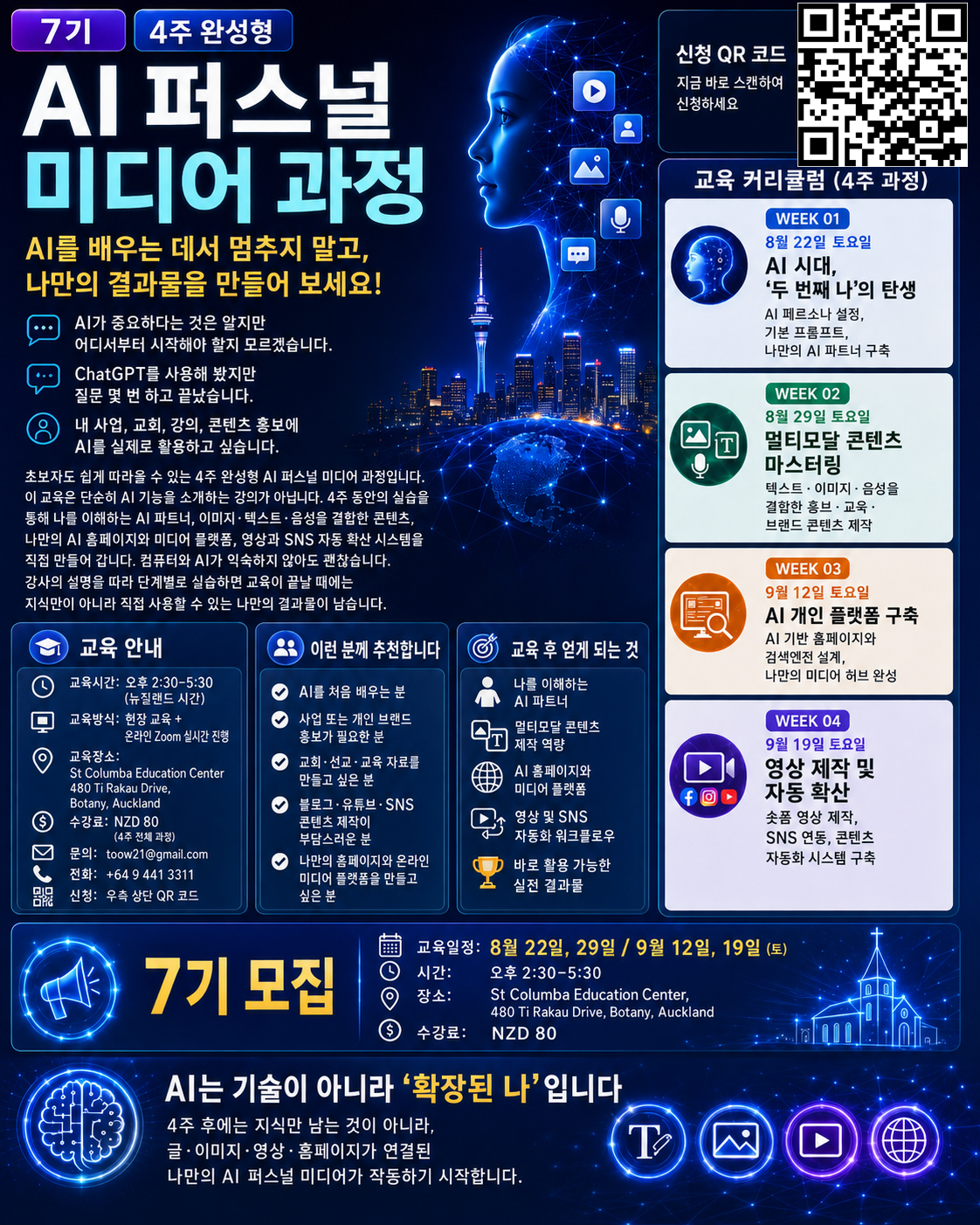
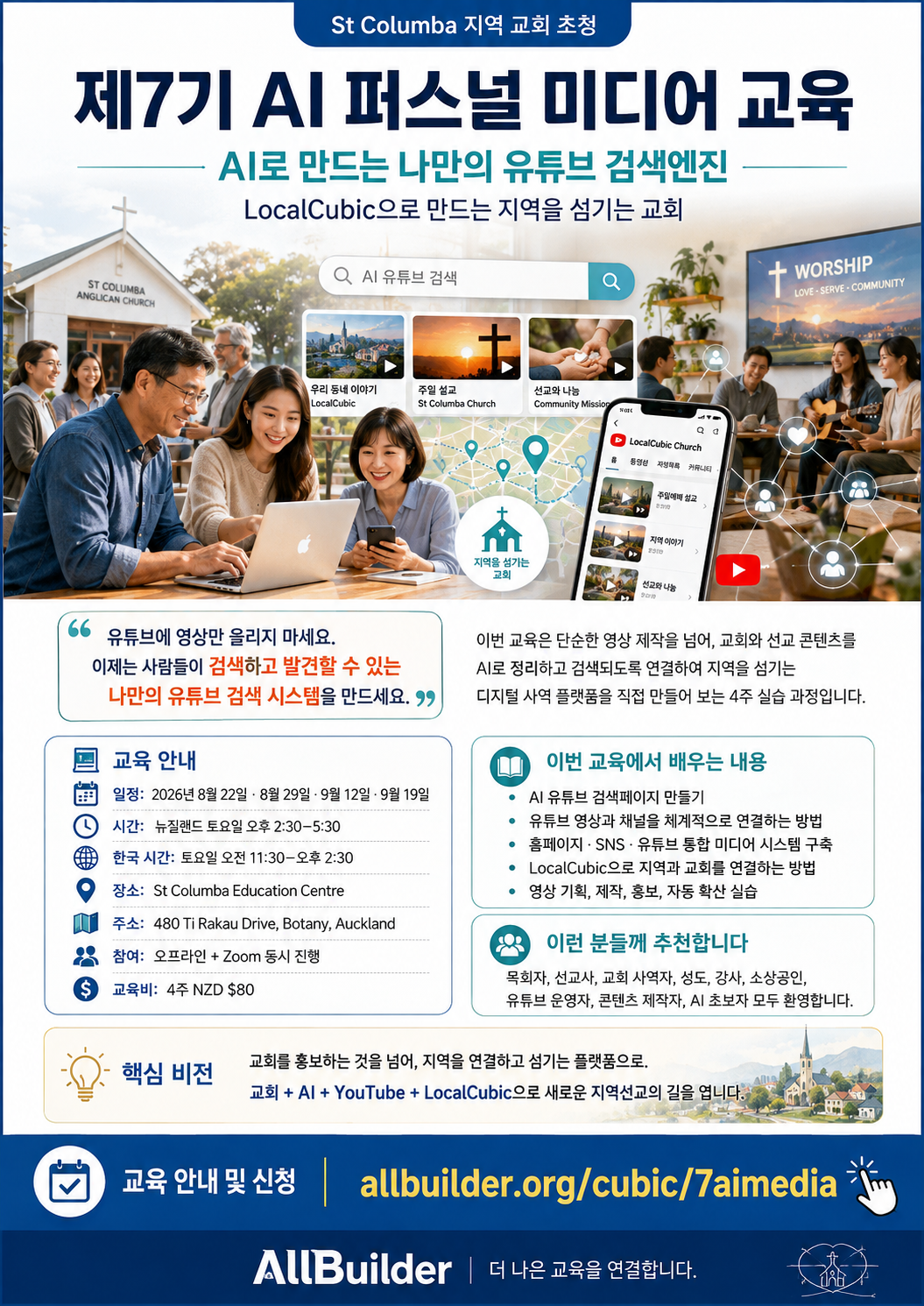
Official 7th cohort AI Personal Media reference image
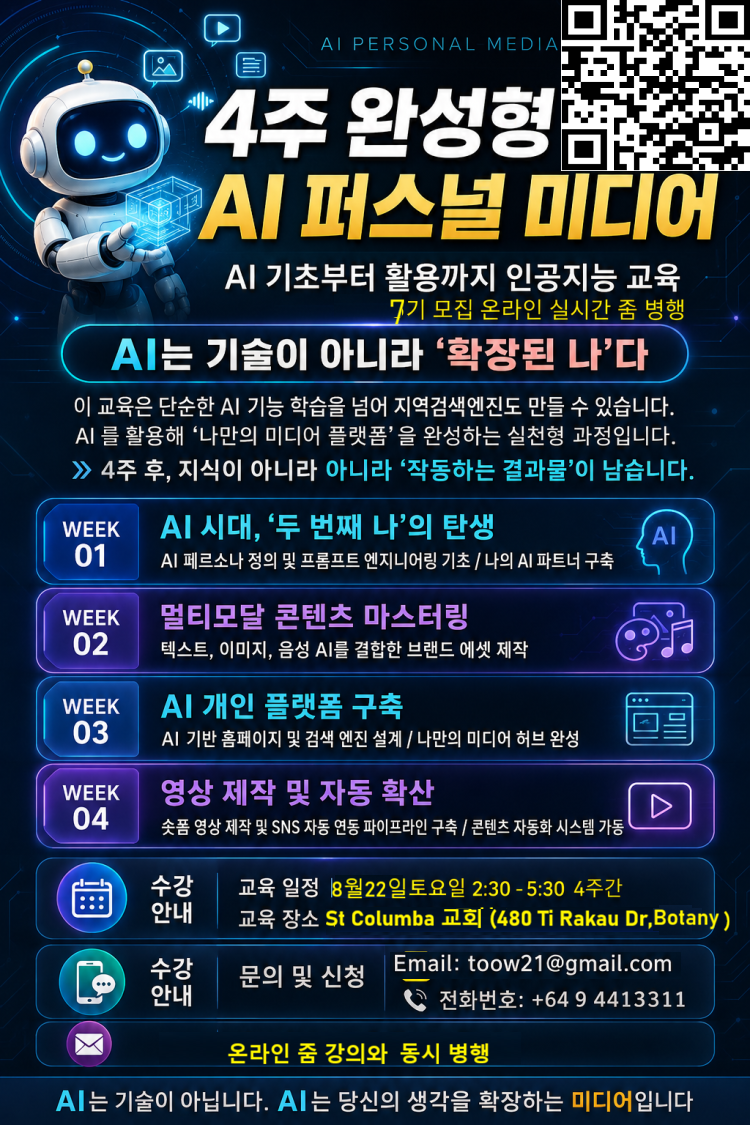
Korean brochure for the four-week 7th AI Personal Media course
Four-week AI Personal Media schedule and curriculum
Reference image for connected city, local and AI media training
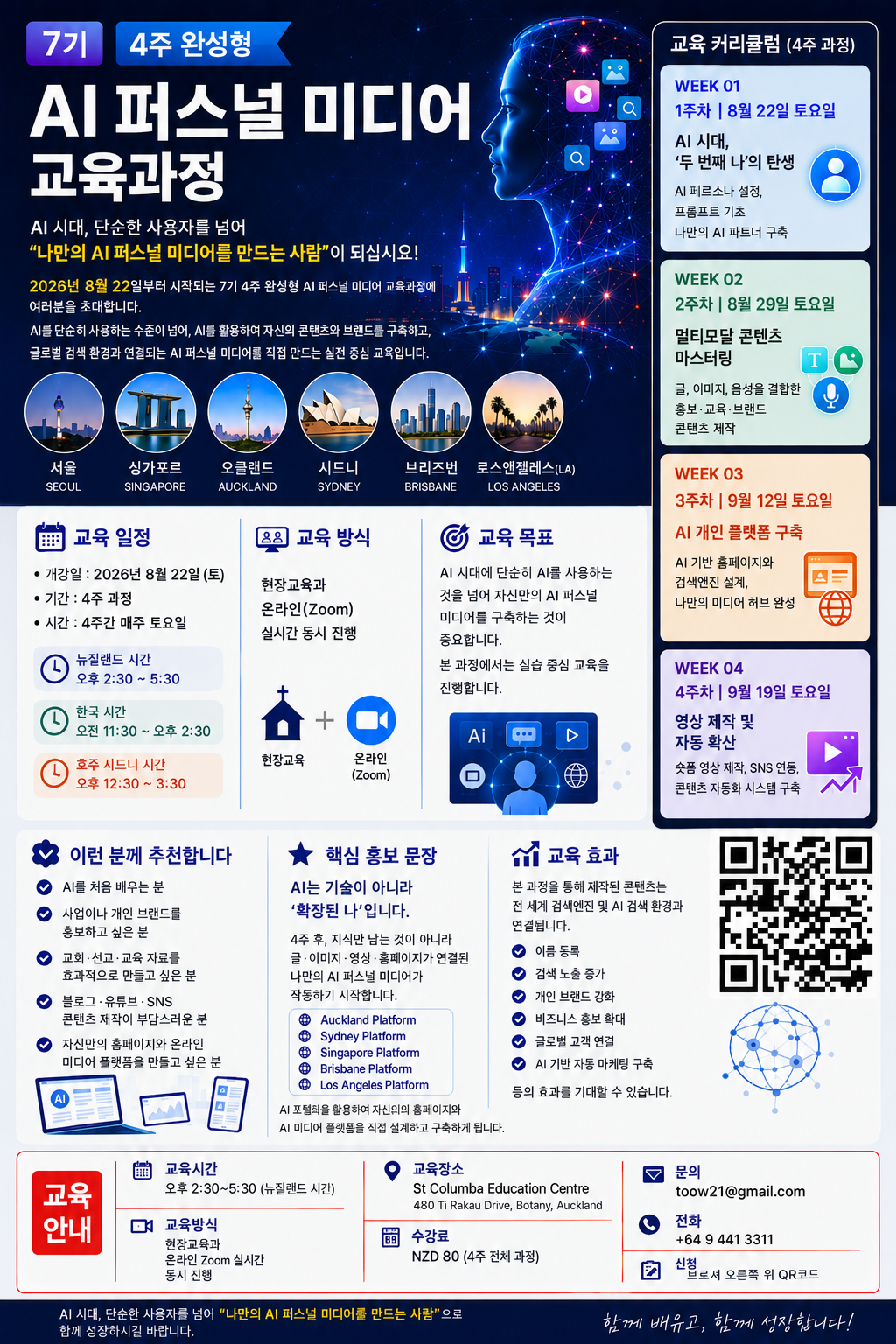
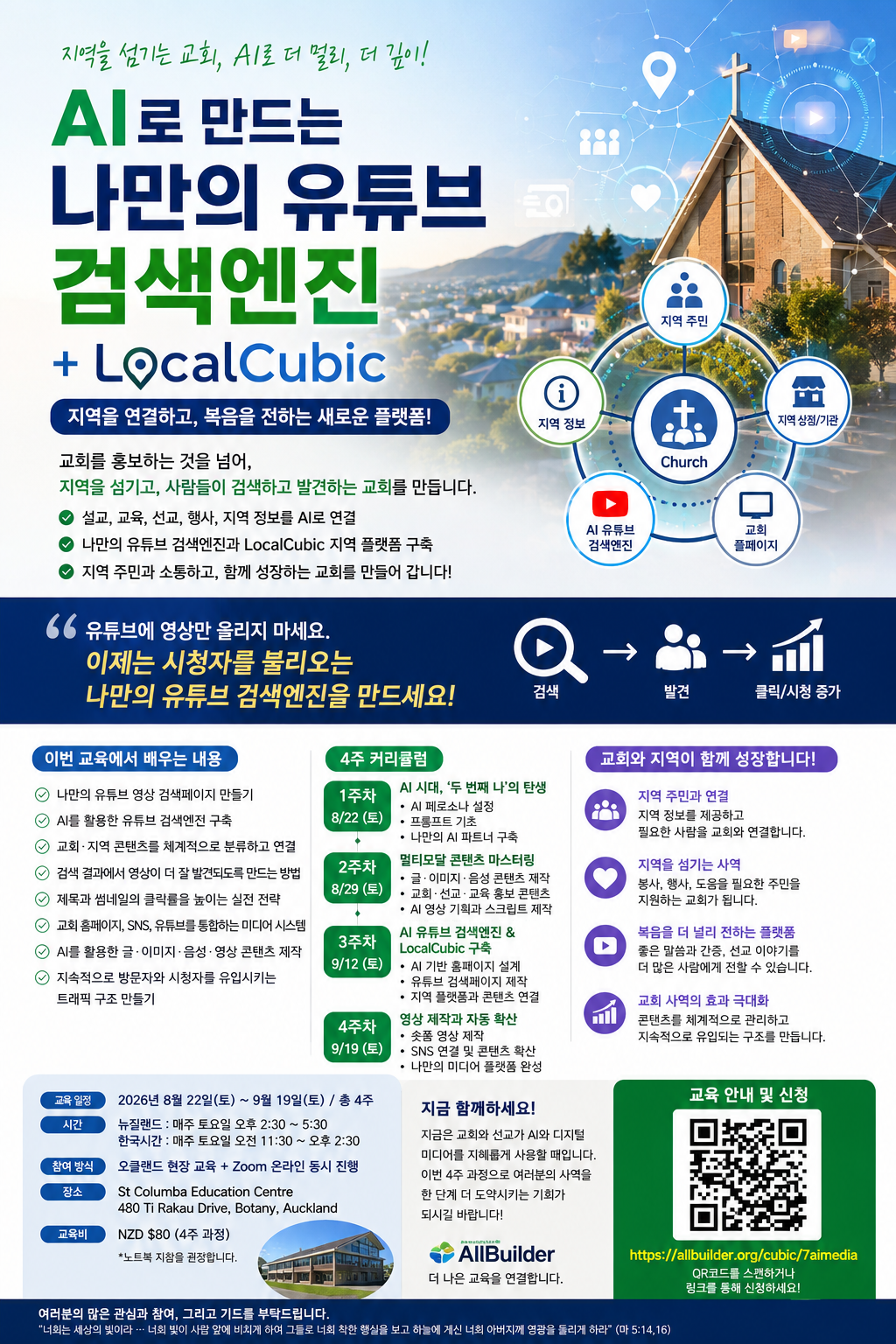
Brochure showing global-city timing and curriculum for the 7th AI Personal Media course
Global learning connection across Seoul, Singapore, Auckland, Sydney, Brisbane and Los Angeles
09 / CHURCH APPLICATIONS

Six small projects a local church can start immediately.

Do not start by building a huge platform. Start with one neighbourhood, one question and one audience, then repeat a simple pattern of useful content, search and connection.

Local Life Guide

Connect healthcare, dining, education, events and welfare information in a resident-friendly format.

Searchable Church Events

Make seminars, worship events, children's programmes and classes easier to discover.

Support Local Business

Create respectful stories about good local businesses and services that residents can find.

Mission & Volunteering

Connect the purpose, participation details and real stories of local service projects through video and search.

Next Generation

Provide useful youth and children's content through AI, video, search and a clear website experience.

Newcomers & Migrants

Help people settle into a new area with both church information and practical local guidance.

10 / GLOBAL CITY CHURCH NETWORK

A local church may be small while its city network can still connect globally.

SmartCubic's public City Network connects multiple city and local portals. The same principle can help churches serve their own neighbourhood faithfully while learning from useful local models across other cities.

LOCAL INFORMATION. GLOBAL CONNECTION.

Local churches keep their own identity and local focus while useful information can connect across a wider city network.

New YorkLos AngelesChicagoHoustonBrisbaneSydneySeoulBusanGangnamYangpyeongAucklandNorth ShoreSingaporeParisTokyo
The objective is not a larger city count. The first priority is for each church to understand real local needs, publish useful content and build trusted relationships where it actually serves.
View SmartCubic Global City Network
SmartCubic local portal network visual
Global connection only becomes meaningful when the local story is clear first.
SmartCubic network linking specialised and city portals
Church, education, health, event and business information can be rediscovered through different specialist entrances.
COURSE & NETWORK SNAPSHOT

Start small and repeat the connection.

The core units used in this model.

4
WEEK PRACTICAL COURSE
3
CONNECTED HUBS
15
CITY & LOCAL PORTALS
1
LOCAL SERVICE MISSION
COURSE & CHURCH CONTACT

Choose the first practical project for your church and area.

If you are unsure whether to begin with a church website, LocalCubic information, an AI YouTube search page or local content, tell us where you are now and what you want to build.

Helpful questions before you enquire

  • Which city and neighbourhood does your church serve?
  • What information do local residents repeatedly need?
  • What sermon, event or service videos do you already have?
  • What usable result would you like to have after four weeks?
info@smartcubic.com

We will review your enquiry and reply by email.

Your enquiry has been sent.
We will get back to you after review.
WHAT IF YOUR CHURCH BECAME A LOCAL DISCOVERY DOOR?

Move beyond promoting the church and build a church that serves its locality.

Connect LocalCubic for local discovery, AI for searchable information, YouTube for local stories and the church website for real relationships. Build the practical structure with us over four weeks.

Open 7th Cohort RegistrationDiscuss Your Church Use Case
ALLBUILDERCONNECTING BETTER EDUCATION

A practical model connecting AI, YouTube, LocalCubic and a church website so local churches can know, connect with and serve their communities.

LOCAL CHURCH

  • Local Mission
  • Digital Doorway
  • Use Cases

AI & LOCAL

  • LocalCubic
  • AI YouTube Search
  • Global City Network

CONTACT

info@smartcubic.com
allbuilder.org/cubic/7aimedia

© 2026 AllBuilder · SmartCubic. All rights reserved.

TermsPrivacyCookies
LOCAL CHURCH

7th AI Personal Media Course | Build Your Own YouTube Search Engine
ALLBUILDER
Connecting better education
YouTube EngineCurriculumSmartCubic PortalWebsite StrategyScheduleFAQ
KO
Apply Now
Starts 22 August 2026 · 7th Cohort · In-person and Zoom

Do not only upload videos.
Build a discovery system
with your own YouTube search engine.

Move beyond asking AI questions and waiting for viewers. In four practical weeks, connect an AI personal media hub, YouTube search page, website, social channels, and QR registration flow so people can search, discover, click, and watch your content.

Apply or Request Course AdviceExplore the Four-Week Plan
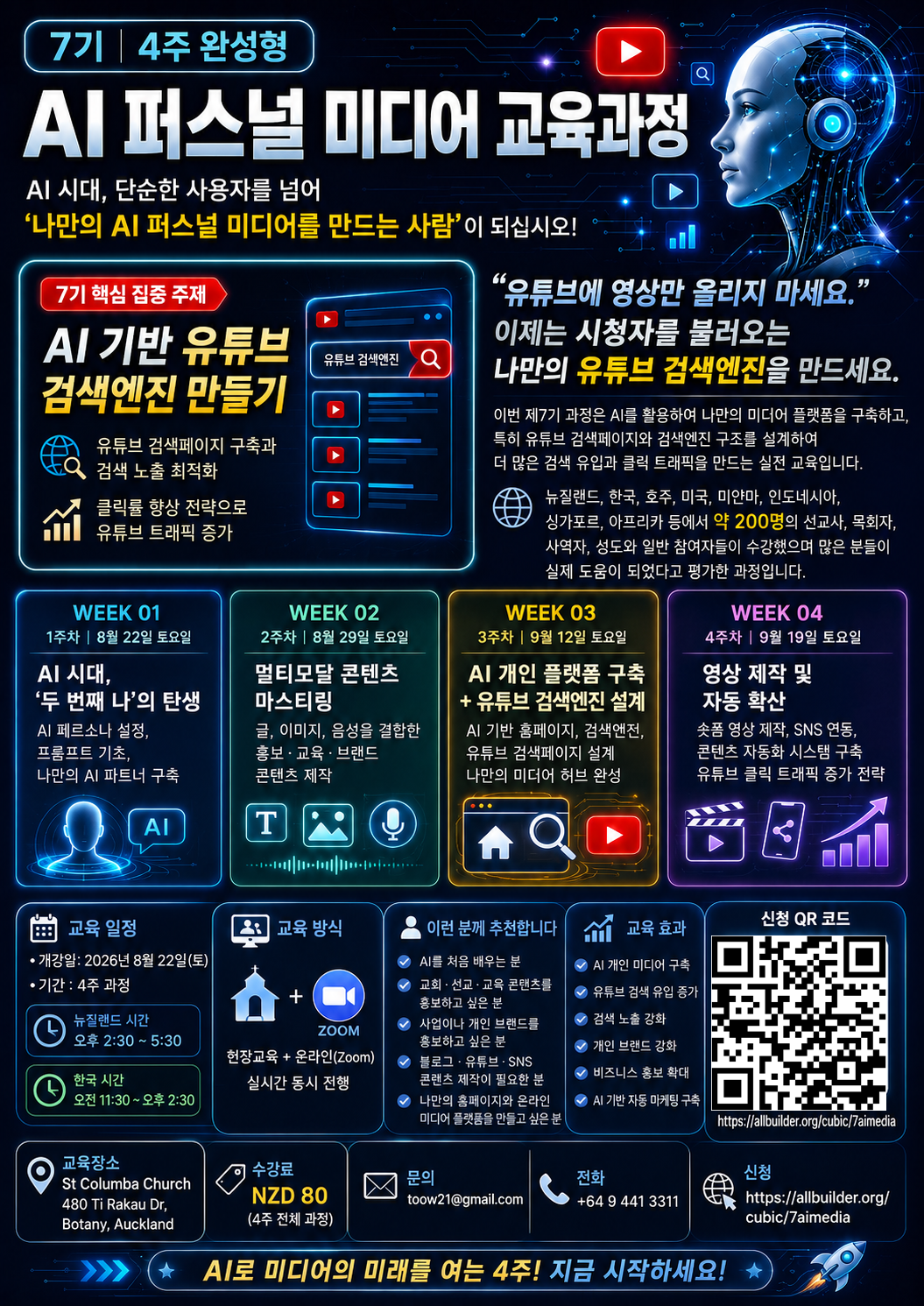
7th AI Personal Media four-week course English brochure
AI Search
YouTube Traffic
BROCHURE

Preview the 7th cohort through four official brochures

The new main poster and three existing English brochures are linked from their original public URLs. Review the schedule, outcomes, curriculum, application QR code and beginner-friendly course structure on any screen.

Main English brochure for the AI YouTube Search Engine course
Main AI YouTube Search Engine course brochure
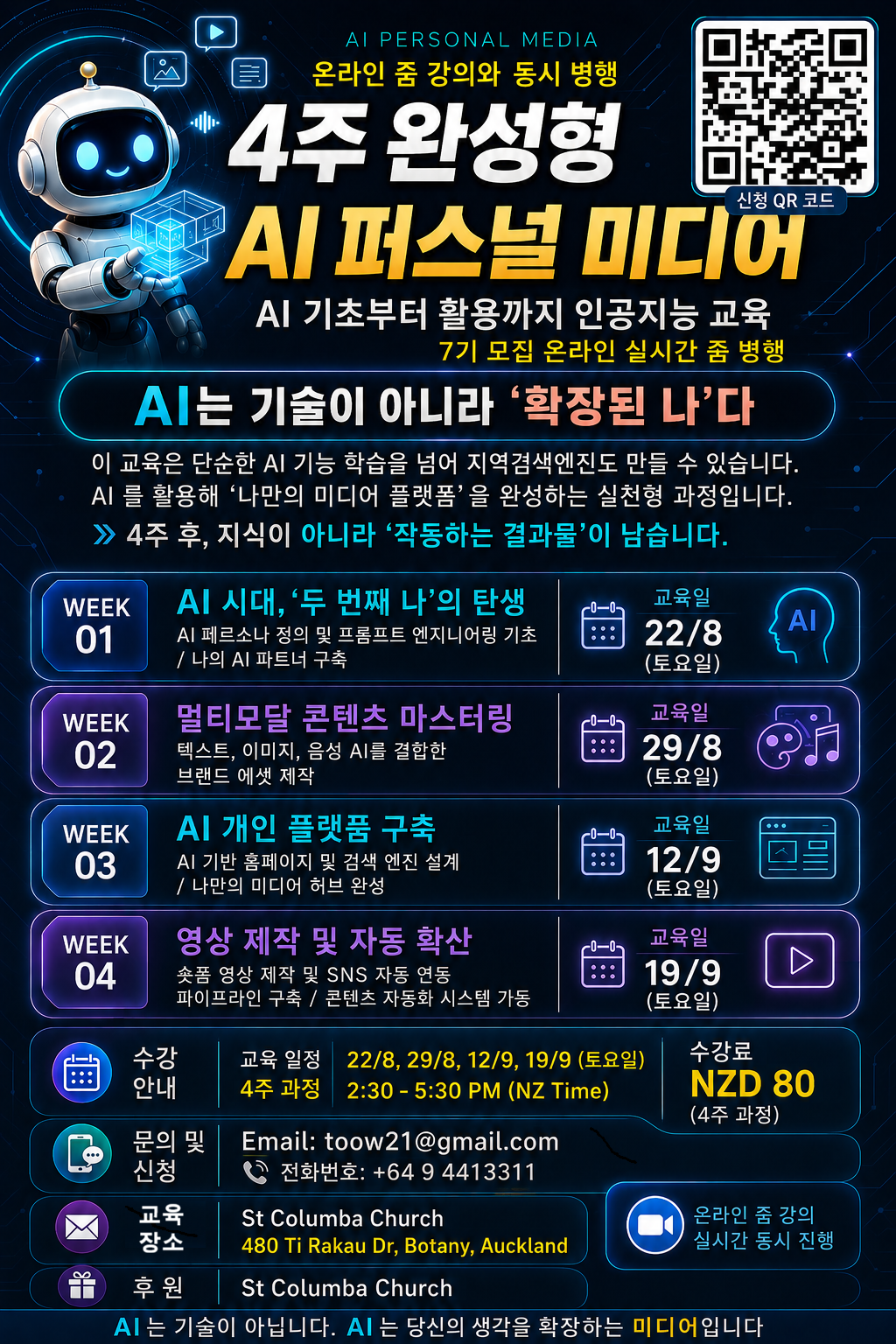
English brochure for the 7th four-week AI Personal Media course
7th four-week AI Personal Media course brochure
English schedule, global city times, curriculum and QR guide
Schedule, city times, curriculum and QR guide
English beginner guide, outcomes, venue and application brochure
Beginner guide, outcomes, venue and application
COURSE AT A GLANCE

Practical AI education experienced by around 200 participants

Participants have reported that the training helped them apply AI to church ministry, mission, education, business promotion, personal branding, and content production. This cohort places a stronger focus on YouTube search discovery and click traffic systems.

4
weeks to completion
70%
hands-on practice
200+
participants across regions
30+
years of IT experience
CORE PROGRAM

Build your own AI-powered YouTube search engine

A search page is more than a video list. It works like a helpful library desk: it organises content by meaning, helps visitors find the right video quickly, and gives every video a clearer path to the next click.

Greetings and peace to you. The 7th cohort is hosted at the invitation of the local St Columba church. Around 200 missionaries, pastors, ministry workers, church members, and general participants from New Zealand, Korea, Australia, the United States, Myanmar, Indonesia, Singapore, Africa, and other regions have joined previous offline and Zoom training.

01

Organise Video Assets

Bring videos, channels, playlists, and descriptions into one structure.

02

Classify with AI

Group content by topic, audience, problem, and solution.

03

Build the Search Page

Help visitors find the right video through questions and keywords.

04

Improve the Click

Optimise titles, thumbnails, descriptions, and next actions.

05

Connect Distribution

Link the website, social channels, QR flow, and course enquiries.

Build a personal YouTube video search page that lets visitors find videos by topic in one place.
Create an AI-powered search structure connecting titles, descriptions, keywords, and meaning.
Organise videos and channels like a clear library catalogue so visitors do not get lost.
Use question-led titles and structured descriptions to improve discovery in search results.
Treat the title and thumbnail as one storefront sign and apply practical click-through principles.
Connect the website, social channels, and YouTube as one bridge rather than separate islands.
Use AI to reduce time spent on video planning, production, promotion, and repeat distribution.
Design a sustainable traffic path that moves a visit toward another video, an enquiry, or registration.
4-WEEK CURRICULUM

Complete one usable result every week

The course starts with beginner-friendly foundations and progresses to practical outputs. About 70 percent of the learning is hands-on, so knowledge becomes a working media system.

01

The Birth of Your Second Self

Define an AI persona, learn prompt foundations, and build your own AI partner. Output: an AI persona card and reusable core prompt set.

WEEK 01Output
02

Multimodal Content Mastery

Combine writing, images, and voice to create promotional, educational, and branded assets. Output: three texts, three images, and one video voice script.

WEEK 02Output
03

AI Personal Platform and YouTube Search Page

Design an AI-powered homepage and YouTube search engine, then complete your media hub. Output: a searchable video page and homepage draft.

WEEK 03Output
04

Video Production and Automatic Distribution

Create short-form videos, connect social workflows, and build a content automation pipeline. Output: a video script, distribution plan, and final personal media platform.

WEEK 04Output
WHO SHOULD JOIN

One media foundation for church, business, education, and personal brands

Writing, images, search, websites, video, and social promotion are not taught as isolated tools. They are connected into one personal media system.

Church and Mission

Connect sermon summaries, teaching resources, mission videos, and church websites through a searchable media hub.

Teaching contentMission videoHomepage

Small Business Promotion

Connect products, services, testimonials, and YouTube videos to local search and customer enquiry flows.

Local searchBrand pageEnquiries

Educators and Personal Brands

Organise lessons, posters, blogs, and videos into one clear personal platform.

Course contentPortfolioSocial growth
SMARTCUBIC INTEGRATED PORTAL

A circular search ecosystem connecting local and professional information through YouTube

SmartCubic connects hospitals, restaurants, buildings, events, people, products and services through video and meaningful relationships, turning a city portal into a living local media search engine.

SmartCubic is not a directory of unrelated websites. It is an integrated local media portal that connects regions, industries, facilities, events, people, products, services and YouTube videos in a meaning-based network so that useful content can be searched, rediscovered and presented again.

One video may appear through hospital search, food search, building search, event search and city search. The content is the same, but the user questions and intentions are different.

Health Cubic

Hospitals, dental clinics, pharmacies, practitioners, healthcare videos and local medical information.

MICE Cubic

Exhibitions, seminars, education, performances, festivals and local events converted into searchable media assets.

Food Cubic

Restaurants, cafes, menus, cooking processes, reviews and local food videos.

Building Cubic

Buildings, malls, offices, tenants, facilities and location-based information.

City Portals

All in Auckland, All in Seoul, All in LA, All in Sydney and other city media portals.

Professional Portals

Industry, education and business portals, including All That Power, connected with local content.

Local hospitals and restaurants meet customers directly through YouTube

When an Auckland hospital publishes a healthcare video, it can appear in Health Cubic hospital results, All in Auckland local search, Building Cubic medical-facility information and MICE Cubic health-seminar results.

  • The same expert video can be discovered through searches such as Auckland Korean hospital, North Shore dentist, health check, back pain or local health seminar.
  • After watching, a user can move to the hospital website, consultation form, phone call, booking or physical visit.
  • A restaurant video can connect to Food Cubic, a city portal, a shopping-centre tenant page, a food event and YouTube restaurant search.

Local events become video assets that continue working after the event

Church gatherings, business seminars, food festivals, health lectures, exhibitions, performances, education programmes, property briefings and community meetings can remain discoverable after the event has finished.

  • Before: preview videos, registration guidance, speaker introductions, venue and programme information
  • During:on-site coverage, interviews, key talks, participant reactions, performance and exhibition footage
  • After: highlights, lecture summaries, testimonials, next-event notices and partner introductions

These videos do not remain only on YouTube. They reconnect with MICE Cubic, city portals, professional portals, Building Cubic, Food Cubic and Health Cubic.

Search creates content, and content creates more search

Local information appears

Hospitals, restaurants, shops, buildings, education, performances and seminars are registered.

Video content is produced

Introductions, interviews, educational videos, event videos and reviews are created.

Professional portals connect

Content links to Health, MICE, Food, Building Cubic and related professional portals.

City portals expose it

Content appears through All in Auckland, All in Seoul, All in LA and All in Sydney.

Users search and click

People discover videos through region, industry, venue, menu, event and service searches.

YouTube receives real traffic

Search users move to the channel, watch and subscribe.

Related content grows

Reviews, interviews, follow-up events and new information are created.

Results are rebuilt

New content connects with existing information and enriches future search results.

A city portal becomes a growing media system, not a fixed website

Traditional city portals often operate as static business lists maintained by an administrator. In SmartCubic, residents, hospitals, restaurants, buildings, event organisers, experts and educators continually produce videos and information. New content is classified and connected to the right region and professional field.

  • Connect local healthcare, restaurant menus, building tenants, events, education, churches, communities and expert interviews.
  • Guide users toward real actions such as booking, enquiry, application, purchase, subscription and website visits.
  • Extend a model tested in Auckland to Seoul, Los Angeles, Sydney and other cities.

One item of content can carry its complete local and professional context

A restaurant video can include country, city, neighbourhood, building, business name, cuisine, signature dishes, hours, booking, event participation, YouTube channel, website, language and search keywords. A hospital video can connect region, specialty, practitioner, building, health event, consultation and booking.

SmartCubic is not a content-copying system. It analyses meaning and relationships, then presents the same content through the entrance that matches the user's purpose: Health Cubic for healthcare, MICE Cubic for events, Building Cubic for places, Food Cubic for dining, and a city portal for local discovery.

The goal is direct local connection, not views alone

  • Hospital consultation and booking
  • Restaurant visits and orders
  • Event registration
  • Store and facility visits
  • Course enrolment and product enquiries
  • YouTube subscriptions, further viewing and website visits
Local information becomes video, video becomes searchable, and search creates new content and direct customer connections.
PREMIUM WEBSITE CONTENT

Ten studio-grade principles for a site that does not feel templated

A premium website is not the page with the most decoration. It is the page that removes doubt and shows the visitor where to go next. These ten principles translate design-studio thinking into simple, practical decisions.

01

Studio-Grade Structure

Templates list visible sections. Studio sites arrange problem, solution, proof, process, and action in the order visitors naturally ask questions. Like a building, the route between rooms matters as much as the rooms.

Information architectureConversion path
02

Typography Upgrade

Use readable Noto Sans KR for body copy, Bebas Neue for strong figures, and DM Serif Display for editorial emphasis. Premium hierarchy comes from a clear scale of size and weight, not a collection of unrelated fonts.

Type scaleReadability
03

White Space Audit

Empty space is not wasted space; it is punctuation for the page. More room around the key message can make more content visible because the eye knows where to pause.

SpacingFocus
04

Micro-Interactions

A slight card lift, a stronger button shadow, and a gentle reveal are enough. Motion should behave like a signpost, not a fireworks display.

HoverScroll
05

Studio Portfolio Framing

Present a project through problem, reasoning, process, result, and learning. Trust grows from explaining why decisions were made, not from showing every screen.

Case studyEvidence
06

Final Polish Pass

Check alignment, image ratios, CTA wording, link status, and mobile spacing in that order. Obsess over one final question: can the first screen and primary action be understood in three seconds?

Pre-launchHero clarity
07

Mobile-First Design

Do not treat mobile as a smaller desktop. Start with one-hand reading, 48-pixel touch targets, comfortable text, and one form field per row.

320pxTouch UX
08

SEO and GEO Together

SEO gives the sign a name. GEO explains where it is, who it helps, and why it should be recommended. Design for both search ranking and AI understanding.

SEOGEO
09

Clear CTA and Real Form

Replace vague labels with an outcome such as Request Course Consultation. The form must genuinely send data through Formspree rather than merely change the screen.

CTAFormspree
10

Accessible for All Ages

Use larger text, strong contrast, plain language, clear labels, and meaningful alt text. Accessibility is not a special add-on; it is a wider front door.

Older adultsAccessibility
BEFORE AND AFTER

Do not wait for viewers; build a system to be searched and discovered

The old approach uploads a video and hopes. The connected approach organises videos, improves titles and thumbnails, and links search, website, social channels, and registration into one repeatable traffic structure.

Old Upload-and-Wait Approach

Upload and rely on the algorithm
Leave content scattered across YouTube, social media, and websites
Choose titles and thumbnails by instinct alone
Promote once and restart from zero
Keep search, viewing, and registration disconnected
VS

AI YouTube Search System

Classify videos by topic in an AI search page
Connect website, YouTube, and social channels through one hub
Design titles and thumbnails around search intent and click motivation
Build reusable prompts and distribution routines
Link discovery, viewing, enquiry, and registration in one traffic flow
INSTRUCTOR

Practical AI education with Vincent Sim

With more than 30 years across IT, ERP, ESG, AI, and digital platforms, Vincent teaches participants how to apply AI to life, business, education, church, and mission rather than merely understand the technology.

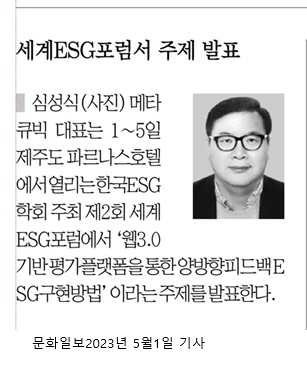
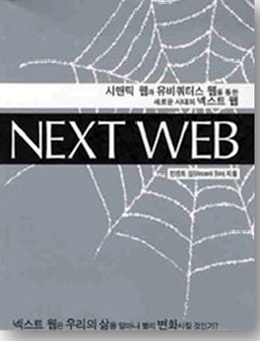
Vincent Sim instructor and World ESG Forum media featureNEXT WEB book cover by Vincent Sim
INSTRUCTOR PROFILE

Vincent Sim

AI, Semantic AI and Digital Platform Educator | Globaliz Founder and CEO

The goal is not only to explain what AI is, but to help people build something useful and apply it to life, business, education, and ministry.

Master degree from the Graduate School of Information Science, Kookmin University
Author of NEXT WEB
Bachelor degree from Alphacrucis College, New Zealand
Former Education Team Lead at SAS SOFTWARE
More than 30 years across IT, ERP, ESG, AI, and digital platforms
Speaker at the World ESG Forum and featured in Korean media
Consulting and development experience in ERP, CRM, POS, logistics, distribution, generative AI, semantic AI, and personal platforms
SCHEDULE

7th cohort dates and participation options

The course runs simultaneously in Auckland and online through Zoom. In-person participants should bring a laptop for hands-on practice.

DATES

Four weeks · Saturdays

22 August
29 August
12 September
19 September
New Zealand 2:30 PM-5:30 PM · Korea 11:30 AM-2:30 PM · Sydney 12:30 PM-3:30 PM
St Columba Education Centre, 480 Ti Rakau Drive, Botany, Auckland
Simultaneous in-person practice and live Zoom participation
New Zealand NZD 80 · Korea KRW 70,000 · Group discounts may apply
Build Your Own AI YouTube Search Engine

Practical training to improve YouTube discovery and click traffic

Move beyond asking AI questions and waiting for viewers. In four practical weeks, connect an AI personal media hub, YouTube search page, website, social channels, and QR registration flow so people can search, discover, click, and watch your content.

The existing course page mentions a two-year MetaCubic access benefit. Confirm eligibility and conditions during final registration.
REGISTRATION

From enquiry to Zoom access, one clear process

Send an enquiry through the connected Formspree form, or use the existing AllBuilder, All in Auckland, and All in Seoul registration flows. Confirm the official payment information before transferring funds.

Send an enquiry or application

Enter your name, email, organisation, and question in the Formspree form below. Existing AllBuilder members may continue through their current account flow.

Create an account and verify email

Complete basic profile details through AllBuilder, All in Auckland, or All in Seoul and confirm the email verification link.

Pay the course fee

Use New Zealand BNZ, Korea IBK, Australia Commonwealth Bank, or PayPal card payment. Reconfirm the official details before sending funds.

Confirm receipt and participation

Send the depositor name, receipt, and contact email. Zoom access and preparation notes will be provided after confirmation.

Prepare laptop and accounts

In-person participants should bring a laptop. Online participants should check Zoom, email, and YouTube account access in advance.

Existing Online Registration Links

AllBuilder Sign UpNew Zealand Sign UpKorea Sign Up
Existing registration reference: BNZ 02-0272-0164025-000 / GLOBALIZ LIMITED / SWIFT BKNZNZ22. The current page also provides Korea IBK and Australia Commonwealth Bank details. Reconfirm the final official notice before transferring funds.
FAQ

Clear answers for first-time participants

Learn whether beginners can join, what equipment is needed, what you will build, and how online participation works.

Can complete beginners join?
Yes. The course begins with prompt foundations and progresses step by step through writing, images, search pages, video, and social distribution.
How is a personal YouTube search engine different from YouTube search?
It is a purpose-built page that organises and searches your videos and related content. You design the discovery path and connect it directly to your website and social channels.
Can I participate only through Zoom?
Yes. The Auckland in-person class and live Zoom class run simultaneously.
What will I have after four weeks?
You will have an AI partner prompt set, multimodal content, a searchable YouTube page, homepage structure, a video script, and a social distribution plan connected as one personal media hub.
Who benefits most from this course?
Pastors, missionaries, church teams, educators, small business owners, YouTube operators, content creators, and beginners building a personal brand.
What are the dates and tuition?
Sessions run on 22 August, 29 August, 12 September, and 19 September 2026. The full New Zealand tuition is NZD 80.
Is a MetaCubic access benefit included?
The existing course page mentions a two-year MetaCubic benefit. Confirm current eligibility and conditions in the final registration notice.
START NOW
AllBuilder AI Personal Media

After four weeks, leave with a working result, not only knowledge.

Start building a personal YouTube search system that helps people search, discover, click, and watch your content.

Apply or Request Course AdviceReview the Brochures
CONTACT

Send your application or course question now

Enter a correct email address so the team can send registration confirmation, preparation notes, and Zoom participation information.

Course Information

The 7th AI Personal Media course runs simultaneously at St Columba in Auckland and live through Zoom.

Starts 22 August 2026 · Four weeks
Saturdays 2:30 PM-5:30 PM New Zealand time
480 Ti Rakau Drive, Botany, Auckland
info@smartcubic.com
+64 9 441 3311

Average reply within 24 hours · Free consultation with no contract

Your request has been sent.
We will reply with registration details within 24 hours.
ALLBUILDERConnecting better education

AllBuilder AI Personal Media education helps people move beyond isolated AI tools by connecting content, websites, search, video, and social promotion into one working personal media system.

Course

  • YouTube Search Engine
  • Four-Week Curriculum
  • Schedule and Venue

Resources

  • Brochures
  • SmartCubic Portal
  • Website Strategy
  • Frequently Asked Questions

Contact

info@smartcubic.com+64 9 441 3311St Columba, Botany, Auckland

© 2026 Globaliz / AllBuilder. All rights reserved.

Terms of ServicePrivacy PolicyCookie Policy
ALLBUILDER
Build Your Own AI Portal in 4 Weeks - Hands-On Course
AI PORTAL 4W
4-WEEK HANDS-ON COURSE
Instructor Curriculum Schedule Why This Course Register Now
50% Hands-On · 4 Weeks · Local Revenue AI

Stop Just Asking AI.
Build Your Own Search AI Platform
with your own hands

A 4-week, hands-on course [50% practice]. Connect your local community and partner with small businesses to launch local AI search — and start earning from it.

Advanced AI CRM for companies, schools & communities Local school & church community platform collaboration Local small-business CRM collaboration platform Your personal AI search engine platform QR code business Automated SNS promotion Side income / startup
Register Now and Start Your Local AI Income Explore the Curriculum
Preview

See the Course Before You Join

Check the posters and the intro video to preview your 4-week journey.

AI Portal 4-Week Course main poster image
AI Portal 4-Week Course information poster
4
Weeks to completion
3 hours every Saturday
70%
Hands-on curriculum
You build it yourself
$80
Full 4-week tuition
Group discounts available
30+
Years of instructor experience
in IT, ERP, ESG & AI
Instructor

Meet Your Instructor

Learn from 30+ years of real-world IT and AI leadership — not theory.

Instructor Vincent Sim (Sungsik Sim) photo

Vincent Sim (심성식)

AI · Semantic AI · Digital Platform Education Specialist
Globaliz Founder & CEO

Master's degree, Graduate School of Information Science, Kookmin University
Author of "NEXT WEB"
Bachelor's degree, Alphacrucis College, New Zealand

Former Education Team Lead at SAS SOFTWARE, the US statistics and IT company
30+ years of hands-on and leadership experience across IT, ERP, ESG, AI and digital platforms

Keynote speaker at the World ESG Forum; featured in Munhwa Ilbo and other media
Drawing on real project experience in generative AI, semantic AI and personal platform development,
he trains you to be "not just someone who uses AI, but someone who applies it to life, business and ministry."

Curriculum

4-Week Hands-On Curriculum [70% Practice]

You finish one real deliverable every week. In 4 weeks, your own revenue-ready AI platform is complete.

01

Your "Second Self" Is Born

Prompt engineering & building your own AI partner for the AI era

02

Master Multimodal Content

Create brand content by combining text, image, voice and video AI

03

Build Your Local Search AI Site

Design and optimize your own homepage + local search engine
Design a revenue model with your local community and small businesses

04

Automated Video & Distribution

Auto-generate short-form videos + complete your local-search-linked SNS auto-promotion system
Finalize your local revenue engine

Schedule

Schedule & Venue

Join in person in Auckland or online via Zoom — wherever you are.

Start date: Saturday, 22 August 2026, 2:30 PM to 5:30 PM (NZ time) / 11:30 AM to 2:30 PM (Korea time)

Same time every Saturday (Aug 22, Aug 29, Sep 5, Sep 12)

Venue: St Columba church (480 Ti Rakau Dr, Botany Downs, Auckland) — in person, bring your laptop / online via Zoom also available

Tuition: $80 for the full 4 weeks / KRW 70,000 (Korea) — group discounts available

Enquiries: +64 9 441 3311 | toow21@gmail.com

Registration

How to Register & Pay

New Zealand participants: sign up and pay on the All in Auckland website, https://allinauckland.com/
Korean participants: sign up and pay on the All in Seoul website, https://allinseoul.net/

1

Create Your Account

New Zealand participants: at https://allinauckland.com/member/form, click the 'Sign Up' button at the top right, then enter your ID, password, email, name, gender and phone number.

Korean participants: at https://allinseoul.net/member/form, click the 'Sign Up' button at the top right, then enter your ID, password, email, name, gender and phone number.

2

Verify Your Email & Complete Your Profile

Fill in your organisation (company/church) and role (position/ministry title), generate your thumbnail QR code, agree to the terms and submit. You will receive a confirmation link by email (check your spam folder too).

3

Pay by Bank Transfer

After payment, email your transfer receipt to toow21@gmail.com and you will receive your Zoom link.

Bank: BANK OF NEW ZEALAND (BNZ) Account number: 02-0272-0164025-000 Account name: GLOBALIZ LIMITED For overseas transfers, SWIFT CODE (BIC): BKNZNZ22 Bank transfer within Korea: Globaliz - Korea personal agent IBK Industrial Bank / Account name: Sim Kyung-sik / Account number: 01093024842 Transfer from Australia: Sung ki Park, Commonwealth Bank, BSB - 062181, Account number - 11143989
4

Pay by Card (PayPal)

New Zealand: log in at https://allinauckland.com/member/login, click the icon at the top left, then select the "Payment History" menu.

Click "Add" at the bottom right, enter [your ID + registration fee] in the payment description, enter $80 as the amount, then click the PAYPAL button.

Korea: log in at https://allinseoul.net/member/login, click the icon at the top left, then select the "Payment History" menu.

Click "Add" at the bottom right, enter [your ID + registration fee] in the payment description, enter $80 as the amount, then click the PAYPAL button.

No PayPal account? You can still pay by card with just your email. Once payment is confirmed, your Zoom link will be emailed to you.

Enquiries: +64 9 441 3311 | toow21@gmail.com

Why This Course

What Makes This Course Different

Application-first AI education, built on 30 years of real-world delivery.

"We teach AI we have actually used — not theory."

Real consulting and development experience in ERP, POS, logistics and distribution systems

AI, big data and cloud taught from a real-world problem-solving perspective

Lectures that show you "what you can do with AI" — not just "what AI is"

Teaching that connects technology + education + faith + life

Youth and young-adult ministry experience across New Zealand and international churches

Developed and taught a digital Bible education platform for young people

AI and digital literacy training for churches, mission organisations, seminaries, schools and the general public

From generative AI to semantic AI, all the way to personal, group and local platforms

Not just ChatGPT usage training — meaning-based AI (semantic AI) and a scalable digital platform structure

A structural understanding of how AI use expands from the individual to the group, the church and the region

"An educator who makes you use AI in your life — not just know about it."
"AI education that teaches meaning beyond technology."

This course aims for 'understanding' over technical explanation, 'application' over tool usage, and 'transformation' over knowledge transfer.
In an age when AI feels intimidating, it shows you a way to learn AI together and use it together.

Practice-First

Real application, not theory

For Everyone

From young adults to business owners

Real Growth

Complete a revenue-ready platform built on your local community

4 Weeks to Your Own AI Platform

Your Local Search AI Website — in Just 4 Weeks!

A revenue-ready AI homepage, built together with your local community and small businesses.
Build it yourself now, rank high in local search, and turn automated SNS into local income.

Register Now · $80 Check the Schedule

$80 for the full 4 weeks (KRW 70,000 in Korea) · Group discounts available · Zoom option included

AI PORTAL 4W 4-WEEK REVENUE AI HOMEPAGE COURSE

Go beyond asking AI questions. Build your own personal portal and search AI platform in a hands-on course — the start of local revenue AI with your community and small businesses.

Course

  • Instructor
  • Curriculum
  • Schedule & Venue
  • Why This Course

Register

  • All in Auckland
  • All in Seoul
  • Registration & Payment

Contact

toow21@gmail.com +64 9 441 3311 St Columba church, Botany Downs, Auckland

Copyright © 2026 All Rights Reserved.

Terms of Service Privacy Policy Cookie Policy
AI PORTAL 4W

..


Google Map
© Allbuilder ^