Allbuilder

8thyoutube AI 4 WEEK COURSE

8thyoutube AI 4 WEEK COURSE

Starts 3 Oct 2026 · 8th Cohort · On-site + Zoom simultaneous

  • 8th Cohort YouTube Class AI
  • 8 TH AI PROJECT Cource
  • 8 TH AI Persaonal Media
  • 8 TH AI YOUTUBE MEDIA COURCSE
  • intro
  • 8 th Youtube course
  • 8 AI PROJECT POSTER
  • reference
  • 8 th brochure
8th AI YouTube Course | Build Your AI Personal Media in 4 Weeks
ALLBUILDER AI
AI PERSONAL MEDIA LAB
Why Now4 WeeksVideoMedia SystemRegisterApply Online
8TH COHORT · STARTS 03 OCT 2026

Move from using AI
to building your own media

Do more than upload a video and wait. In four practical weeks, connect AI content creation, a personal website, a YouTube search page, search discovery and social distribution into one beginner-friendly media system you can keep using.

Starts 3 Oct 2026Saturdays 12:00-2:00 PM NZ TimeIn-person + ZoomNZD $60 / 4 weeks
Apply for the 8th Cohort Watch the Course Video
AI Video Planning and SmartCubic DistributionPLAY IN PAGE
COURSE AT A GLANCE

8th Cohort at a Glance

Four Saturdays, one consistent time, and one connected AI personal media project.

4
weeks
4
practical sessions
$60
full tuition
2H
per session
OFFICIAL MEDIA

See the brochure and YouTube video on one page

Critical details are provided as readable HTML, not only inside images, and the YouTube video is embedded so visitors can watch it without leaving the page.

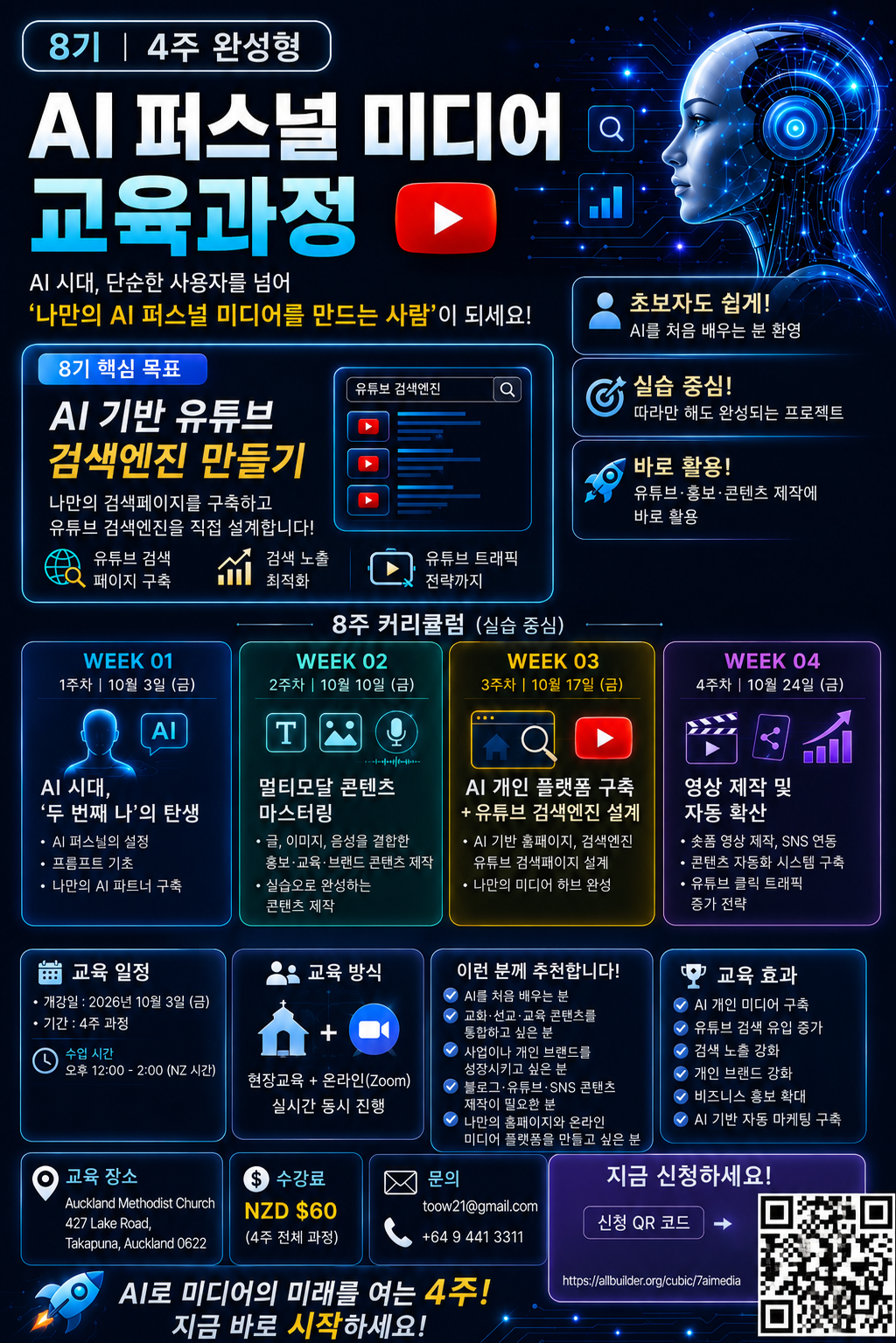
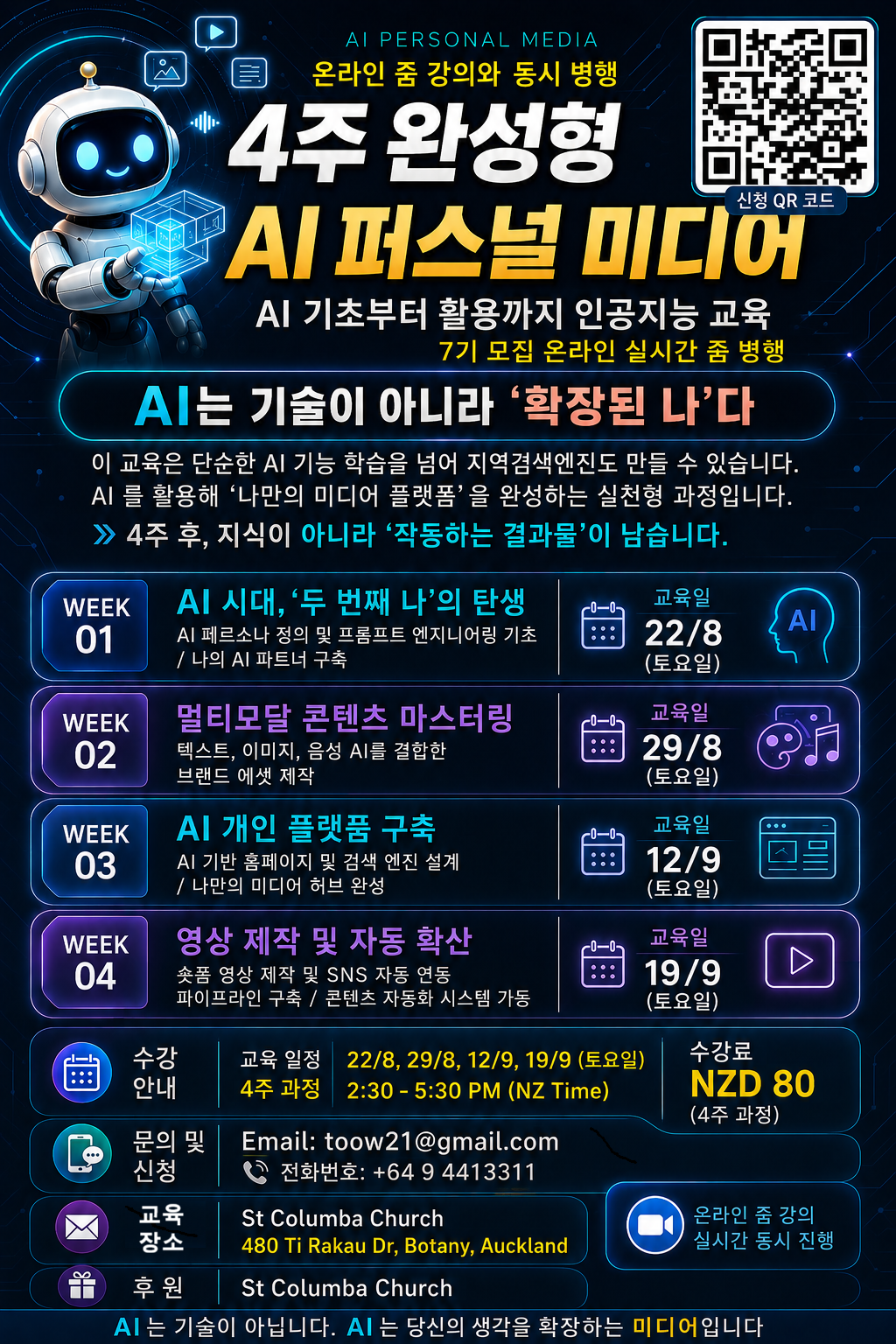
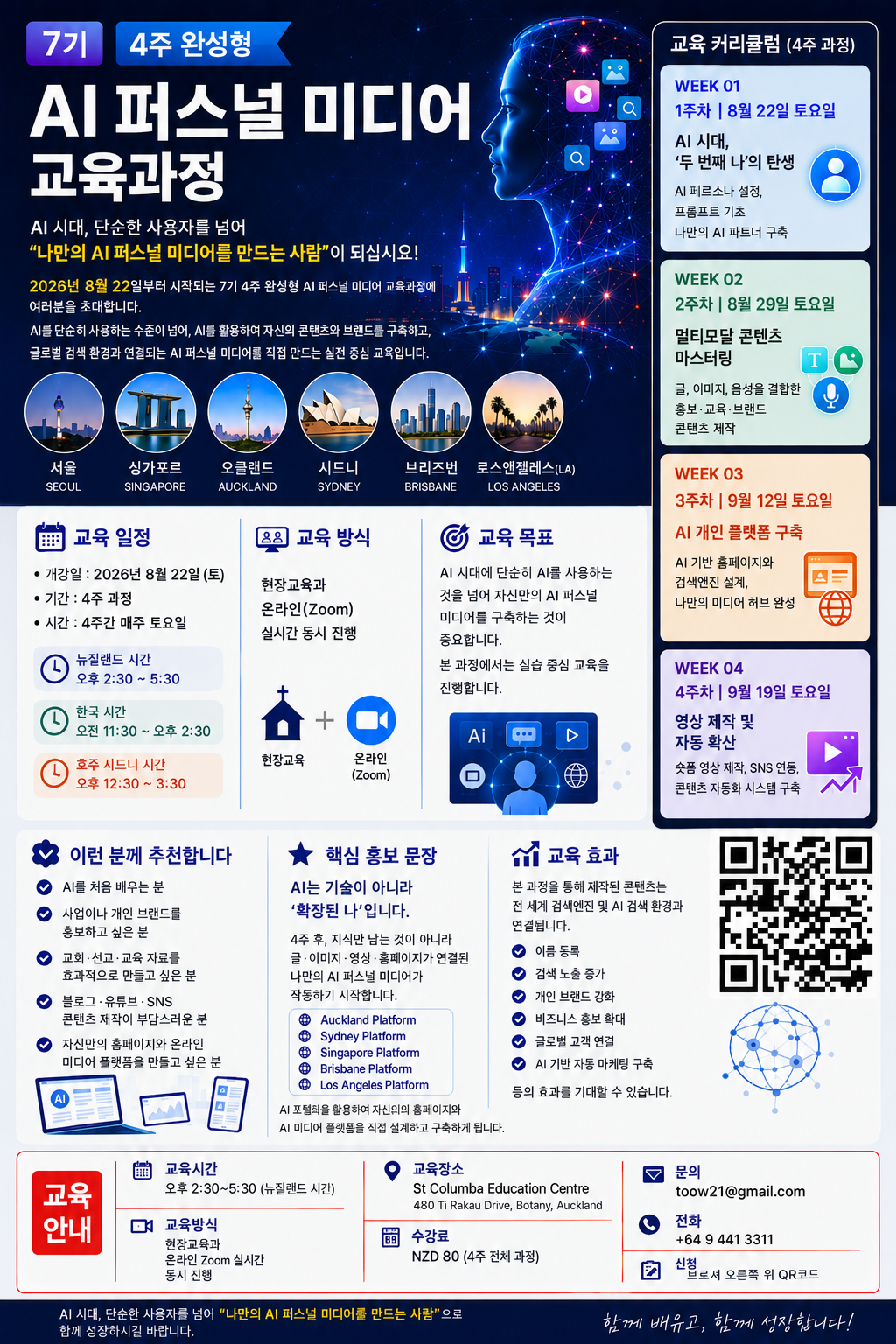
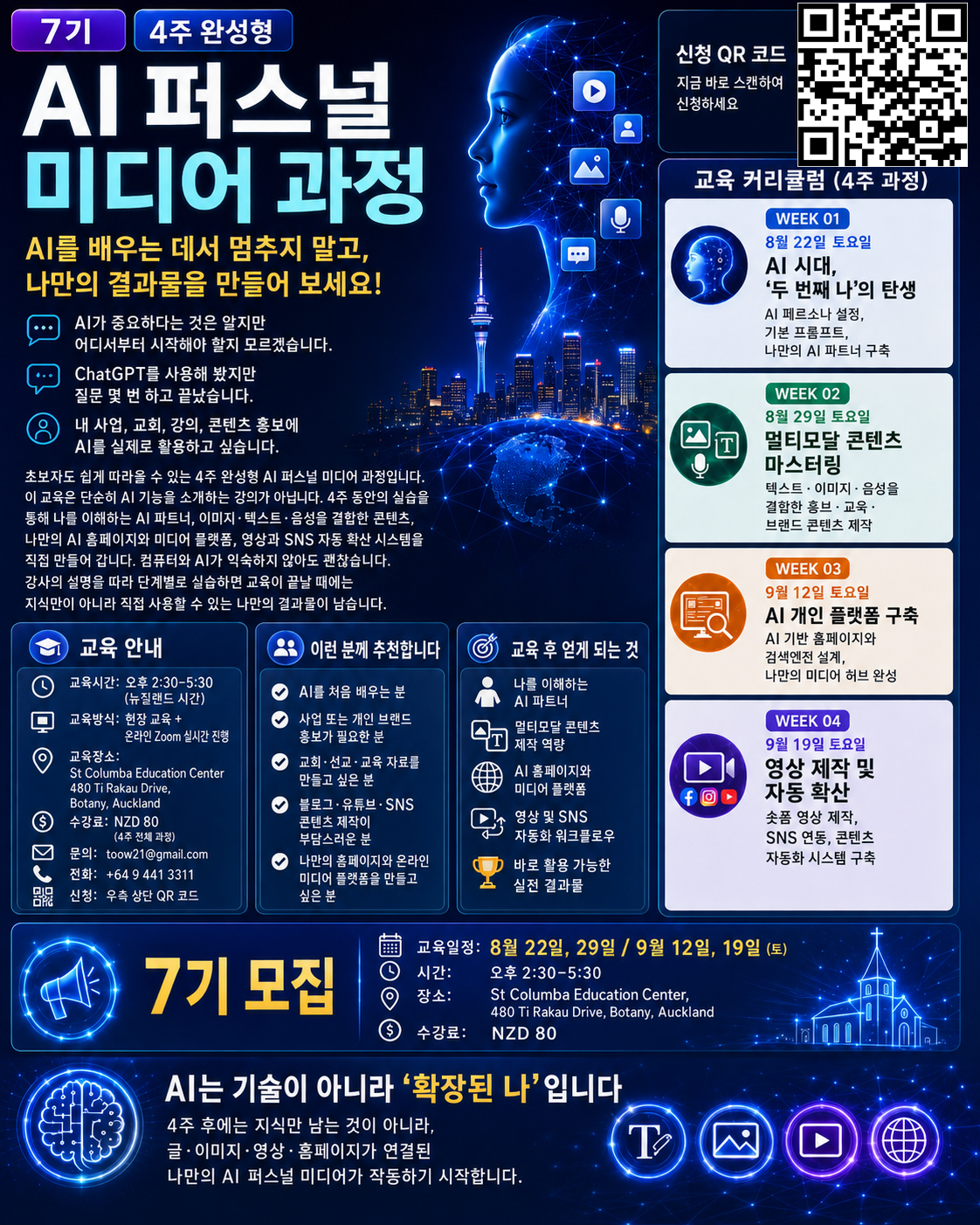
8th AI YouTube Course recruitment brochure
Watch the Course Video Here

From understanding the course to applying without getting lost

The brochure gives a fast visual overview of dates and the QR code. The video shows the direction of the training. From there, visitors can choose the easiest next step: the online application page, phone, email or the enquiry form. The journey is intentionally arranged as understand, verify and apply.

Watch the embedded YouTube video without leaving the page.

Open BrochureWatch on YouTubeView 7th Cohort Page
WHY THIS COURSE

Do not only make more videos. Build a discovery system

The real question is not how many videos you publish. It is where the content lives, who can find it, why they should click, and what meaningful next action follows.

01

Start with purpose, not tools

Instead of asking AI random questions, define who you want to help and what you want them to understand or do. A clear purpose becomes the common instruction behind writing, images, video and web pages, so every asset points in the same direction.

PurposeAI partnerPrompting
02

Build your AI second self

Capture your background, audience, tone, goals and working rules in a reusable AI persona. It is like briefing a reliable assistant once instead of explaining the same context from zero every day.

PersonaConsistencyProductivity
03

Turn one idea into many media forms

Expand one well-organised idea into an article, social card, image concept, voice script, Short and website section. The aim is not to create more noise, but to reuse one strong source across the channels your audience actually uses.

MultimodalRepurposingAssets
04

Operate your own YouTube search page

Do not depend only on search inside YouTube. Organise videos by topic, question and audience on a page you control. Think of it as a helpful library desk that guides each visitor to the right video instead of showing an unstructured shelf.

Search pageYouTubeDiscovery
05

Make your website the media home

Your social accounts are busy public roads; your website is the address you control. Use the website as the central place that explains who you are, organises your content and connects YouTube, social channels and registration.

WebsiteMedia hubOwnership
06

Build a bridge from search to click

Align titles, descriptions, thumbnails, keywords and website context. Help a visitor recognise that the content matches their question, then make the next step obvious: watch another video, enquire, register or visit a relevant page.

Search trafficClickJourney
07

Rediscover church, mission and education content

Sermons, testimonies, teaching resources and mission updates often disappear after one post. Organise them around current questions and themes so useful older content can be found again when it becomes relevant.

ChurchMissionEducation
08

Explain a business or personal brand clearly

Move beyond promotional slogans. Use video and webpages to answer who you help, what problem you solve and how the service works. Connect introductions, demonstrations, testimonials and FAQs so visitors can make a confident next decision.

BrandBusinessFAQ
09

Beginner-friendly for every age

The course reduces jargon and explains both what to click and why the step matters. The learning path is built around making real outputs, which helps complete beginners and older learners understand the workflow instead of memorising software terminology.

BeginnersOlder learnersHands-on
10

Finish with a system, not a folder of files

The goal is not a handful of images or videos. It is a small reusable media system connecting an AI partner, repeatable prompts, a search page, a website, video production and social distribution. New content can then enter the same structure instead of starting from zero.

SystemReusableMedia asset
4-WEEK PRACTICAL CURRICULUM

Complete one working output each week and connect them into one system

This is a build-as-you-learn course. Each week produces something usable, and the four outputs are connected into a final personal media project.

01
Saturday, 3 October
12:00-2:00 PM NZ Time

The Birth of Your AI Second Self

Learn the concept of AI personal media, generative AI basics, prompt foundations and AI persona design. Move beyond simple question-and-answer use by defining goals, audiences, output formats and reusable working rules.

Week output: AI persona card + reusable core prompt set
02
Saturday, 10 October
12:00-2:00 PM NZ Time

Multimodal Content Mastery

Practise turning one idea into writing, images, voice and video concepts. Use promotion, education, church and brand examples to create content that can be repurposed across YouTube, social channels and your website.

Week output: Publishable copy + image concept + voice or video script
03
Saturday, 17 October
12:00-2:00 PM NZ Time

AI Personal Platform + YouTube Search Engine

Design the information structure of a personal website and connect YouTube videos into a search page organised by topic, question and audience. Learn the foundations of discoverability and how to reduce visitor confusion.

Week output: AI homepage draft + searchable YouTube media page
04
Saturday, 24 October
12:00-2:00 PM NZ Time

Video Production and Automatic Distribution

Connect AI video and Shorts production with YouTube, social repurposing and repeatable distribution. Finish by linking content, website, search, YouTube, social channels and user traffic into one practical flow.

Final output: Video workflow + distribution plan + personal media system
YOUR MEDIA FLOW

Connect the seven-step journey from AI to real audience action

Learn why each tool exists and how one stage hands the visitor to the next.

PurposeWho and why
AI ContentCopy, images, scripts
WebsiteYour home base
Search PageDiscovery
YouTubeWatch
SocialRepurpose and share
TrafficEnquiry and growth
BEFORE AND AFTER

Move from upload-and-wait to designed discovery and connection

The same video can have a much longer useful life when it is placed in a clear system and connected to the right next action.

Old upload-and-wait approach

  • Upload and wait for the YouTube algorithm to recommend the video.
  • Keep websites, social posts and videos scattered across separate platforms.
  • Choose titles and thumbnails mainly by instinct.
  • Promote once, then start from zero with the next piece of content.
  • Keep search, viewing, enquiry and registration disconnected.
VS

AI personal media approach

  • Organise videos by topic and question so they can be rediscovered through your own search page.
  • Use the website as a hub that connects YouTube and social channels.
  • Design titles, descriptions and thumbnails around search intent and click motivation.
  • Reuse prompts and distribution routines to reduce repeated work.
  • Connect discovery, viewing, enquiry and registration in one journey.
WHO SHOULD JOIN

You do not need to be a programmer. You need something worth sharing

The course is designed for beginners and for people who need to communicate, teach, promote or organise useful content.

Complete AI beginners

Start with clear goals and guided practice rather than technical jargon.

People who want more from YouTube

Go beyond production and connect video to search and website traffic.

Church, mission and education teams

Turn sermons, lessons and updates into organised searchable media assets.

Small business and personal brands

Connect expertise, products and services to clearer explanations and enquiry flows.

People creating blog and social content

Learn to repurpose one idea into multiple useful formats.

Anyone wanting a personal media platform

Build a website-centred foundation instead of relying on one social platform.

SMARTCUBIC CONNECTION

Search is the entrance. Connection is the goal

From a SmartCubic perspective, content becomes more useful when it is connected to the region, topic, person, service or event that gives it context.

SMARTCUBIC / MY MEDIA
Searchable content connection

AI + Website + YouTube + Social

Meaning before noise

Let one piece of content answer several different questions

A church teaching video might connect to a sermon page, a course, an event and a local portal. A business video might connect to a service explanation, local discovery and customer enquiries. The point is not to duplicate the video; it is to add the context that helps the right person find it from a relevant entrance. The 8th cohort brings this big idea down to a practical personal scale by focusing on your own search page and website.

  • Connect content to location, topic, audience and problem.
  • Let one video be rediscovered through several meaningful search entrances.
  • Design for real actions such as enquiry, registration and visits, not views alone.
WHY IT IS DIFFERENT

Spend class time building outcomes, not only listening

Beginners improve faster when they make something, test it and improve it with guidance.

Beginner-friendly
Follow a clear sequence that explains the purpose of each step, not only the buttons.
Hands-on first
Produce an output every week and connect the four outputs into a final project.
Immediately useful
Apply what you build to church, education, business or personal branding.
Beyond video production
Learn how people discover and click content through a search structure.
Build your own platform
Create a media space you operate instead of remaining only a consumer on platforms.
In-person + Zoom
Join the Auckland class or participate live online from another location.
SCHEDULE & REGISTRATION

Start your four-week project on 3 October 2026

Dates, venue, fee and application options are collected in one place. In-person participants are encouraged to bring a laptop.

Schedule and venue

The course runs at the same time each Saturday with Auckland in-person training and live Zoom participation.

Dates
3-24 October 2026 / every Saturday
Time
12:00-2:00 PM / New Zealand Time
In person
Auckland Methodist Church, 427 Lake Road, Takapuna, Auckland 0622
Online
Live Zoom at the same time
Tuition
NZD $60 / full four-week course
Course enquiry
tooW21@gmail.com
Phone
+64 9 441 3311
Open Venue in MapsOfficial Online Application
QR code for the 8th AI YouTube Course online application
Apply from your phone

Scan the QR code or use the online application button below.

Request course advice

Following the supplied coding rules, this form sends real data through Formspree. Use the official online application page for formal course registration.

Typical response within 24 hours · use the official registration page to enrol

Your enquiry has been received.
We will contact you after review.
FAQ

Clear answers for first-time participants

The answers focus on what you need to know before joining, without unnecessary technical language.

Can complete beginners join?

Yes. Week one starts with prompt and AI partner foundations, then gradually expands into writing, images, search pages and video distribution.

Do I need a laptop?

A personal laptop is strongly recommended because the course is practical. Zoom participants benefit from being able to watch the class and work on their own screen.

Do I need an existing YouTube channel?

No. If you already have one, you can use it. If not, you can first design the content and search structure and prepare the channel as you progress.

Can I join only by Zoom?

Yes. The Auckland in-person class and the live Zoom class run simultaneously.

What should I have after four weeks?

The goal is a connected system including an AI partner setup, reusable prompts, multimodal content, a homepage structure, a searchable YouTube page and a video/social distribution plan.

Does NZD $60 cover the whole course?

Yes. The stated NZD $60 registration fee covers the full four-week course.

Which fields benefit most?

Church and mission, education, small business, personal branding, YouTube operations and content creation are all suitable when you have information that needs to be discovered and connected.

What should I prepare after registering?

Bring a laptop and have access to email, a generative AI service such as ChatGPT, and ideally a YouTube account. Any additional preparation can be confirmed after registration.

BUILD YOUR OWN MEDIA

Do not stop at learning AI.
Build media that can be searched, connected and reused

8th AI YouTube Course · starts 3 October 2026 · four weeks · in-person + Zoom · NZD $60

Apply for the 8th CohortWatch the Course Video
ALLBUILDER AIAI PERSONAL MEDIA LAB

A practical AllBuilder AI personal media course connecting AI, YouTube, search pages, websites and social distribution into one usable workflow.

Course

  • 4-week curriculum
  • Who should join
  • Schedule and venue

Quick links

  • 8th cohort application
  • YouTube video
  • 7th cohort reference

Contact

Site: info@smartcubic.com+64 9 441 3311

© 2026 AllBuilder / SmartCubic. All rights reserved.

TermsPrivacyCookies
8TH AI MEDIA
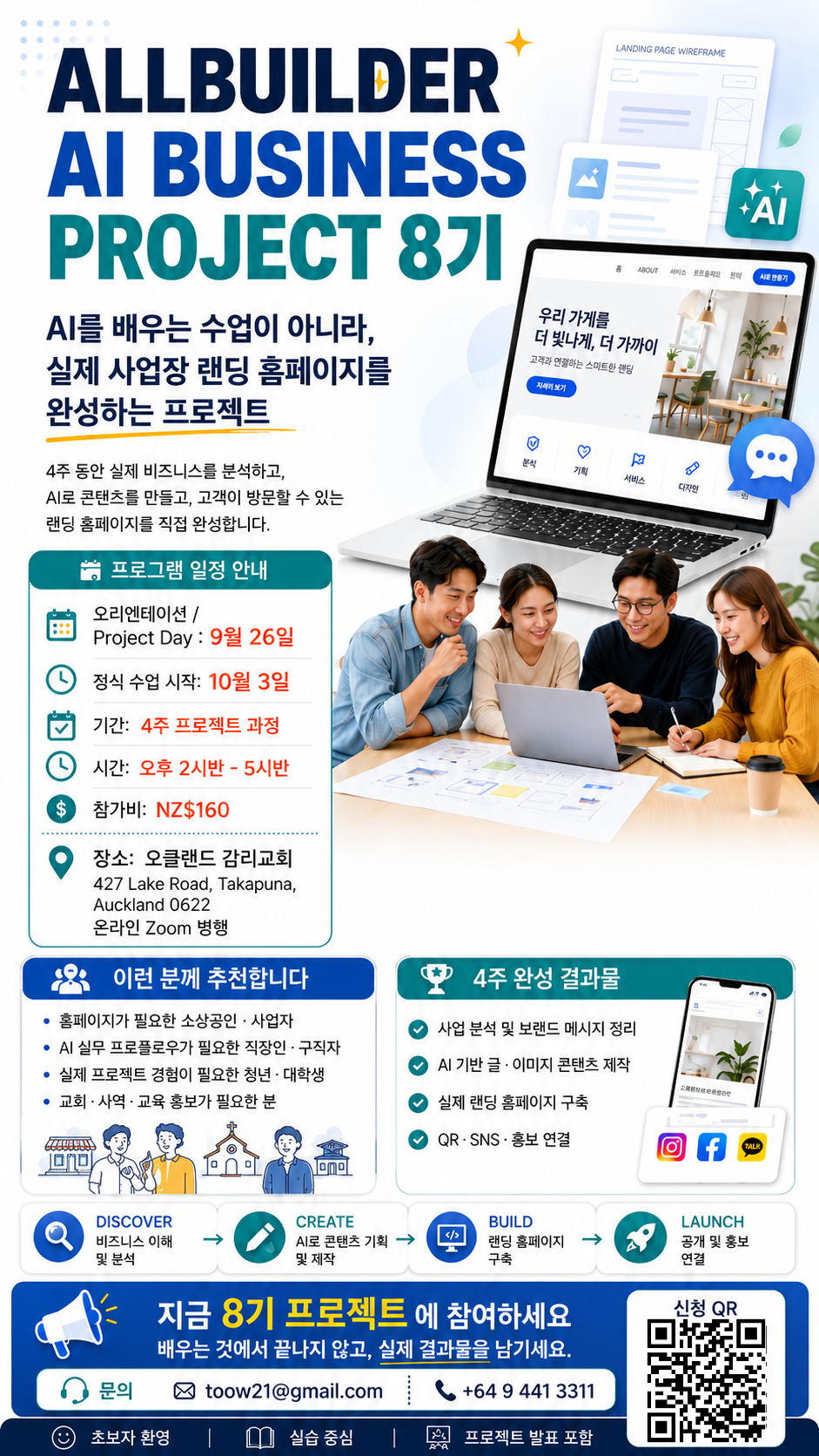
ALLBUILDER AI BUSINESS PROJECT Cohort 8 | 4-Week Landing Page Project
ALLBUILDER
AI BUSINESS PROJECT 8
Project4 WeeksVenue & ZoomFeeFAQ Apply
ALLBUILDER PROJECT SCHOOL · 8TH COHORT

Do not stop at
learning AI.
Build a real business website in 4 weeks.

Choose a real business project, analyse it with AI, create the copy and visual content, then build a landing page customers can actually visit. Finish by connecting QR, social channels, enquiries and launch activities.

Standard NZ$160NZ$120
Apply at NZ$120 Early BirdSee the 4-week project
ALLBUILDER AI BUSINESS PROJECT Cohort 8 team project training
4 WEEKS · 1 REAL BUSINESSLeave with a result, not just a certificate
VENUE · HYBRID CLASS

Join in Auckland or live online via Zoom.

Attend the project classes in person in Takapuna or join online by Zoom. See the official Cohort 8 poster and registration QR below.

Official ALLBUILDER AI BUSINESS PROJECT Cohort 8 recruitment poster
Official ALLBUILDER AI BUSINESS PROJECT Cohort 8 programme image

In-person + live Zoom hybrid delivery

The same project programme is delivered in Auckland and online. Zoom access details will be provided to registered participants.

VenueAuckland Methodist Church
427 Lake Road, Takapuna, Auckland 0622
ParticipationIn-person Auckland class + live online Zoom
Class time2:30 PM - 5:30 PM
Enquiriestoow21@gmail.com
+64 9 441 3311
ALLBUILDER Cohort 8 registration QR code

Cohort 8 Registration QR

Scan the QR code with your phone camera to open the ALLBUILDER Cohort 8 information and registration page.

Open Cohort 8 page
View venue on mapEnquire about joining
WHY PROJECT SCHOOL

Not another AI class. A real project.

This is not a course where you copy a sample screen and stop. You start with a real business problem and finish with something customers can see and use.

01

Real business analysis

Use AI to structure the customer, offer, competitive edge and brand message.

BusinessCustomerMessage
02

AI content production

Create headlines, business copy, service descriptions, image direction and promotional content.

CopyImageContent
03

Landing page build

Connect the hero, services, CTA, enquiry, QR and social links into one working page.

LandingCTAQR
04

Promotion connection

Design the flow from QR and social sharing to search visibility and customer enquiries.

SocialSearchLaunch
05

Portfolio result

Show a real project outcome instead of simply saying you studied AI.

PortfolioCase Study
06

Project collaboration

Beginners can contribute through business analysis, content and web-building roles.

TeamPBLBeginner
BEFORE & AFTER

Move from learning and stopping to building and keeping

See the difference between a conventional AI class and the Cohort 8 project model.

Typical AI Class
Tool explanations first
Ends after sample exercises
Outputs stay as personal notes
Separated from real customer response
VS
AI BUSINESS PROJECT Cohort 8
Starts with a real business problem
Finishes one project in four weeks
Creates a publishable landing page
Connects QR, social and enquiry flows
4-WEEK SPRINT

DISCOVER · CREATE · BUILD · LAUNCH

Each week produces an asset that becomes the input for the next stage of the project.

DISCOVER

WEEK 1 · 3 OCT

Understand the business first.
Define the customer, problem, offer, USP and brand message. Build an AI Business Strategy Canvas and wireframe.

CREATE

WEEK 2 · 10 OCT

Turn AI into a content team.
Create the headline, introduction, service copy, FAQ, image direction and social content for the real business.

BUILD

WEEK 3 · 17 OCT

Build the actual landing page.
Implement the hero, services, benefits, CTA, enquiry, map, QR, social and video elements.

LAUNCH

WEEK 4 · 24 OCT

Show it to customers and present it.
Check QR, social and search connections, then present the before-and-after result at Project Demo Day.

PROJECT SNAPSHOT

ALLBUILDER AI BUSINESS PROJECT 8

Build a real business website in 4 weeks.

4
Project weeks
1
Real business
1
Publishable landing page
120
NZ$ early bird
WHO SHOULD JOIN

Designed for people who need a real outcome

Not just for people interested in AI. It is for people who need a useful business result.

Small-business owners
For owners who need a landing page and want to understand and shape their own digital presence.
People applying AI to business
For those who want to move beyond AI chat and use it for analysis, content and promotion.
Professionals and job seekers
For people who need a real AI project portfolio rather than a list of tools they have tried.
Students and young adults
For learners who want project experience with a real business context.
Churches, nonprofits and educators
For teams that need a simple way to explain programmes and connect visitors to enquiries or registration.
AI and web beginners
For people willing to solve a real problem with AI even if they have little coding experience.
EARLY BIRD

Lower entry price. Same project outcome.

Join at the early-bird fee of NZ$120, saving NZ$40 from the standard NZ$160 fee while completing the full four-week project.

EARLY BIRD

ALLBUILDER AI BUSINESS PROJECT 8

NZ$120NZ$160
  • Four-week project classes
  • Real business analysis
  • AI copy and image content
  • Landing page build
  • QR, social and promotion connection
  • Project presentation and portfolio
Apply at NZ$120 Early Bird
Project Day / Orientation

26 September 2026 · programme introduction and project matching

Formal classes begin

3 October 2026 · followed by the four-week project

Class time

2:30 PM - 5:30 PM

Auckland Methodist Church

427 Lake Road, Takapuna, Auckland 0622
In-person + live Zoom online

Programme enquiries

toow21@gmail.com · +64 9 441 3311

RESULT

Leave with a project, not just a certificate

Turn the full journey from business analysis to a customer-facing landing page and promotion flow into one clear case study.

Strategy Canvas

Summarise the target customer, problem, value proposition and message on one page.

AI Content Package

Organise the website copy, image direction and promotional content around the business.

Live Landing Page

Connect the offer, services and CTA in a publishable page structure.

QR & Social Flow

Design the customer path from offline QR to social content and enquiry.

FAQ

Common questions from first-time participants

You do not need to be an experienced coder. The programme is designed around solving a real problem with AI.

Can I join with no coding experience?

Yes. The project is structured step by step across business analysis, content and web building. Finishing the project matters more than arriving with coding experience.

Can I join if I do not own a business?

Yes. You can work with an available real-world project or participate through a team project.

What is included in NZ$120?

The four-week project classes, business analysis, AI content creation, landing page build, QR and social connection, and project presentation are included.

What happens on 26 September?

Project Day introduces the programme, demonstrates the AI workflow, helps set project direction and supports project matching.

Can I use the project after the class?

The aim is to leave with a publishable landing page and portfolio. Ongoing hosting or maintenance conditions depend on the platform and project scope used.

Can I participate by Zoom?

Yes. The programme runs in person at Auckland Methodist Church and live online via Zoom. Registered participants will receive the online access instructions.

Who do I contact about the programme?

For programme schedule and participation enquiries, contact toow21@gmail.com or +64 9 441 3311.

CONTACT

Enquire about Cohort 8

Leave your details below. Submissions are handled through the official SmartCubic enquiry system.

Ready to start the project?

Join at NZ$120 early bird instead of the NZ$160 standard fee. You can also use the direct programme contact details for course questions.

Programme contact
Auckland Methodist Church · 427 Lake Road, Takapuna, Auckland 0622
In-person + live Zoom hybrid delivery
toow21@gmail.com +64 9 441 3311

Average response within 24 hours · no-obligation enquiry

Your enquiry has been sent.
We will contact you within 24 hours.
Start Building

Move from using AI
to building a real business result with AI.

Four weeks from now, the goal is not to say 'I studied AI' but 'I built this business landing page.'

Apply at NZ$120 Early BirdProgramme enquiry
ALLBUILDERAI BUSINESS PROJECT SCHOOL

A project school that moves beyond explaining AI to solving a real business problem and producing a usable result.

Project

DISCOVERCREATEBUILDLAUNCH

Information

4-week courseNZ$120 Early BirdFAQ

Contact

Auckland Methodist Churchtoow21@gmail.com+64 9 441 3311

© 2026 ALLBUILDER. All rights reserved.

TermsPrivacyCookies
ALLBUILDER 8
8th AI Personal Media Course | Build Your Own YouTube Search Engine
ALLBUILDER
BETTER EDUCATION, BETTER CONNECTION
YouTube SearchCurriculumSmartCubicStudio PrinciplesScheduleFAQKOApply
8TH COHORT · STARTS 03 OCT 2026 · IN-PERSON + ZOOM

Do not just upload videos.
Build a discovery system
with your own YouTube search engine.

The 8th AI YouTube Course goes beyond learning AI as a search tool. Over four practical weeks, you will connect personal AI media, a YouTube search page, a website, social distribution and registration pathways into one system designed to help people search, discover and click your content.

Starts 3 Oct 2026Saturdays 12:00-2:00 PM NZ TimeIn-person + ZoomNZD $60 / 4 weeks
Apply for the 8th CohortView the 4-Week Curriculum
Official brochure for the 8th AI YouTube Course
Official 8th Cohort Brochure4 weeks · In-person + Zoom · NZD $60
COURSE AT A GLANCE

A stronger 8th cohort built on practical training experience

Previous courses brought together around 200 missionaries, pastors, ministry workers, church members and general learners from multiple countries in person and on Zoom. The 8th cohort puts even more emphasis on search discovery and YouTube click-through flow.

4
practical weeks
70%
hands-on learning
200+
previous participants
30+
years of instructor IT experience
YOUTUBE & 8TH BROCHURE

Two YouTube videos on the left, the 8th cohort brochure on the right

The media and registration information are deliberately separated for clarity. Play both YouTube panels directly on the left and review the official 8th cohort brochure on the right.

YOUTUBE 01 · AI MEDIA VIDEO
YOUTUBE 02 · AI MEDIA VIDEO
Open on YouTube
8TH COHORT OFFICIAL BROCHURE
Official brochure for the 8th AI YouTube Course
Official 8th AI YouTube Course brochure · starts 3 October 2026 · four weeks · in-person + Zoom · NZD $60
Open brochure
CORE PROGRAM

Build your own AI YouTube search engine

A search page is more than a list of videos. Think of it as a library information desk that organises content by topic and purpose so visitors can find what they need and click faster.

Organise assetsBring channels, playlists and descriptions together.
AI meaning groupsClassify by topic, audience, problem and solution.
Build searchLet visitors search with questions and keywords.
Optimise clicksImprove titles, thumbnails and next actions.
Connect websiteBring search results into your media hub.
Distribute sociallyReuse the same content across channels.
Build trafficConnect viewing to enquiries and applications.
Your own video search page
Make multiple videos searchable by topic in one place.
AI-based search structure
Connect titles, descriptions, keywords and meaning.
Clear classification
Organise channels and videos like a library catalogue.
Design reasons to click
Treat the title and thumbnail as one storefront sign.
Connect web and social
Turn separate islands into one bridge.
Reduce repeat work
Use AI to shorten planning, production and redistribution.
4-WEEK CURRICULUM

Finish one practical output every week

The course starts at beginner level but leaves you with usable work every week, then connects the four outputs into one personal media system.

01
Saturday, 3 October
12:00-2:00 PM NZ Time

The birth of your second self in the AI era

Personal AI concepts, ChatGPT, prompt basics, AI persona design and your own working AI partner.

Output: AI persona card and reusable core prompts
02
Saturday, 10 October
12:00-2:00 PM NZ Time

Master multimodal content

Expand one idea into writing, images, audio, video and website content for YouTube, social media and promotion.

Output: written, visual and video-script content set
03
Saturday, 17 October
12:00-2:00 PM NZ Time

AI personal platform + YouTube search engine

Build a personal AI website, a YouTube search page, a discovery structure and your own media hub.

Output: searchable video page and personal website
04
Saturday, 24 October
12:00-2:00 PM NZ Time

Video creation and automated distribution

Practice AI video and Shorts production, social connection, content repurposing and strategies for YouTube click traffic.

Output: video script, distribution plan and final media hub
WHO SHOULD JOIN

One media foundation for church, business, education and personal brands

Instead of learning writing, images, search, websites, video and social media separately, connect them into one personal media system.

Church and mission

Connect sermon summaries, teaching resources, mission videos and church websites into a searchable media hub.

TeachingMission videoWebsite

Small business and promotion

Connect products, services, reviews and YouTube videos to local search and enquiry pathways.

Local searchBrand pageEnquiries

Educators and personal brands

Organise teaching materials, posters, blogs and YouTube videos in one personal platform.

EducationPortfolioSocial growth
SMARTCUBIC INTEGRATED PORTAL

Connect local and specialist information to YouTube through a self-reinforcing search ecosystem

Connect hospitals, restaurants, buildings, events, people and services through video and meaning relationships to grow a living local media search engine.

SMARTCUBIC LOCAL MEDIA
Meaning-based discovery

Connect location, category, place, event and video as one relationship network

Design relationships, not a directory of links.

SmartCubic connects locations, industries, facilities, events, people, products, services and YouTube videos through a meaning-based network. One video can be discovered through different entrances such as health, food, buildings, events or city searches depending on the visitor's intent.

Health Cubic
Hospitals, clinicians, health information and videos.
MICE Cubic
Exhibitions, seminars, education, performances and events.
Food Cubic
Restaurants, menus, reviews and local food videos.
Building Cubic
Buildings, shops, tenants and place information.
City portals
Local media for Auckland, Seoul, LA, Sydney and more.
Specialist portals
Connect industry, education and business knowledge to local content.
01

Hospitals and restaurants can meet local customers through YouTube

A health video can connect to Health Cubic, local hospital search, building information and health seminars. A restaurant video can connect to Food Cubic, city portals, shopping locations and food events, with viewing leading toward a website, enquiry, booking or visit.

02

Local events become searchable media assets

Church events, business seminars, health talks, food festivals and education can leave a digital trail before, during and after the event, then remain discoverable through MICE Cubic and related city or specialist portals.

03

Search creates content, and content creates more search

New local information produces videos, videos connect to specialist and city portals, visitors discover and act, and the resulting reviews and follow-up content make the search network richer again.

Local infobusinesses, places, events
Video assetsintroductions, interviews, education
Specialist portalsHealth, Food, MICE
City portalslocal discovery
Search and clicksintent-based discovery
YouTube trafficviewing and subscriptions
New contentreviews and follow-ups
Health enquiries and bookings
Connect discovery to a real service action.
Restaurant visits and orders
Connect menu video and local search to visits.
Event registrations
Connect videos, programme, venue and registration.
Course and product enquiries
Move from information consumption to action.
PREMIUM WEBSITE CONTENT

Ten principles that make a site feel studio-grade, not template-made

A premium website is not the one with the most decoration. It is the one that removes confusion and makes the important path obvious.

01

Studio-grade structure

Arrange problem, solution, proof, process and application in the order visitors naturally ask questions.

Information architectureConversion flow
02

Typography upgrade

Use a clear hierarchy of size and weight instead of adding many fonts.

HierarchyReadability
03

White-space audit

Empty space is punctuation, not waste. Give important content room to be noticed.

SpacingFocus
04

Micro-interactions

Motion should behave like a signpost, not fireworks. Use subtle movement only when it helps orientation.

HoverScroll
05

Portfolio framing

Show the problem, decisions, making process, result and lessons instead of only a gallery.

Case studyEvidence
06

Final polish pass

Check alignment, image ratios, button language, links and mobile spacing, then test whether the first screen is clear in three seconds.

Launch QAFirst screen
07

Mobile-first design

Do not treat mobile as a smaller desktop. Design touch targets, text and forms for one-handed use first.

320pxTouch UX
08

SEO and GEO together

Use search keywords and meaning context so systems understand not only the name but where it fits and who needs it.

SEOGEO
09

Clear CTA and real forms

State the result of the action and make enquiry forms actually send data rather than behave like decoration.

CTAFormspree
10

Accessibility for every age

Use readable text, strong contrast, simple sentences, clear labels and meaningful alternative text.

Older usersAccessibility
BEFORE AND AFTER

Do not wait for videos to be seen. Design them to be discovered.

The old approach uploads and waits. The new approach connects search, classification, thumbnails, websites and social distribution to systematically improve the chance of discovery.

Old approach

  • Upload and rely mainly on the algorithm
  • Content scattered across YouTube, social media and websites
  • Titles and thumbnails chosen mostly by instinct
  • Promote once and restart from zero
  • Search results disconnected from enquiries and applications
VS

AI YouTube search system

  • Classify videos by topic on an AI search page
  • Connect website, YouTube and social channels into one hub
  • Reflect search intent and click motivation in title and thumbnail
  • Build reusable prompts and distribution routines
  • Connect search, viewing, enquiry and application into one traffic flow
INSTRUCTOR

Teaching application, not just technology: Vincent Sim

With more than 30 years of experience across IT, ERP, ESG, AI and digital platforms, Vincent guides learners through practical applications for life, business, education, church and mission.

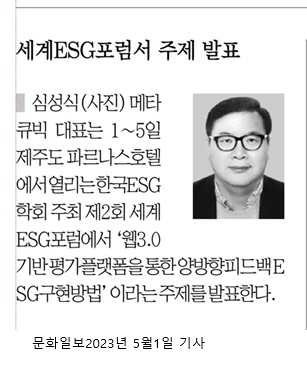
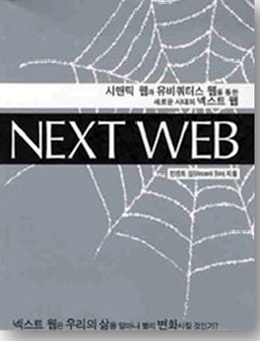
Vincent Sim instructor and ESG forum media imageNEXT WEB book cover by Vincent Sim
INSTRUCTOR PROFILE

Vincent Sim

AI · Semantic AI · Digital Platform Educator | Globaliz Founder & CEO

The focus is not only what AI is, but what you can build with it and how to apply it in work, business and ministry.

Master's degree in Information Science, Kookmin University
Author of NEXT WEB
Bachelor's degree, Alphacrucis College, New Zealand
Former education team lead at SAS SOFTWARE
30+ years across IT, ERP, ESG, AI and digital platform practice and leadership
World ESG Forum presentation and media coverage experience
SCHEDULE

8th cohort schedule and participation options

Auckland in-person training and live Zoom participation run simultaneously. In-person learners are encouraged to bring a laptop.

Dates · venue · tuition

The course runs at the same time on four Saturdays.

Dates
3-24 October 2026 / every Saturday
Time
12:00-2:00 PM / New Zealand Time
In person
Auckland Methodist Church, 427 Lake Road, Takapuna, Auckland 0622
Online
Live Zoom at the same time
Tuition
NZD $60 / full four-week course
Course enquiry
tooW21@gmail.com
Phone
+64 9 441 3311
Open Venue in MapsOfficial Online Application
QR code for the 8th AI YouTube Course online application
Apply from your phone

Scan the QR code or use the online application button.

DATES

Four sessions · Saturdays

01
3 October

Your second self in the AI era

02
10 October

Multimodal content mastery

03
17 October

AI platform + YouTube search engine

04
24 October

Video creation and automated distribution

REGISTRATION

From application to Zoom instructions, keep the process simple

Use the official application page to register for the course. Use the enquiry form below for questions about content or preparation.

01

Complete the online form

Enter your basic details on the official 8th cohort application page.

02

Confirm contact details

Use an accurate email address and phone number so course information can reach you.

03

Review registration guidance

Tuition is NZD $60. Follow the current official application instructions for payment details.

04

Check Zoom and accounts

Online participants should check Zoom, email and YouTube access before class.

05

Prepare your laptop

In-person participants are encouraged to bring a personal laptop for hands-on practice.

06

Start the four-week project

Connect each weekly output into a final personal media hub.

Official 8th Cohort Application
CONTACT

Send your course questions now

Enter an accurate email address for information about preparation, Zoom participation and follow-up. Use the official application page for the actual course registration.

8th cohort information

The Auckland Methodist Church class and Zoom class run at the same time.

Starts 3 October 2026 · four weeks
Saturdays 12:00-2:00 PM NZ Time
427 Lake Road, Takapuna, Auckland 0622
info@smartcubic.com
+64 9 441 3311

Course enquiry

Send your question and we will follow up.

Typical response within 24 hours · free enquiry

Your enquiry has been sent.
We will follow up with course information.
FAQ

Common questions from first-time participants

Simple answers about beginner access, preparation and what you will have at the end of the course.

Can I join if I am new to AI?

Yes. The course starts with prompt basics and moves step by step through writing, images, search pages, video and social connections.

How is this different from YouTube's own search?

You build a personal search page that classifies your videos and related content around your purpose, then connect it to your website and social channels.

Can I participate only by Zoom?

Yes. Auckland in-person teaching and live Zoom participation run simultaneously.

What will I have after four weeks?

Reusable AI prompts, multimodal content, a searchable YouTube page, website structure, a video script and social distribution plan connected as one personal media hub.

Who benefits most?

Pastors, missionaries, ministry workers, educators, small businesses, YouTube operators, content creators and beginners building a personal brand.

What are the dates and fee?

The sessions are on 3, 10, 17 and 24 October 2026, Saturdays from 12:00-2:00 PM NZ Time. Full tuition is NZD $60.

BUILD YOUR OWN MEDIA

After four weeks, leave with
a working result, not just information.

8th AI YouTube Course · starts 3 October 2026 · four weeks · in-person + Zoom · NZD $60

Apply for the 8th CohortWatch the Course Video
ALLBUILDER AIAI PERSONAL MEDIA LAB

Connect AI, YouTube, search pages, websites, social media and the SmartCubic local media model into one practical personal media system.

Course

  • YouTube search engine
  • 4-week curriculum
  • SmartCubic portals
  • Studio principles

Quick links

  • 8th cohort application
  • YouTube video
  • Schedule and venue

Contact

info@smartcubic.com+64 9 441 3311

© 2026 AllBuilder / SmartCubic. All rights reserved.

TermsPrivacyCookies
8TH AI MEDIA
8th AI Personal Media Course | 4-Week Intensive · Build Your Own YouTube Search Engine
ALLBUILDER
Connecting better education
YouTube Search EngineCurriculumSmartCubic PortalWebsite StrategyScheduleFAQ
KO
Apply Now
Starts 3 Oct 2026 · 8th Cohort · On-site + Zoom simultaneous

Don’t just upload videos to YouTube.
Attract viewers
with your own YouTube search engine.

We go beyond simply asking AI questions and uploading videos. Over 4 weeks you will build a practical system that connects AI personal media, a YouTube search page, homepage, SNS and QR application flow so people can search, discover and click.

Enquire & ApplyView 4-Week Curriculum
8th AI Personal Media 4-Week Intensive Course Brochure
AI Search
YouTube Traffic
BROCHURE

Preview the 8th course with the brochure

View the main 8th-cohort brochure and additional materials. Check dates, learning goals, curriculum and application QR on both desktop and mobile.

8th Main Brochure – Build Your Own YouTube Search Engine with AI
8th Main Brochure – AI YouTube Search Engine
8th 4-Week Intensive AI Personal Media Brochure
Course schedule and curriculum by city (Korean guide)
City schedules & curriculum guide
8th AI Course Application & Practical Outcomes Brochure
Application & practical outcomes brochure
COURSE AT A GLANCE

Practical AI training experienced by 200+ participants

Many participants reported that AI helped them apply learning to church ministry, mission, education, business promotion, personal branding and content creation. Building on that experience, this course strengthens YouTube search and click-traffic structure.

4
Week Intensive Practical Course
70%
Hands-on Focus
200+
Cumulative Participants Worldwide
30+
Years of Instructor IT Experience
CORE PROGRAM

Build Your Own YouTube Search Engine with AI

A search page is more than a list of videos. Like a library information desk, it organises videos by topic so visitors can quickly find and click the content they need — a true traffic gateway.

Greetings. The 8th cohort is hosted by invitation of Auckland Methodist Church. Around 200 missionaries, pastors, ministry workers, church members and general participants from New Zealand, Korea, Australia, the USA, Myanmar, Indonesia, Singapore and Africa have joined previous cohorts both on-site and via Zoom.

01

Organise Video Assets

Gather videos, channels, playlists and descriptions in one place.

02

AI Semantic Classification

Classify content by topic, audience, problem and solution.

03

Build the Search Page

Let visitors find the videos they want via questions and keywords.

04

Click Optimisation

Improve titles, thumbnails, descriptions and next actions.

05

Integrated Distribution

Connect homepage, SNS, QR and enquiry/application flows.

Your own YouTube video search page so visitors can find multiple videos by topic in one place.
AI-powered search engine structure that links video titles, descriptions, keywords and meaning.
Organise videos and channels like a library catalogue so visitors never get lost.
Design question-style titles and descriptions so your videos are more discoverable in search results.
Treat title + thumbnail as a paired signboard and apply practical principles to raise click-through rate.
Connect homepage, SNS and YouTube as one bridge instead of separate islands.
Use AI to reduce time spent on video planning, production, promotion and repeated distribution.
Build a continuous traffic structure where one visit leads to the next video, application or consultation.
4-WEEK CURRICULUM

One practical deliverable completed every week

Starts from the basics so beginners can follow, yet every week produces usable content and platform results — a 70% hands-on course.

01

The AI Era – Birth of Your ‘Second Self’

AI persona setup, prompt fundamentals, building your personal AI partner. Deliverable: AI persona card + reusable core prompts.

WEEK 01 · 3 Oct (Fri)Output
02

Mastering Multimodal Content

Create promotional, educational and brand content combining text, image and voice. Deliverable: 3 texts, 3 images, voice script for video.

WEEK 02 · 10 Oct (Fri)Output
03

Build AI Personal Platform + YouTube Search Engine Design

Design AI-based homepage, search engine and YouTube search page. Complete your media hub. Deliverable: searchable video page + homepage draft.

WEEK 03 · 17 Oct (Fri)Output
04

Video Production & Automated Distribution

Short-form video production, SNS integration, content automation system. Strategies to increase YouTube click traffic. Deliverable: video scripts, distribution plan, final personal media platform.

WEEK 04 · 24 Oct (Fri)Output
WHO SHOULD JOIN

One media foundation for church, business, education & personal brand

Instead of learning text, images, search, homepage, video and SNS separately, connect them into one personal media system.

Church & Mission

Connect sermon summaries, teaching materials, mission videos and church homepage into a searchable media hub.

Sermon ContentMission VideosHomepage

Small Business & Promotion

Connect products, services, customer reviews and YouTube videos to local search and enquiry forms.

Local SearchBrand PageCustomer Enquiries

Instructors & Personal Brand

Organise lecture materials, posters, blogs and YouTube videos into one personal platform.

Educational ContentPortfolioSNS Growth
SMARTCUBIC INTEGRATED PORTAL

A circular search ecosystem linking local & professional information to YouTube

Connect local hospitals, restaurants, buildings, events, people and services through video and semantic relationships into a living regional media search engine.

SmartCubic is not a simple collection of homepage links. It is an integrated regional media portal that connects places, industries, facilities, events, people, products, services and YouTube videos into one semantic network so content is repeatedly searched and rediscovered.

The same video can appear as different entry points for hospital search, food search, building search, event search or city search — because users have different questions and purposes.

Health Cubic

Connects hospitals, oriental clinics, dental practices, pharmacies, clinicians, health-management videos and local health information.

MICE Cubic

Turns exhibitions, trade shows, seminars, education, performances, festivals and local events into video assets.

Food Cubic

Makes restaurants, cafés, menus, cooking processes, customer reviews and local “best food” videos searchable.

Building Cubic

Connects buildings, retail premises, shopping centres, offices, tenants, facilities and place information.

Regional Portal

Integrates city-level living information and regional media such as All-in-Auckland, All-in-Seoul, All-in-LA and All-in-Sydney.

Specialist Portal

Connects industry, education and business specialist information (including All-That-Power) with regional content.

Local hospitals and restaurants meet customers directly through YouTube

When an Auckland hospital uploads a health video, it can simultaneously appear in Health Cubic hospital search, All-in-Auckland local hospital search, Building Cubic medical facility info and MICE Cubic health seminars.

  • The same specialist video can be found under different search terms such as Auckland Korean hospital, North Shore dental, health check-up, back pain or local health seminar.
  • After watching, users move on to the hospital homepage, consultation, phone call, booking and actual visit.
  • Restaurant videos connect to Food Cubic, regional portals, shopping-centre tenant search, food festivals and YouTube “best restaurants” searches.

Local events become lasting video assets that never disappear

Church events, business seminars, health lectures, food festivals, performances, education, property briefings and community gatherings can remain searchable content long after the event ends.

  • Before: teaser videos, registration info, speaker introductions, venue and programme details
  • During: live footage, interviews, key talks, participant reactions, performance and exhibition records
  • After: highlights, talk summaries, participant reviews, next-event and related-organisation introductions

These videos do not stay only on YouTube — they reconnect to MICE Cubic, regional portals, industry portals, Building Cubic, Food Cubic and Health Cubic.

Search creates content, and content creates search again

Local information appears

Hospital, restaurant, shop, building, education, performance and seminar data are registered.

Video content is produced

Introduction videos, interviews, educational videos, event footage and reviews are created.

Linked to specialist portals

Connected to Health, MICE, Food, Building Cubic and related specialist portals.

Exposed on regional portals

Appears on All-in-Auckland, All-in-Seoul, All-in-LA, All-in-Sydney and more.

User search & click

Videos are discovered through city, industry, place, menu, event and service searches.

Real YouTube traffic

Searchers move to the YouTube channel, watch and subscribe.

Related content is generated

Reviews, interviews, follow-up events and new information are created again.

Search results rebuild

New content links to existing information, making search results richer.

A regional portal is not a static homepage — it is a continuously growing media

Traditional regional portals were closer to static homepages where an admin uploaded business listings. In SmartCubic, residents, hospitals, restaurants, buildings, event organisers, specialists and educational institutions continuously produce video and information. New content is classified and linked to relevant regions and specialist fields.

  • Local hospitals & health info, restaurants & menu videos, buildings & tenants, events & education, churches & community, specialist interviews — all connected in one place.
  • Designed to lead to real actions: booking, enquiry, application, purchase, YouTube subscription and homepage visits.
  • The structure proven in Auckland can expand to Seoul, LA, Sydney and other city portals.

One piece of content connects region and every relationship at once

Even a single restaurant video can link country, city, suburb, building, restaurant, cuisine type, signature menu, opening hours, booking, event participation, YouTube channel, homepage, language and search keywords. A hospital video links region, medical specialty, clinicians, building, health events, consultation and booking.

SmartCubic is not a system that copies the same content into many places. It analyses the meaning and relationships of content and rebuilds the entry points that match each user’s search purpose. Health seekers see Health Cubic; event seekers see MICE Cubic; place seekers see Building Cubic; regional-info seekers see the city portal.

More important than view counts is direct connection between local customers and businesses

  • Hospital consultation & booking
  • Restaurant visit & order
  • Event registration
  • Shop & facility visit
  • Course enrolment & product enquiry
  • YouTube subscribe, further viewing & homepage visit
Every piece of local information becomes video, video becomes searchable, and search creates new content and customer connections again — a circular regional media ecosystem.
PREMIUM WEBSITE CONTENT

10 studio-grade principles that don’t look like a template

A good website is not one with lots of decoration — it is one that shows visitors the way so they never hesitate. Here are 10 principles applied in this course and website design, explained with simple analogies.

01

Studio-grade Information Architecture

Templates only list visible sections. A studio site arranges problem → solution → proof → process → application in the order of the visitor’s questions. Corridors must be designed before rooms so no one gets lost.

IAConversion Path
02

Typography Upgrade

Readable body (Noto Sans KR), strong numbers (Bebas Neue) and emotional emphasis (DM Serif Display) each have a role. Clear size and weight hierarchy matters more than using many fonts.

Type HierarchyReadability
03

White-space Appreciation

Empty space is not waste — it is the comma between sentences. Giving important content more breathing room makes it more visible, not less.

SpacingFocus
04

Subtle Micro-interactions

A slight lift on cards, changing button shadows and gentle fade-ins are enough. Motion should be a signpost, not fireworks.

HoverScroll
05

Portfolio Framing

Don’t stop at pretty photos. Show problem → decision → process → result → lessons. Why you did it builds more trust than what you did.

Case StructureEvidence
06

Final Polish Checklist

Check alignment, image ratios, button copy, link states and mobile spacing in order. The one thing to obsess over last: can the first-screen message and apply button be understood in 3 seconds?

Pre-launch CheckFirst Screen
07

Mobile-first Design

Don’t treat a small screen as a shrunk PC. Design button height, type size and single-line inputs first so everything can be read and tapped with one hand.

320pxTouch UX
08

SEO + GEO Connection

Design keywords for search engines together with meaning structures for AI recommendation. SEO is writing the name on the sign; GEO is explaining where it is and who needs it.

SEOGEO
09

Clear CTA & Real Form

Say the outcome (e.g. “Enquire about the course”) instead of “Learn more”. The form must actually submit via Formspree, not just change the screen.

CTAFormspree
10

Accessibility for All Ages

Use larger type, high contrast, simple sentences, clear labels and alt text. Good accessibility is not a special feature — it is basic design that opens the door wider for every visitor.

Mature UsersAccessibility
BEFORE AND AFTER

Don’t wait for videos to be found — make them discoverable

The old way uploads a video and hopes. The new way systematically raises discoverability by connecting search, classification, thumbnails, homepage and SNS.

Old Way

Upload and hope the algorithm notices
Content scattered across YouTube, SNS and homepage
Titles and thumbnails decided by gut feel
Promote once, then start from scratch again
Search results not connected to application flow
VS

AI YouTube Search System

Videos classified by topic on an AI search page
Homepage, YouTube and SNS connected as one hub
Titles & thumbnails that reflect search intent and click reasons
Reusable prompts and distribution routines
Traffic flow that continues from search → view → consultation → application
INSTRUCTOR

Teaching application more than theory — Vincent Sim (Sim Seong-sik)

Drawing on 30+ years of IT, ERP, ESG, AI and digital-platform experience, he guides you step-by-step on applying AI to life, business, education, church and mission contexts.

Vincent Sim instructor and World ESG Forum media featureNEXT WEB book cover by Vincent Sim
INSTRUCTOR PROFILE

Vincent Sim (Sim Seong-sik)

Specialist Instructor in AI · Semantic AI · Digital Platforms | Founder & CEO, Globaliz

He doesn’t stop at explaining what AI is — he teaches what you can build with it and how to apply it to life, business and ministry.

Master’s, Graduate School of Information Science, Kookmin University
Author of NEXT WEB
Bachelor’s, Alphacrucis College, New Zealand
Former Education Team Leader, SAS Software (USA)
30+ years hands-on IT, ERP, ESG, AI & digital platform leadership
Keynote speaker at World ESG Forum; featured in Munhwa Ilbo and other media
Consulting on ERP/CRM/POS/logistics/distribution systems; generative AI, semantic AI and personal platform development
SCHEDULE

8th Course Schedule & How to Join

On-site classes in Auckland, New Zealand run simultaneously with live Zoom sessions. Please bring a laptop if attending in person.

DATES

4 Weeks · Every Friday

3 Oct
10 Oct
17 Oct
24 Oct
NZ 12:00–14:00 · Korea 09:00–11:00 · Sydney 10:00–12:00
Auckland Methodist Church, 427 Lake Road, Takapuna, Auckland 0622
On-site practical + live Zoom simultaneous
NZD 60 (NZ) · approx. KRW 50,000 (Korea) · Group discounts available
Build Your Own YouTube Search Engine with AI

Practical training to increase YouTube views and click traffic

We go beyond simply asking AI questions and uploading videos. Over 4 weeks you will build a practical system that connects AI personal media, a YouTube search page, homepage, SNS and QR application flow so people can search, discover and click.

Any MetaCubic 2-year usage benefit mentioned in previous course notices will be confirmed under the final registration conditions.
REGISTRATION

From application to Zoom details — everything in one place

You can enquire first via the Formspree form below or use the existing AllBuilder / All in Auckland / All in Seoul registration flow. Please re-confirm official details before payment.

Submit enquiry or application

Enter your name, email, organisation and questions in the Formspree form below. Existing AllBuilder members may use their existing account flow.

Sign up & email verification

Enter basic details on AllBuilder, All in Auckland or All in Seoul and complete registration via the email confirmation link.

Course fee payment

Payment available via BNZ (NZ), IBK (Korea), Commonwealth Bank (Australia) or PayPal/card. Please re-confirm official details before transferring.

Receipt & participation details

After payment, send depositor name, receipt and contact email to receive Zoom link and preparation notes.

Laptop & account preparation

On-site participants bring a laptop; online participants check Zoom, email and YouTube accounts in advance.

Existing online registration links

AllBuilder Sign-upNew Zealand Sign-upKorea Sign-up
Reference from previous notices: BNZ 02-0272-0164025-000 / GLOBALIZ LIMITED / SWIFT BKNZNZ22. IBK (Korea) and Commonwealth Bank (Australia) details are also on the existing pages. Always confirm final instructions before transferring.
FAQ

Frequently asked questions from first-time participants

Clear answers on whether you can join with no AI experience, what to prepare, and what deliverables you will leave with.

Can I join even if I have never used AI?
Yes. We start from prompt fundamentals and progress step-by-step through text, images, search pages, video and SNS connection.
How is a YouTube search engine different from YouTube’s own search?
It is your own search page that classifies and searches your videos and related content by purpose. You design the discovery path yourself by linking it to your homepage and SNS.
Can I join via Zoom only?
Yes. Auckland on-site and Zoom online run live at the same time.
What will I have after 4 weeks?
AI-partner prompts, multimodal content, a searchable YouTube page, homepage structure, video scripts and SNS distribution plan — all connected as one personal media hub.
Who benefits most?
Pastors, missionaries, church workers, instructors, small-business owners, YouTube operators, content creators and beginners building a personal brand.
What about fees and schedule?
Runs on 3, 10, 17 and 24 October 2026. Full course fee is NZD 60 (New Zealand).
Is there a MetaCubic benefit?
Any MetaCubic 2-year usage benefit from previous course notices will be confirmed in the final registration information.
START NOW
AllBuilder AI Personal Media

After 4 weeks, leave with working results — not just knowledge.

Start building your own YouTube search system that lets people search, discover, click and watch.

Enquire & ApplyView Brochure Again
CONTACT

Send your application or questions now

Enter a valid email address to receive registration details, preparation notes, Zoom instructions and follow-up guidance.

Course Information

The 8th AI Personal Media course runs simultaneously at Auckland Methodist Church and on Zoom.

Starts 3 Oct 2026 · 4 weeks
Every Friday 12:00–14:00 NZ time
427 Lake Road, Takapuna, Auckland 0622
toow21@gmail.com
+64 9 441 3311

Average reply within 24 hours · Free consultation, no obligation

Enquiry submitted!
We will send registration details within 24 hours.
ALLBUILDERConnecting better education

AllBuilder’s AI Personal Media courses help you go beyond simply using AI — connecting personal content, homepage, search, video and SNS into one working media system.

Course

  • YouTube Search Engine
  • 4-Week Curriculum
  • Schedule & Venue

Resources

  • Brochure
  • SmartCubic Portal
  • Website Strategy
  • FAQ

Contact

toow21@gmail.com+64 9 441 3311Auckland Methodist Church, Takapuna, Auckland

© 2026 Globaliz / AllBuilder. All rights reserved.

TermsPrivacyCookies
ALLBUILDER


Google Map
© Allbuilder ^