Allbuilder

9thGenerative AI 4 WEEK COURSE

9thGenerative AI 4 WEEK COURSE

11월 7일 / 11월 14/ 11월 21일 / 11월28잏

  • 9TH AI COURESE
  • 8 th project
  • 8 TH AI PROJECT Cource
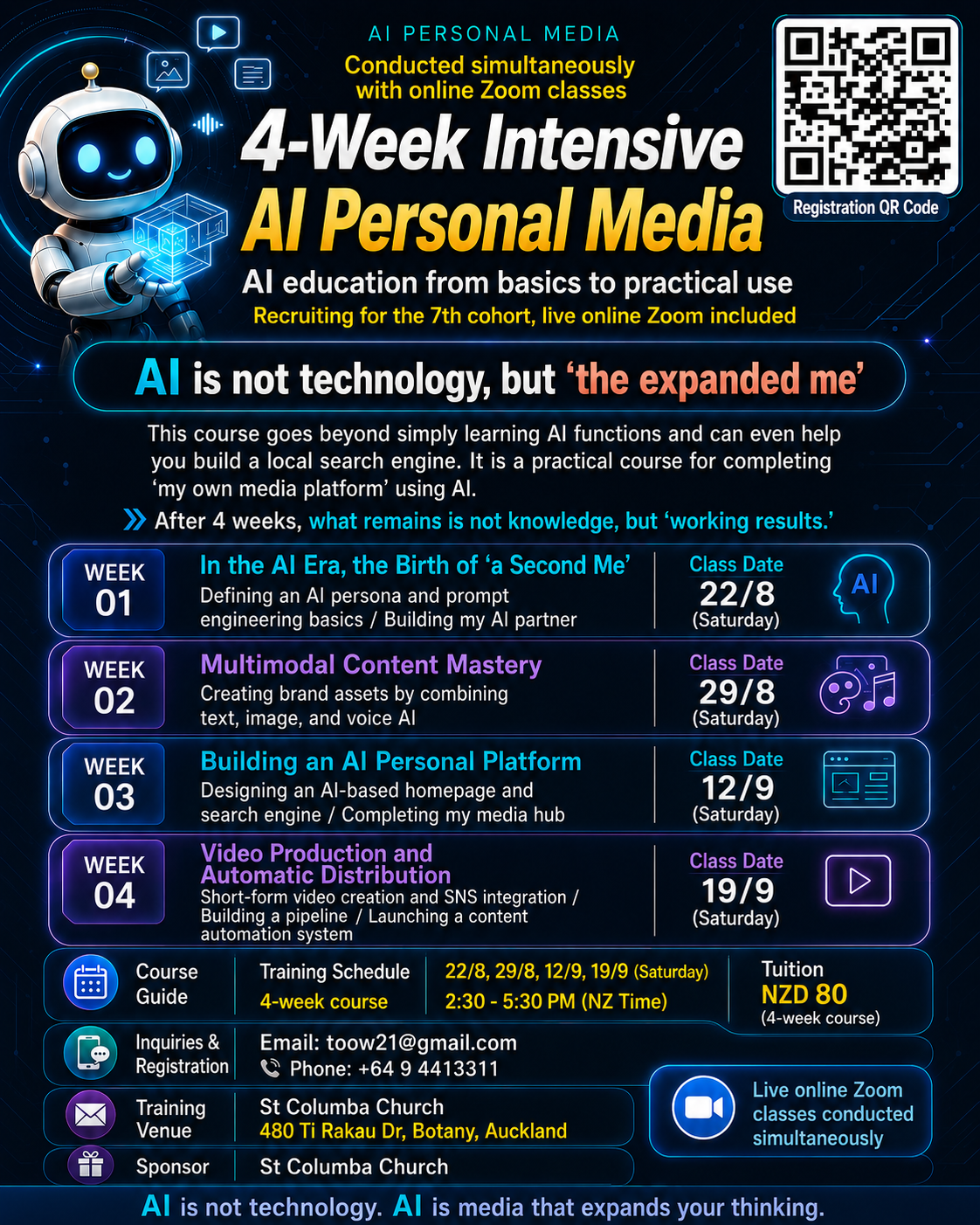
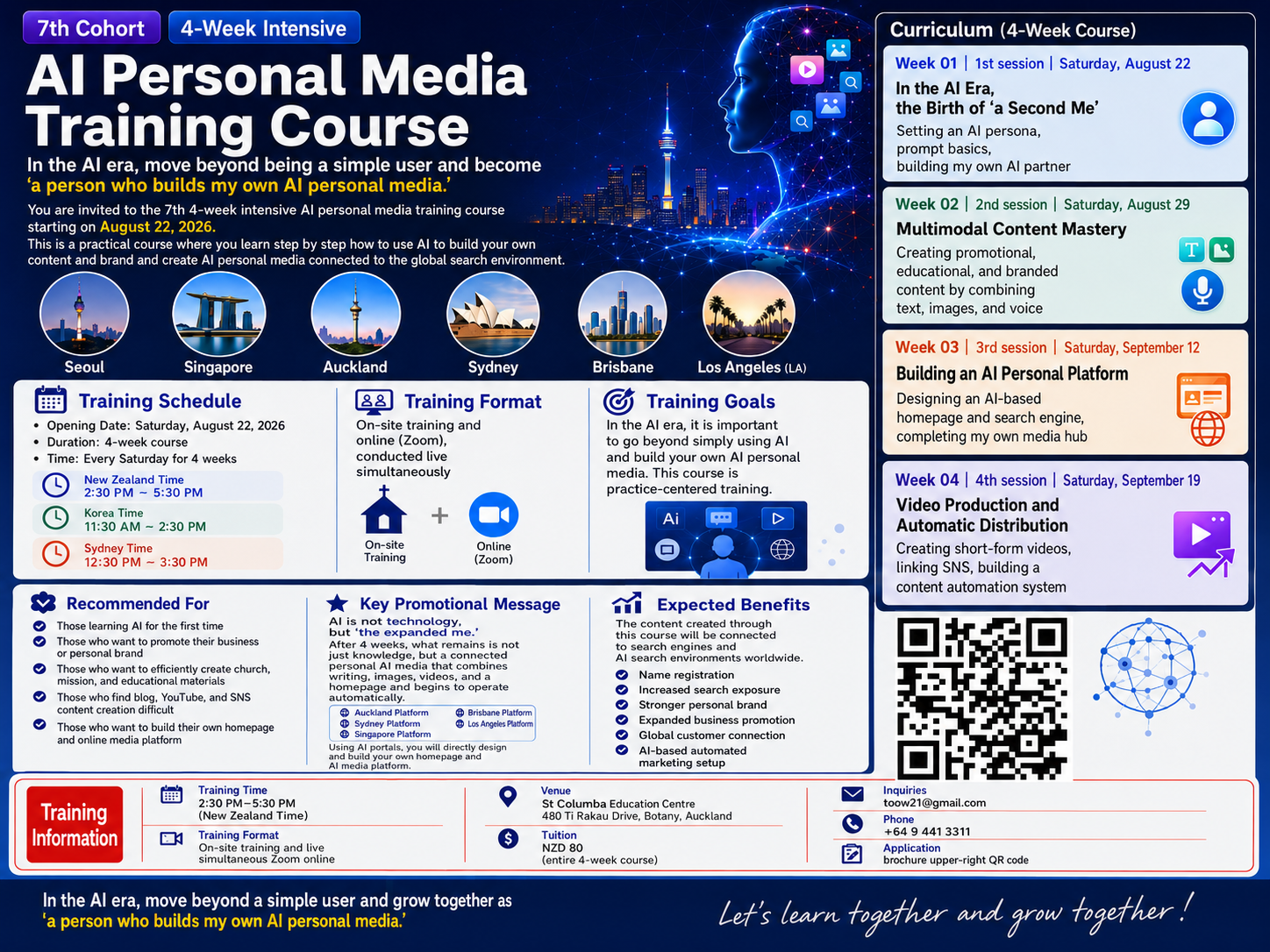
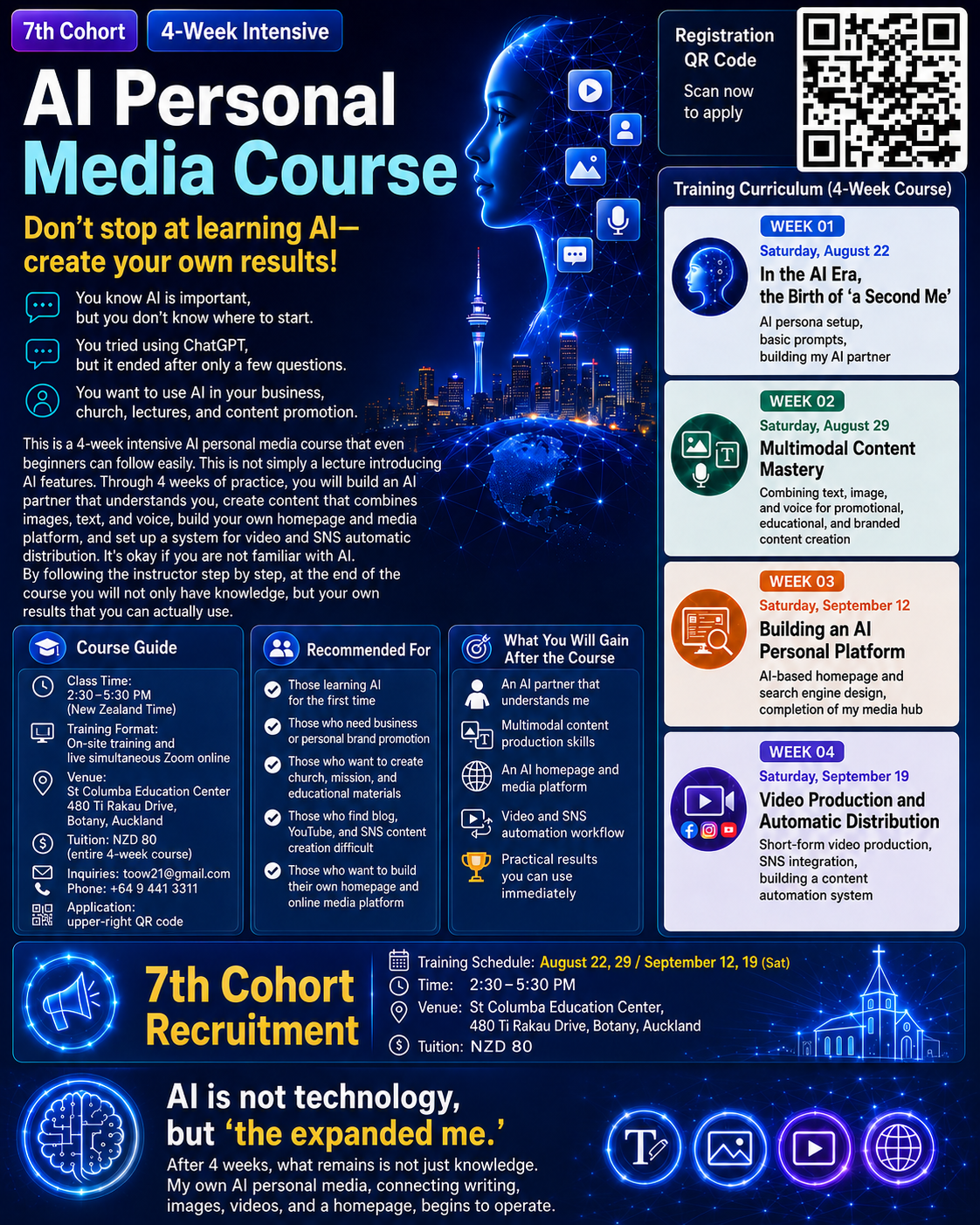
  • 7 th generative AI Personal media
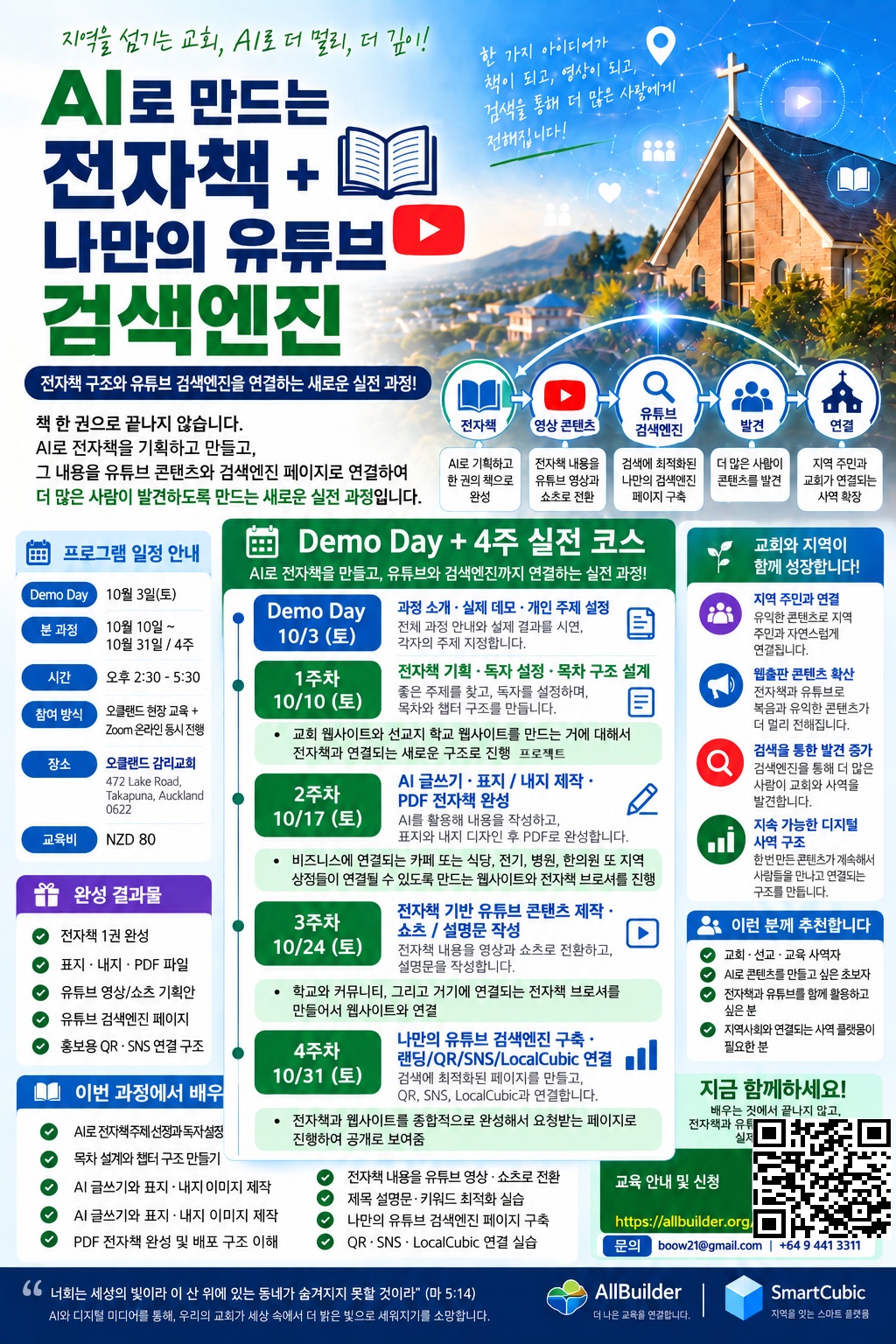
  • Brochure
  • localcubic youtube search engine
  • 9 th basic AI courses
  • 9 th PROJECT BROCHURE
  • 8 AI PROJECT POSTER
  • brochure
  • church brochure
  • reference
  • local media search
ALLBUILDER 9기 | AI 퍼스널 미디어 기초·전자책 유튜브 검색엔진 4주 실전교육
ALLBUILDER
AI PERSONAL MEDIA + PROJECT
과정 안내기초과정프로젝트과정일정·수강료FAQENGLISH9기 참가 문의
ENGLISH
ALLBUILDER · 제9기 · 두 과정, 각 4주

AI를 배우는 데서
끝내지 마세요.
나만의 미디어를 만들고
세상과 연결하세요.

기초과정은 글·이미지·영상·AI 개인 플랫폼을 익히고, 프로젝트과정은 전자책·웹사이트·YouTube 검색엔진·QR·SNS·LocalCubic을 하나의 공개 결과물로 완성합니다.

2026년 11월 7·14·21·28일오클랜드 평강교회 + Zoom기초 12:00–14:00프로젝트 14:30–17:30
교육과정과 일정 보기브로셔 확인하기
ALLBUILDER Cohort 9 AI Personal Media Basic Course brochure
OFFICIAL BROCHURE · COHORT 9BASIC · 4 WEEKS
OFFICIAL BROCHURES

제9기 공식 브로셔

신청 전에 기초과정과 프로젝트과정의 공식 안내 이미지를 확인하세요. 이미지를 클릭하면 원본 크기로 열립니다.

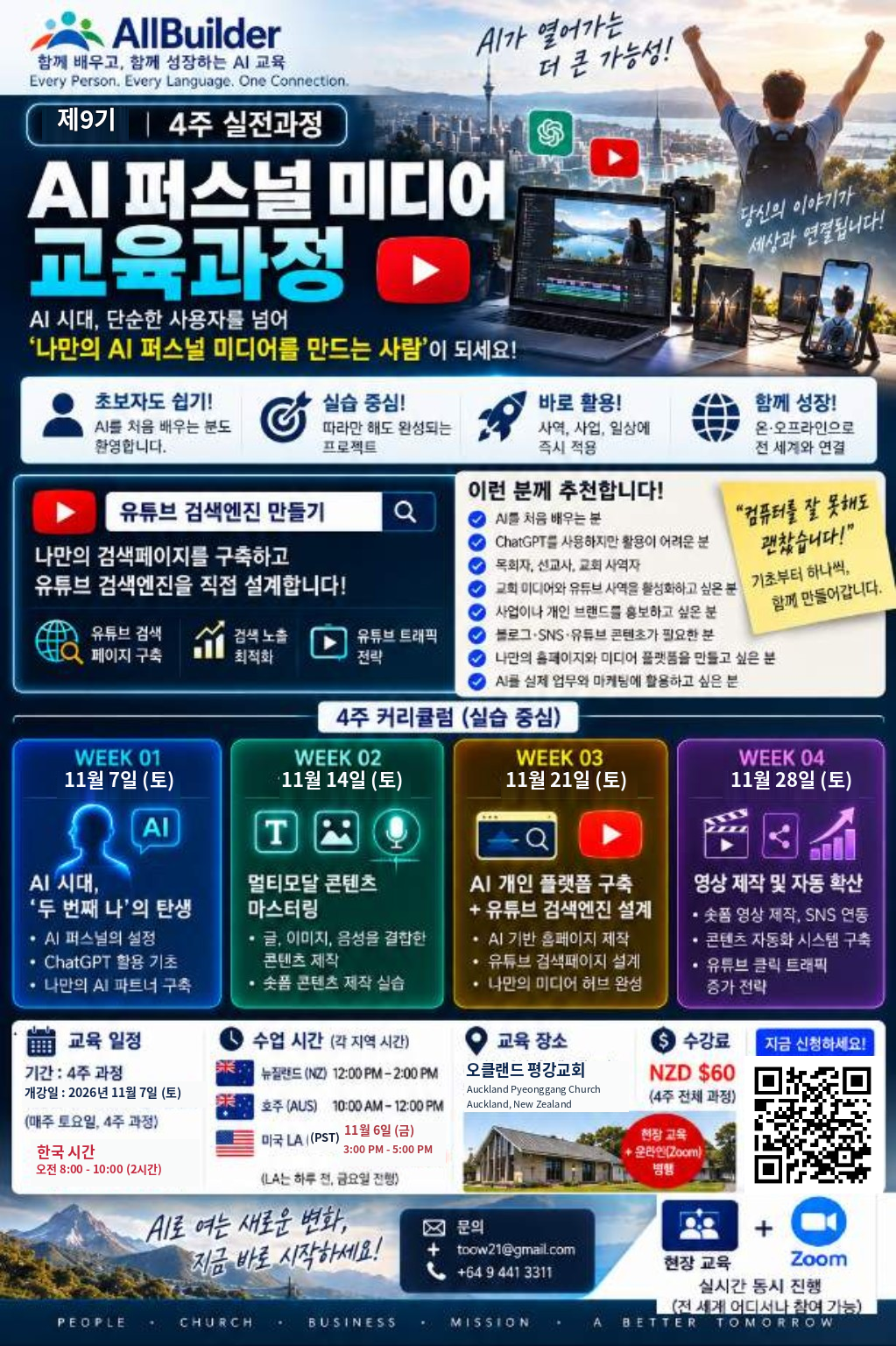
AI 퍼스널 미디어 기초과정

NZD 60
AI 퍼스널 미디어 기초과정 · ALLBUILDER Cohort 9 brochure
기초과정 · 11월 7·14·21·28일 · NZD 60
브로셔 원본 보기

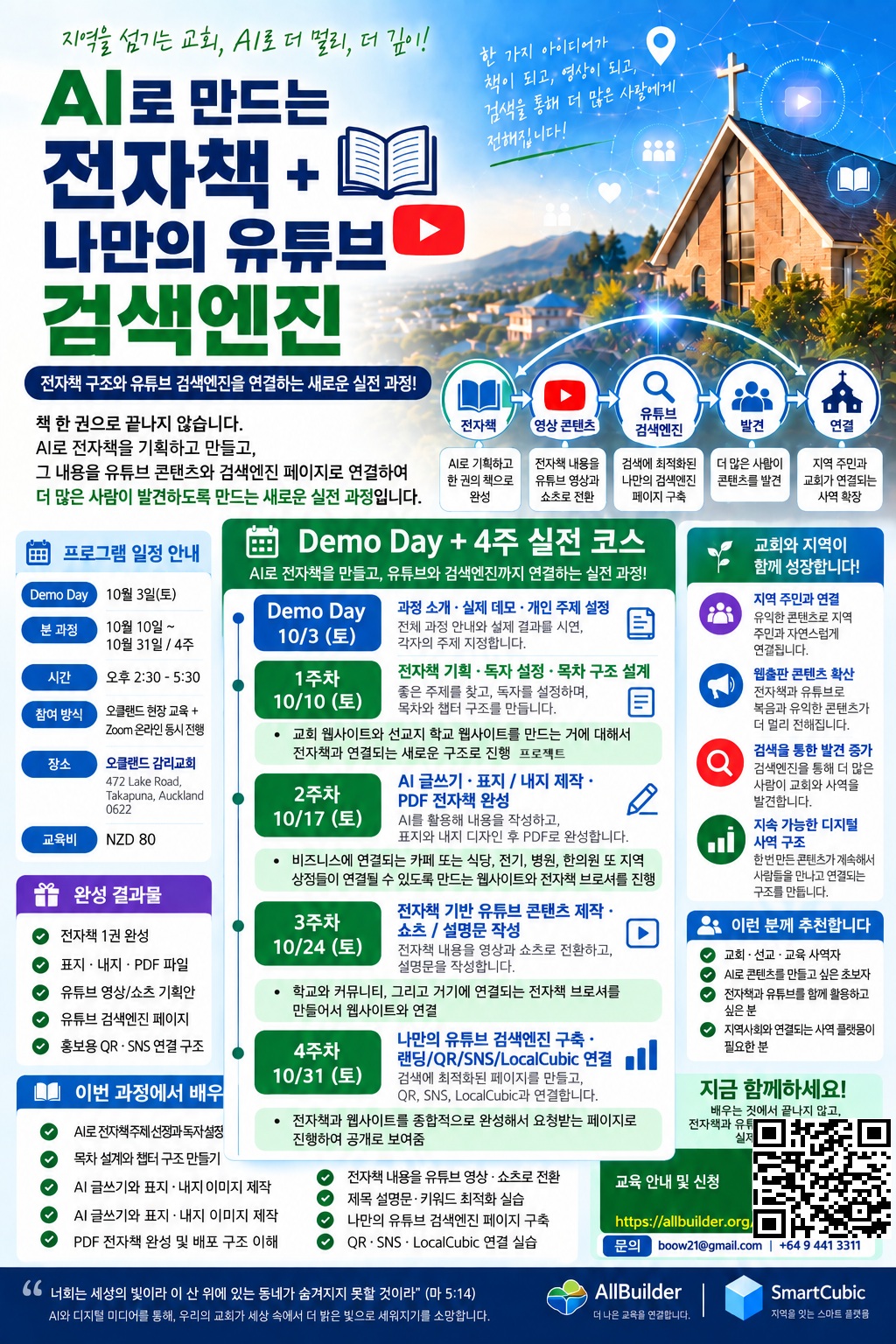
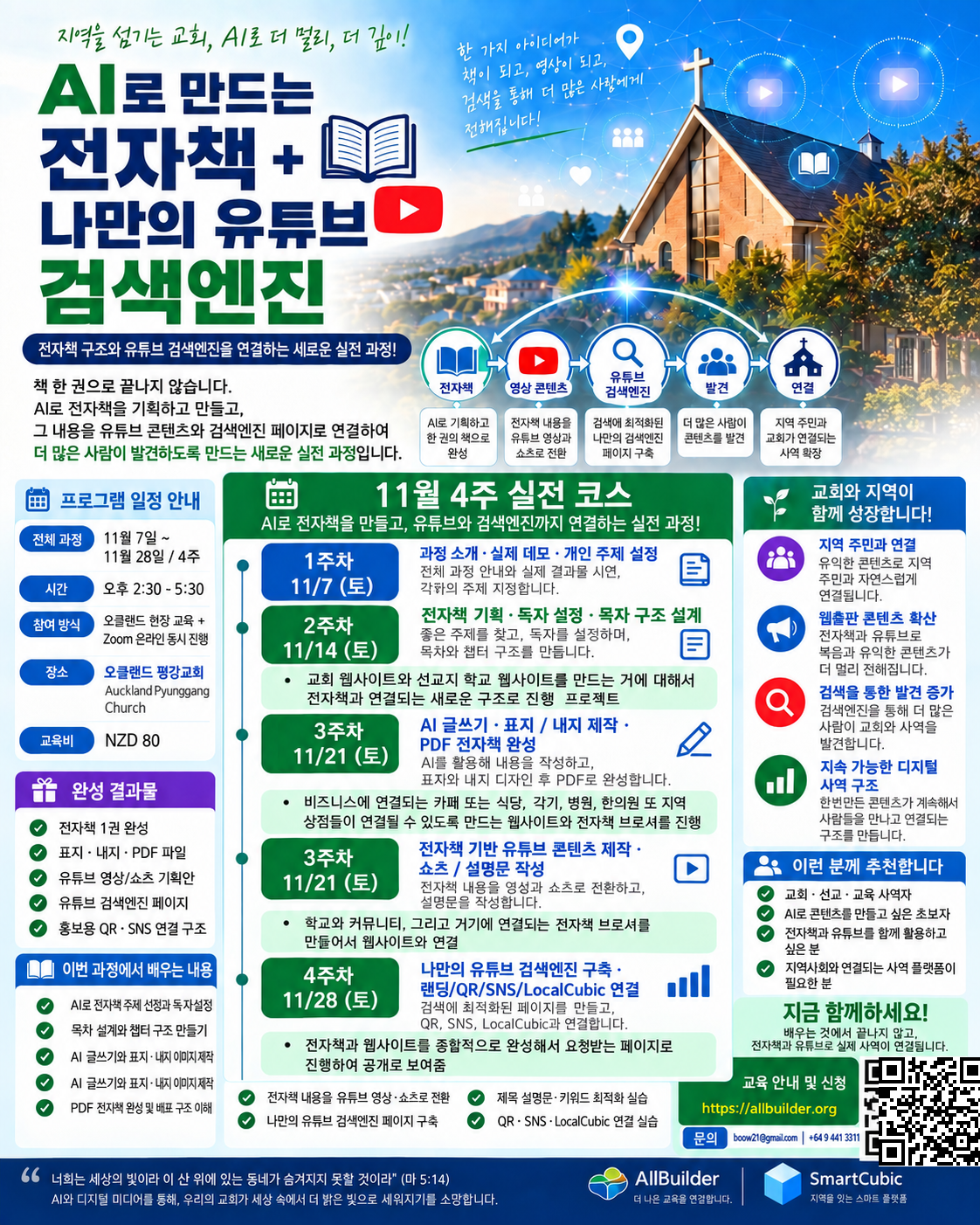
전자책 + 나만의 YouTube 검색엔진

NZD 80
전자책 + 나만의 YouTube 검색엔진 · ALLBUILDER Cohort 9 brochure
프로젝트과정 · 11월 7·14·21·28일 · NZD 80
브로셔 원본 보기

안내: 위 프로젝트 브로셔에는 3주차가 두 번 표시되어 있습니다. 실제로는 11월 21일에 전자책 PDF 제작과 YouTube 영상·Shorts 제작을 통합하여 진행합니다. 아래 최신 일정표를 기준으로 확인해 주세요.

TWO COURSES · SAME FOUR SATURDAYS

기초를 배우고 프로젝트로 완성합니다

두 과정 모두 같은 4주간의 토요일에 운영됩니다. 기초과정은 정오부터, 프로젝트과정은 오후 2시 30분부터 진행됩니다.

BASIC COURSE

1단계 · AI 퍼스널 미디어 기초과정

ChatGPT와 프롬프트, AI 글쓰기·이미지·음성·영상, 개인 미디어·YouTube 검색 페이지·SNS 확산을 실습합니다.
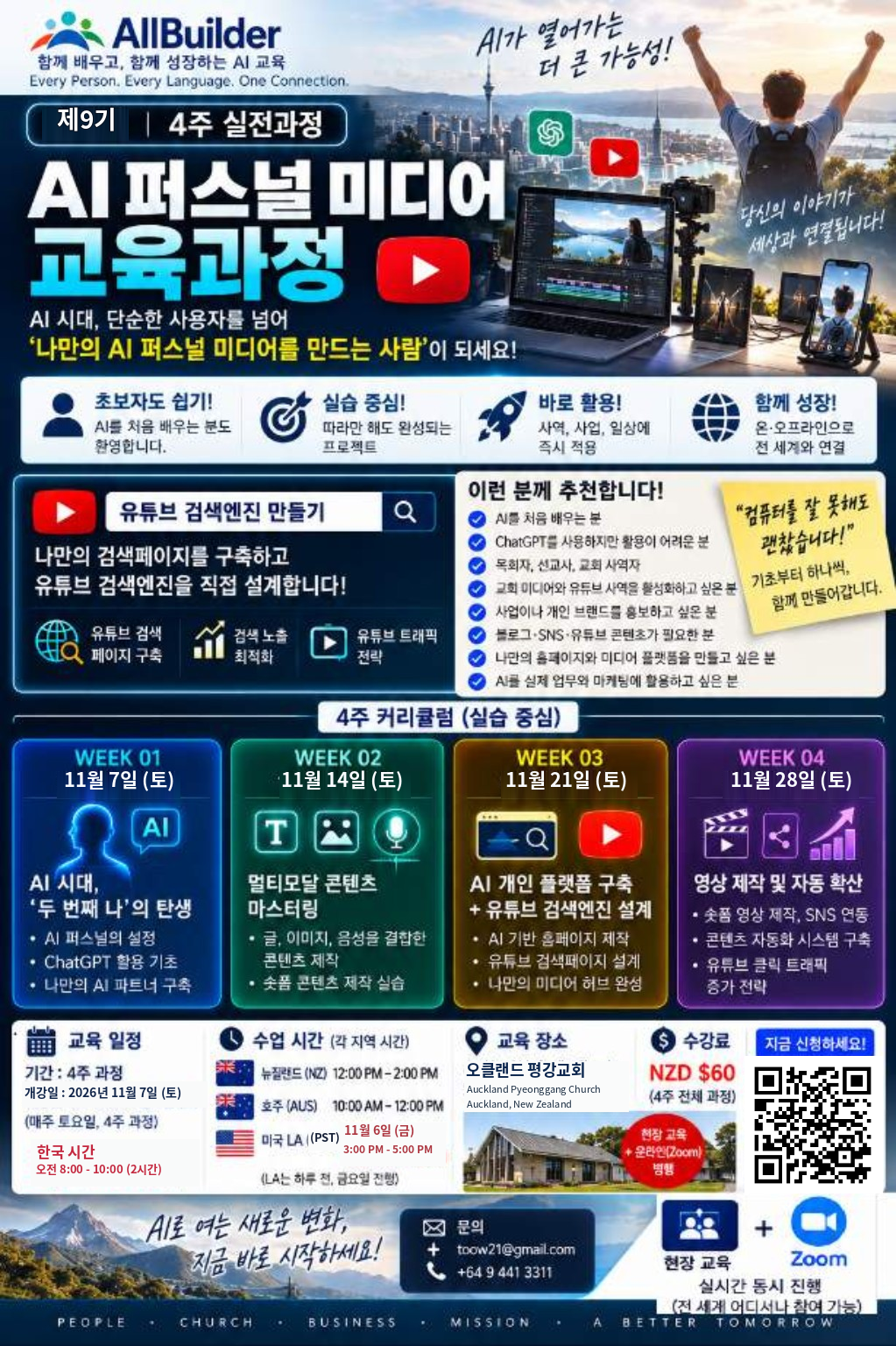
2026년 11월 7일–28일 (매주 토요일)
뉴질랜드 오후 12:00–2:00
오클랜드 평강교회
현장 + Zoom 동시 진행
NZD 60
PROJECT COURSE

2단계 · 전자책·웹사이트·YouTube 프로젝트

전자책을 원천 콘텐츠로 기획·제작하고, 교회·비즈니스·학교·커뮤니티 웹사이트와 영상·검색엔진·QR을 연결합니다.

2026년 11월 7일–28일 (매주 토요일)
뉴질랜드 오후 2:30–5:30
오클랜드 평강교회
현장 + Zoom 동시 진행
NZD 80
WHY ALLBUILDER

사용법에 머물지 않고 실제 결과물까지

두 과정 모두 실습 중심이며, 프로젝트과정은 검색되고 공유되는 콘텐츠 구조를 완성하는 데 집중합니다.

기존의 단편적인 AI 활용
기능 설명을 듣고 마치는 교육
개별 파일과 예제로 흩어지는 콘텐츠
실제 사용자에게 공개되지 않는 결과물
교회·지역·비즈니스와 분리된 미디어
VS
ALLBUILDER 9기 실전교육
나만의 AI 퍼스널 미디어 구축
전자책·웹사이트·영상 실제 제작
검색 페이지·QR·SNS 연동
교회와 지역사회를 잇는 공개 프로젝트
BASIC COURSE · 4 WEEKS

AI 퍼스널 미디어 기초 4주

11월 7일·14일·21일·28일, 매주 토요일 12:00–14:00(NZDT). 처음 배우는 분도 단계별 실습을 따라올 수 있도록 구성했습니다.

WEEK 01 · 11/7 (토)

AI 시대, 두 번째 나의 탄생

AI 퍼스널 설정, ChatGPT 기초, 프롬프트 작성, 나만의 AI 파트너를 구성합니다.

WEEK 02 · 11/14 (토)

멀티모달 콘텐츠 마스터링

AI 글·이미지·음성·영상을 결합하고 숏폼 및 콘텐츠 제작 기초를 실습합니다.

WEEK 03 · 11/21 (토)

AI 개인 플랫폼 + YouTube 검색엔진

AI 홈페이지와 나만의 검색 페이지를 설계하고 콘텐츠를 하나의 미디어 허브에 연결합니다.

WEEK 04 · 11/28 (토)

영상 제작과 콘텐츠 확산

Shorts 영상, SNS 연동, 콘텐츠 확산 구조와 YouTube 방문 유입 방법을 실습합니다.

PROJECT COURSE · 4 WEEKS

전자책부터 영상·검색엔진·공개 페이지까지

11월 7일부터 28일까지 매주 토요일 14:30–17:30(NZDT). Demo Day는 별도 5주차가 아니라 11월 7일 1주차에 포함됩니다.

WEEK 01 · 11/7 (토)

과정 소개 · Demo Day · 개인 주제 설정

전체 과정을 시연하고 개인 또는 기관의 프로젝트 주제를 설정합니다. 교회·선교지 학교·지역 사업체 등 적용 대상을 선정합니다.

개인 주제·대상·프로젝트 목표 수립
WEEK 02 · 11/14 (토)

전자책 기획 · 독자 설정 · 목차 구조 설계

시장과 독자를 분석하고 전자책의 주제·목차·챕터 구조를 설계합니다. 교회·학교·지역 비즈니스 웹사이트로 확장할 구조를 기획합니다.

전자책 아웃라인과 웹사이트 콘텐츠 구조
WEEK 03 · 11/21 (토)

AI 글쓰기 · 표지·내지·PDF + YouTube 영상·Shorts

AI를 이용해 본문을 집필·편집하고 표지·내지를 디자인하여 PDF 전자책을 완성합니다. 같은 내용을 YouTube 영상·Shorts·설명문으로 재구성하고 교회·비즈니스·학교·커뮤니티 웹사이트와 연결합니다.

통합 3주차: PDF 전자책 + 영상·Shorts + 웹 콘텐츠
WEEK 04 · 11/28 (토)

나만의 YouTube 검색엔진 · QR/SNS/LocalCubic

YouTube 검색 페이지·랜딩페이지를 완성하고 QR·SNS·LocalCubic과 연결합니다. 결과물을 공개하고 데모로 시연합니다.

검색 페이지 공개 + QR/SNS 연동 + 결과 발표
CONNECTED CONTENT SYSTEM

하나의 아이디어를 검색·발견·연결되는 자산으로

전자책은 지식의 출발점입니다. 이를 영상과 웹페이지로 확장해 사람과 지역을 연결합니다.

ALLBUILDERLOCALCUBIC
CONTENT CONNECTION
E-BOOKVIDEOSEARCH

전자책

주제·독자·목차·챕터를 설계하고 PDF 원본을 만듭니다.

웹사이트

교회·학교·비즈니스·커뮤니티용 웹페이지로 확장합니다.

YouTube + Shorts

전자책 내용을 영상·쇼츠·설명문으로 재구성합니다.

YouTube 검색 페이지

검색 결과에서 발견되는 페이지와 키워드를 설계합니다.

QR · SNS · LocalCubic

현장 안내에서 온라인 페이지로 연결하고 공유합니다.

PROJECT OUTCOMES

배움에서 끝나지 않는 4주 실전형 과정

기초와 프로젝트가 같은 기간에 진행되어 학습 단계에 맞는 코스를 선택할 수 있습니다.

2
선택 과정
4
각 과정 4주
5
콘텐츠 연결 요소
2
현장 + Zoom
WHO SHOULD JOIN

이런 분께 추천합니다

AI를 처음 시작하는 분부터 사역자·교육자·자영업자·지역 커뮤니티 활동가까지 참여할 수 있습니다.

AI가 처음이지만 개인 미디어를 직접 만들고 싶은 분
ChatGPT를 사용해도 결과물을 만들기 어려운 분
목회자·선교사·교회·학교·교육 사역자
전자책을 YouTube 영상과 검색 페이지로 연결하고 싶은 분
카페·식당·상점·병원 등 지역 비즈니스 운영자
학교·커뮤니티·지역 주민을 연결하는 프로젝트 담당자
SCHEDULE · FEES · HYBRID

11월 7일부터 28일까지 4주간 토요일

오클랜드 평강교회 현장과 Zoom으로 동시에 진행합니다. 두 과정의 시간·수강료를 확인하세요.

BASIC COURSE

AI 퍼스널 미디어 기초과정

NZD 604 WEEKS
  • 4주 실습 중심 수업
  • ChatGPT·AI 퍼스널 설정·프롬프트
  • 글·이미지·음성·영상·Shorts
  • 홈페이지·YouTube 검색 페이지·SNS
9기 참가 문의
11월 7·14·21·28일 (토요일)
NZDT 오후 12:00–2:00
한국시간 오전 8:00–10:00
오클랜드 평강교회 + Zoom
PROJECT COURSE

전자책 · 웹사이트 · YouTube 프로젝트

NZD 80Demo Day 포함 · 4주
  • 11월 7일 1주차 Demo Day 포함
  • 전자책·표지·내지·PDF 제작
  • 웹사이트·영상·Shorts 연계
  • YouTube 검색엔진·QR·SNS·LocalCubic
9기 참가 문의
11월 7·14·21·28일 (토요일)
Demo Day 포함 · 4주
NZDT 오후 2:30–5:30
한국시간 오전 10:30–오후 1:30
오클랜드 평강교회 + Zoom
FAQ

자주 묻는 질문

신청 전에 궁금한 내용을 확인하세요.

AI를 처음 배워도 되나요?

네. 기초과정은 AI 개인 설정부터 시작합니다. 기초 지식이나 프로그래밍 경험이 없어도 참여할 수 있습니다.

기초·프로젝트과정은 순서대로만 들어야 하나요?

두 과정 모두 11월 7일에 시작하며 다른 시간대에 운영됩니다. 경험과 목표에 따라 선택할 수 있고, 각각 별도의 수강료가 적용됩니다.

Demo Day는 별도 일정인가요?

아닙니다. 프로젝트과정 1주차인 11월 7일에 과정 소개·실제 데모·주제 설정을 진행합니다.

프로젝트 3주차는 무엇을 배우나요?

11월 21일에 AI 집필·표지·내지·PDF 완성과 YouTube 영상·Shorts 제작, 학교·커뮤니티 등 웹 콘텐츠 연결을 통합해 진행합니다.

Zoom으로도 참여할 수 있나요?

네. 현장과 Zoom을 병행합니다. 접속 방법은 신청 후 안내받으세요.

정확한 교회 주소는 어디인가요?

장소는 오클랜드 평강교회입니다. 상세 주소와 현장 안내는 교육 담당자에게 확인해 주세요.

CONTACT

9기 참가 문의

문의 내용을 보내 주시면 기초과정 또는 프로젝트과정 선택을 안내해 드립니다.

9기 참가 문의

2026년 11월 7일부터 28일까지. 두 과정은 별도의 시간대에 진행됩니다.

toow21@gmail.com+64 9 441 3311
오클랜드 평강교회 (상세 주소 별도 안내)
현장 + Zoom 동시 진행

전송에 실패했습니다. 잠시 후 다시 시도하시거나 이메일로 문의해 주세요.

문의 내용은 교육 담당자에게 전달됩니다. 신청 확정 및 Zoom 링크는 별도로 안내됩니다.

문의가 정상적으로 전송되었습니다.
답변은 이메일로 안내해 드립니다.
START YOUR AI PROJECT
Every Person. Every Language. One Connection.

AI로 만들고 세상과 연결하세요

11월 7일부터 4주간, 교회와 지역사회에 도움이 되는 AI 퍼스널 미디어와 디지털 프로젝트를 함께 만듭니다.

9기 참가 문의브로셔 확인하기
ALLBUILDEREVERY PERSON. EVERY LANGUAGE. ONE CONNECTION.

AI 퍼스널 미디어부터 전자책·웹사이트·YouTube 검색엔진 프로젝트까지 연결하는 ALLBUILDER 9기 교육입니다.

PROGRAM

AI 퍼스널 미디어 기초과정전자책 · 웹사이트 · YouTube 프로젝트일정·수강료

PLATFORM

CONTENT SYSTEMALLBUILDERSmartCubic

CONTACT

toow21@gmail.com+64 9 441 3311오클랜드 평강교회

© 2026 ALLBUILDER · Powered by SmartCubic.

allbuilder.org
ALLBUILDER
ALLBUILDER Cohort 8 | AI Personal Media Basic Course + E-book Website YouTube Search Project
ALLBUILDER
AI PERSONAL MEDIA + PROJECT
2-Stage ModelBasic CourseProject CourseSchedule & FeeFAQ한국어Cohort 8 Enquiry
ALLBUILDER · COHORT 8 · TWO-STAGE PRACTICAL TRAINING

Do not stop at learning AI.
Build in the Basic Course.
Publish in the Project Course.

Build the foundations of AI personal media in the Basic Course, then complete an integrated, publishable e-book, website, video and YouTube search-engine project in the Project Course.
Basic Course starts 3 OctoberProject Demo Day 3 OctoberOn-site + ZoomBasic NZD 60 · Project NZD 80
View the Two-Stage ScheduleSee the Project Outcome Model
ALLBUILDER Cohort 8 Basic and Project Course official brochure
OFFICIAL BROCHURE · COHORT 8Basic Course + Project Course
OFFICIAL BROCHURE

ALLBUILDER Cohort 8 Official Brochure

Review the Basic Course and Project Course schedule, curriculum and participation details in one place.

ALLBUILDER Cohort 8 Basic and Project Course official brochure
ALLBUILDER Cohort 8 official AI practical training brochure
TWO-STAGE PRACTICAL TRAINING

Build capability in the Basic Course, then publish real outcomes in the Project Course.

If you are new to AI, start with the Basic Course. If you already use ChatGPT or create AI content, join Demo Day and move directly into the Project Course.

BASIC COURSE

Stage 1 · AI Personal Media Basic Course

Hands-on practice in personal AI setup, prompting, text, image, voice, video, personal platforms, YouTube search pages, short-form content and social distribution.

3–24 October 2026
NZ 12:00–2:00 PM
427 Lake Road, Takapuna, Auckland 0622
On-site + Zoom
NZD 60
PROJECT COURSE

Stage 2 · AI E-book, Website & YouTube Search Engine Project

Connect an e-book with websites, video, a search engine, QR, social channels and LocalCubic, then publish real pages as a finished project.

Demo Day 3 Oct · Main Course 10–31 Oct
NZ 2:30–5:30 PM
427 Lake Road, Takapuna, Auckland 0622
On-site + Zoom
NZD 80
WHY TWO STAGES

Move from tool lessons to building and publishing real work

The Basic Course builds execution skills. The Project Course converts those skills into outcomes for ministry, business and education.

Typical AI Training
Tool and feature explanations
Practice examples that end in class
Content remains personal notes
Separated from real users and communities
VS
ALLBUILDER Two-Stage Training
Complete AI personal-media foundations
Create real e-books, websites and videos
Build a YouTube search and discovery structure
Connect public pages, QR, social and LocalCubic
BASIC COURSE · 4 WEEKS

Move from using AI to creating your own AI personal media

Every Saturday from 3 to 24 October 2026, 12:00–2:00 PM New Zealand time. Auckland on-site and Zoom run in parallel.

WEEK 01 · 3 OCT

The AI Era and Your Second Self

Set up your personal AI, learn ChatGPT fundamentals and prompt basics, and design your own AI partner.

WEEK 02 · 10 OCT

Multimodal Content Mastery

Create combined text, image and voice content, ministry and education promotion, and practical short-form media.

WEEK 03 · 17 OCT

AI Personal Platform + YouTube Search Engine

Build an AI-powered homepage, design a YouTube search page and complete your personal media hub.

WEEK 04 · 24 OCT

Video Production and Automated Distribution

Produce Shorts, connect social channels, design a content-distribution system and improve YouTube traffic.

PROJECT COURSE · DEMO + 4 WEEKS

Start with an e-book and finish with websites, video, search and public pages

Use Demo Day on 3 October to see the complete model and choose your topic. Then complete one real project from 10 to 31 October.

00

Demo Day · 3 October

See the full project structure through a live demo, choose your personal topic and direction, and prepare to enter the Project Course.

LIVE DEMOTOPICDIRECTION
WEEK 01 · 10 OCT

E-book Planning + Church & Mission-School Websites

Define the e-book topic, reader, table of contents and chapter structure, then create a church website and mission-field school website connected to the e-book.

Added Project: The e-book becomes reusable web content for churches and mission locations rather than ending as a PDF.
WEEK 02 · 17 OCT

AI Writing & PDF E-book + Local Business Websites

Complete the PDF e-book with AI writing, cover and interior design, then create websites and e-book brochures for cafes, restaurants, electricians, hospitals, Oriental medicine clinics and local shops.

Added Project: Business information is restructured into e-book, brochure and web content for practical promotion.
WEEK 03 · 24 OCT

YouTube Video & Shorts + School and Community Connection

Turn e-book chapters into YouTube videos and Shorts, write titles, descriptions and keywords, then create school and community e-book brochures linked to websites.

Added Project: E-books, education, community and video content operate as one connected digital structure.
WEEK 04 · 31 OCT

YouTube Search Engine + Integrated Public Demo

Connect a YouTube search engine, landing pages, QR, social channels and LocalCubic, and complete the e-books and websites from the previous weeks.

Added Project: Publish requested pages and present the finished system in a public Demo and Showcase.
CONNECTED CONTENT SYSTEM

Turn one idea into a searchable and discoverable system.

The e-book, website, video and search page work together as one connected media structure rather than separate assets.

ALLBUILDERLOCALCUBIC
CONTENT CONNECTION
E-BOOKVIDEOSEARCH

E-book

Structure the topic, reader, table of contents and chapters as the source of knowledge.

Website

Expand the e-book into church, school, business and community web pages.

Video & Shorts

Repurpose chapters into video and short-form content.

YouTube Search Engine

Use titles, descriptions, keywords and search pages to improve discovery.

QR, Social & LocalCubic

Connect offline and online touchpoints to real visits and participation.

PROJECT SNAPSHOT

Practical training that does not end with learning AI

Build the foundation in four Basic Course weeks, then complete publishable outcomes in four Project Course weeks.

2
Practical stages
4+4
Focused weeks
6
Connected content elements
2
On-site + Zoom modes
WHO SHOULD JOIN

Designed for people who need real outcomes

For beginners, ministry teams, business owners, professionals and young people who want to build and publish with AI.

People learning AI for the first time
ChatGPT users who struggle to apply it in practice
Pastors, missionaries, church and education teams
People who want to combine e-books and YouTube
Cafe, restaurant, clinic and local-shop owners
Professionals, job seekers, young people and students who need a real portfolio
SCHEDULE · FEE · HYBRID

Start at the Basic or Project level that fits you.

Both courses run at Auckland Methodist Church with simultaneous Zoom access.

BASIC COURSE

AI Personal Media Basic Course

NZD 604 WEEKS
  • 4 weeks of practical classes
  • Personal AI and prompt fundamentals
  • Multimodal, Shorts and social distribution
  • YouTube search page and personal platform
Cohort 8 Enquiry
3–24 October · every Saturday
NZ 12:00–2:00 PM
Korea 9:00–11:00 AM
Auckland Methodist Church + Zoom
PROJECT COURSE

AI E-book, Website & YouTube Search Engine Project

NZD 80DEMO + 4 WEEKS
  • Demo Day + 4-week project
  • E-book, PDF and websites
  • Video, Shorts and YouTube search engine
  • QR, social, LocalCubic and public pages
Cohort 8 Enquiry
Demo Day 3 October · 2:30–5:30 PM
Main course 10–31 October · every Saturday
NZ 2:30–5:30 PM
Auckland Methodist Church + Zoom
FAQ

Frequently asked questions

Key information to help you choose the right course and participation format.

I am completely new to AI. Should I start with the Basic Course?

Yes. The Basic Course is the recommended entry point. If you already use ChatGPT or create AI content, you can attend Demo Day, review the project structure and move directly into the Project Course.

What is the main difference between the two courses?

The Basic Course builds AI personal-media capability. The Project Course turns that capability into an e-book, website, video, YouTube search engine and public page that you can actually use.

Can I join the Project Course without coding experience?

Yes. The focus is content architecture, AI use and connection design rather than coding expertise. You build step by step with guided templates and workflows.

Can I attend by Zoom if I cannot come on site?

Yes. Both courses run on site in Auckland and simultaneously online through Zoom.

What types of organisations can be used for projects?

Projects can cover churches and mission schools as well as cafes, restaurants, electrical businesses, hospitals, Oriental medicine clinics, local shops, schools and communities.

What will I have when the course is finished?

The Basic Course leaves you with a personal AI-media operating structure. The Project Course adds a complete e-book, website, video content, YouTube search engine, QR and social connections, LocalCubic and published pages as a portfolio.

CONTACT

Cohort 8 Enquiry

Tell us your current experience and goal, and we will guide you to the Basic or Project Course that fits you.

Cohort 8 Enquiry

Tell us your current experience and goal, and we will guide you to the Basic or Project Course that fits you.

toow21@gmail.com+64 9 441 3311
427 Lake Road, Takapuna, Auckland 0622
Auckland on-site + Zoom live online

Typical response within 24 hours · Course enquiry with no contract required

Your enquiry has been received.
We will contact you within 24 hours.
START YOUR AI PROJECT
From learning to building, from building to publishing.

Move from learning AI to publishing with AI

Build your own AI personal media in the Basic Course, then publish an integrated e-book, website and YouTube search engine in the Project Course.

Send Cohort 8 EnquiryView Basic Course Schedule
ALLBUILDEREVERY PERSON. EVERY LANGUAGE. ONE CONNECTION.

Practical training that connects AI personal media foundations with e-book, website and YouTube search-engine projects.

PROGRAM

Basic CourseProject CourseSchedule & Fee

PLATFORM

Connected ModelALLBUILDERSmartCubic

CONTACT

toow21@gmail.com+64 9 441 3311427 Lake Road, Takapuna, Auckland 0622

© 2026 ALLBUILDER · Powered by SmartCubic.

TermsPrivacyCookies
ALLBUILDER
ALLBUILDER AI BUSINESS PROJECT Cohort 8 | 4-Week Landing Page Project
ALLBUILDER
AI BUSINESS PROJECT 8
Project4 WeeksVenue & ZoomFeeFAQ Apply
ALLBUILDER PROJECT SCHOOL · 8TH COHORT

Do not stop at
learning AI.
Build a real business website in 4 weeks.

Choose a real business project, analyse it with AI, create the copy and visual content, then build a landing page customers can actually visit. Finish by connecting QR, social channels, enquiries and launch activities.

Standard NZ$160NZ$120
Apply at NZ$120 Early BirdSee the 4-week project
ALLBUILDER AI BUSINESS PROJECT Cohort 8 team project training
4 WEEKS · 1 REAL BUSINESSLeave with a result, not just a certificate
VENUE · HYBRID CLASS

Join in Auckland or live online via Zoom.

Attend the project classes in person in Takapuna or join online by Zoom. See the official Cohort 8 poster and registration QR below.
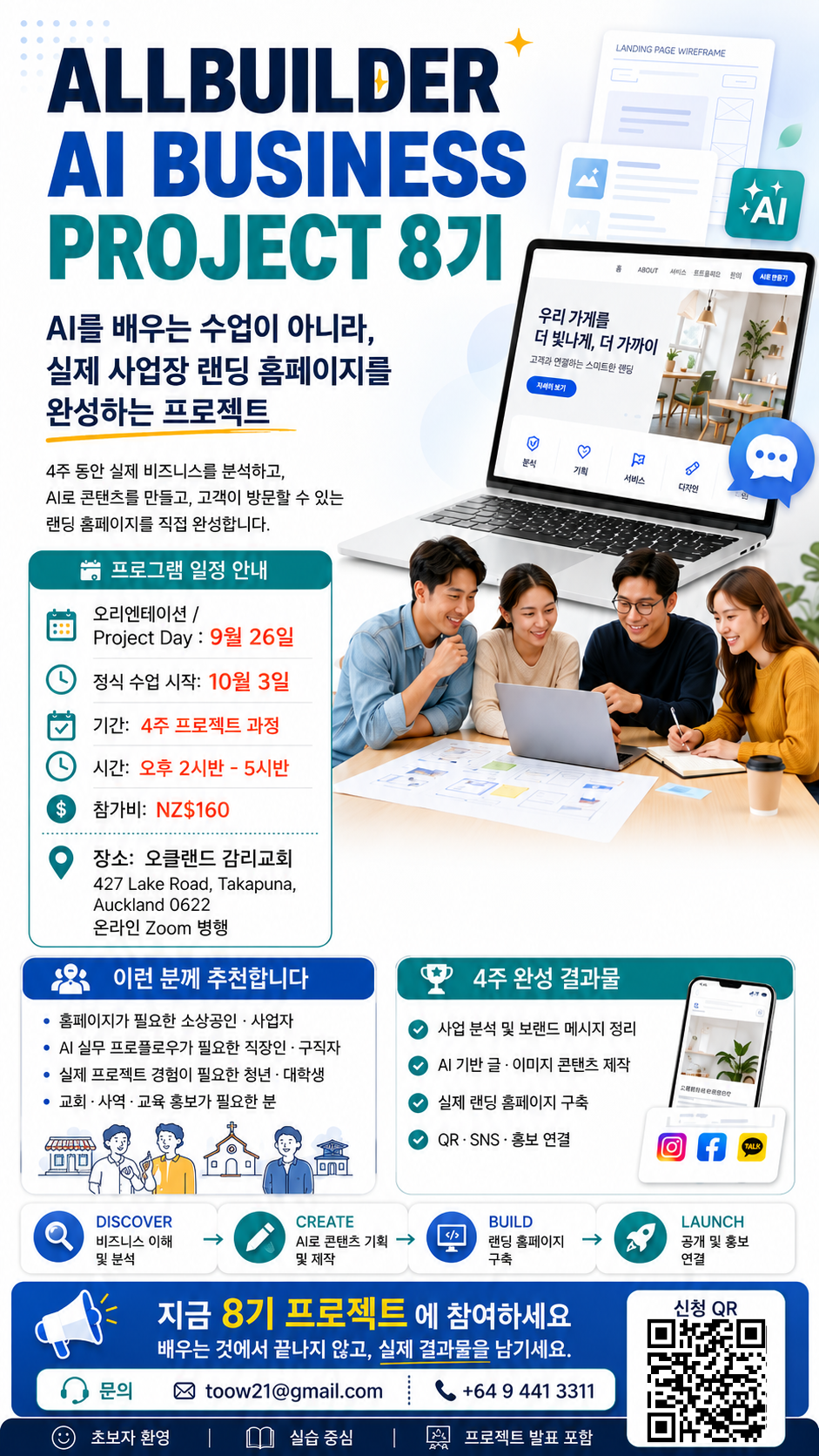
Official ALLBUILDER AI BUSINESS PROJECT Cohort 8 recruitment poster
Official ALLBUILDER AI BUSINESS PROJECT Cohort 8 programme image

In-person + live Zoom hybrid delivery

The same project programme is delivered in Auckland and online. Zoom access details will be provided to registered participants.

VenueAuckland Methodist Church
427 Lake Road, Takapuna, Auckland 0622
ParticipationIn-person Auckland class + live online Zoom
Class time2:30 PM - 5:30 PM
Enquiriestoow21@gmail.com
+64 9 441 3311
ALLBUILDER Cohort 8 registration QR code

Cohort 8 Registration QR

Scan the QR code with your phone camera to open the ALLBUILDER Cohort 8 information and registration page.

Open Cohort 8 page
View venue on mapEnquire about joining
WHY PROJECT SCHOOL

Not another AI class. A real project.

This is not a course where you copy a sample screen and stop. You start with a real business problem and finish with something customers can see and use.

01

Real business analysis

Use AI to structure the customer, offer, competitive edge and brand message.

BusinessCustomerMessage
02

AI content production

Create headlines, business copy, service descriptions, image direction and promotional content.

CopyImageContent
03

Landing page build

Connect the hero, services, CTA, enquiry, QR and social links into one working page.

LandingCTAQR
04

Promotion connection

Design the flow from QR and social sharing to search visibility and customer enquiries.

SocialSearchLaunch
05

Portfolio result

Show a real project outcome instead of simply saying you studied AI.

PortfolioCase Study
06

Project collaboration

Beginners can contribute through business analysis, content and web-building roles.

TeamPBLBeginner
BEFORE & AFTER

Move from learning and stopping to building and keeping

See the difference between a conventional AI class and the Cohort 8 project model.

Typical AI Class
Tool explanations first
Ends after sample exercises
Outputs stay as personal notes
Separated from real customer response
VS
AI BUSINESS PROJECT Cohort 8
Starts with a real business problem
Finishes one project in four weeks
Creates a publishable landing page
Connects QR, social and enquiry flows
4-WEEK SPRINT

DISCOVER · CREATE · BUILD · LAUNCH

Each week produces an asset that becomes the input for the next stage of the project.

DISCOVER

WEEK 1 · 3 OCT

Understand the business first.
Define the customer, problem, offer, USP and brand message. Build an AI Business Strategy Canvas and wireframe.

CREATE

WEEK 2 · 10 OCT

Turn AI into a content team.
Create the headline, introduction, service copy, FAQ, image direction and social content for the real business.

BUILD

WEEK 3 · 17 OCT

Build the actual landing page.
Implement the hero, services, benefits, CTA, enquiry, map, QR, social and video elements.

LAUNCH

WEEK 4 · 24 OCT

Show it to customers and present it.
Check QR, social and search connections, then present the before-and-after result at Project Demo Day.

PROJECT SNAPSHOT

ALLBUILDER AI BUSINESS PROJECT 8

Build a real business website in 4 weeks.

4
Project weeks
1
Real business
1
Publishable landing page
120
NZ$ early bird
WHO SHOULD JOIN

Designed for people who need a real outcome

Not just for people interested in AI. It is for people who need a useful business result.

Small-business owners
For owners who need a landing page and want to understand and shape their own digital presence.
People applying AI to business
For those who want to move beyond AI chat and use it for analysis, content and promotion.
Professionals and job seekers
For people who need a real AI project portfolio rather than a list of tools they have tried.
Students and young adults
For learners who want project experience with a real business context.
Churches, nonprofits and educators
For teams that need a simple way to explain programmes and connect visitors to enquiries or registration.
AI and web beginners
For people willing to solve a real problem with AI even if they have little coding experience.
EARLY BIRD

Lower entry price. Same project outcome.

Join at the early-bird fee of NZ$120, saving NZ$40 from the standard NZ$160 fee while completing the full four-week project.

EARLY BIRD

ALLBUILDER AI BUSINESS PROJECT 8

NZ$120NZ$160
  • Four-week project classes
  • Real business analysis
  • AI copy and image content
  • Landing page build
  • QR, social and promotion connection
  • Project presentation and portfolio
Apply at NZ$120 Early Bird
Project Day / Orientation

26 September 2026 · programme introduction and project matching

Formal classes begin

3 October 2026 · followed by the four-week project

Class time

2:30 PM - 5:30 PM

Auckland Methodist Church

427 Lake Road, Takapuna, Auckland 0622
In-person + live Zoom online

Programme enquiries

toow21@gmail.com · +64 9 441 3311

RESULT

Leave with a project, not just a certificate

Turn the full journey from business analysis to a customer-facing landing page and promotion flow into one clear case study.

Strategy Canvas

Summarise the target customer, problem, value proposition and message on one page.

AI Content Package

Organise the website copy, image direction and promotional content around the business.

Live Landing Page

Connect the offer, services and CTA in a publishable page structure.

QR & Social Flow

Design the customer path from offline QR to social content and enquiry.

FAQ

Common questions from first-time participants

You do not need to be an experienced coder. The programme is designed around solving a real problem with AI.

Can I join with no coding experience?

Yes. The project is structured step by step across business analysis, content and web building. Finishing the project matters more than arriving with coding experience.

Can I join if I do not own a business?

Yes. You can work with an available real-world project or participate through a team project.

What is included in NZ$120?

The four-week project classes, business analysis, AI content creation, landing page build, QR and social connection, and project presentation are included.

What happens on 26 September?

Project Day introduces the programme, demonstrates the AI workflow, helps set project direction and supports project matching.

Can I use the project after the class?

The aim is to leave with a publishable landing page and portfolio. Ongoing hosting or maintenance conditions depend on the platform and project scope used.

Can I participate by Zoom?

Yes. The programme runs in person at Auckland Methodist Church and live online via Zoom. Registered participants will receive the online access instructions.

Who do I contact about the programme?

For programme schedule and participation enquiries, contact toow21@gmail.com or +64 9 441 3311.

CONTACT

Enquire about Cohort 8

Leave your details below. Submissions are handled through the official SmartCubic enquiry system.

Ready to start the project?

Join at NZ$120 early bird instead of the NZ$160 standard fee. You can also use the direct programme contact details for course questions.

Programme contact
Auckland Methodist Church · 427 Lake Road, Takapuna, Auckland 0622
In-person + live Zoom hybrid delivery
toow21@gmail.com +64 9 441 3311

Average response within 24 hours · no-obligation enquiry

Your enquiry has been sent.
We will contact you within 24 hours.
Start Building

Move from using AI
to building a real business result with AI.

Four weeks from now, the goal is not to say 'I studied AI' but 'I built this business landing page.'

Apply at NZ$120 Early BirdProgramme enquiry
ALLBUILDERAI BUSINESS PROJECT SCHOOL

A project school that moves beyond explaining AI to solving a real business problem and producing a usable result.

Project

DISCOVERCREATEBUILDLAUNCH

Information

4-week courseNZ$120 Early BirdFAQ

Contact

Auckland Methodist Churchtoow21@gmail.com+64 9 441 3311

© 2026 ALLBUILDER. All rights reserved.

TermsPrivacyCookies
ALLBUILDER 8
Build Your Own AI Portal in 4 Weeks - Hands-On Course
AI PORTAL 4W
4-WEEK HANDS-ON COURSE
Instructor Curriculum Schedule Why This Course Register Now
50% Hands-On · 4 Weeks · Local Revenue AI

Stop Just Asking AI.
Build Your Own Search AI Platform
with your own hands

A 4-week, hands-on course [50% practice]. Connect your local community and partner with small businesses to launch local AI search — and start earning from it.

Advanced AI CRM for companies, schools & communities Local school & church community platform collaboration Local small-business CRM collaboration platform Your personal AI search engine platform QR code business Automated SNS promotion Side income / startup
Register Now and Start Your Local AI Income Explore the Curriculum
Preview

See the Course Before You Join

Check the posters and the intro video to preview your 4-week journey.
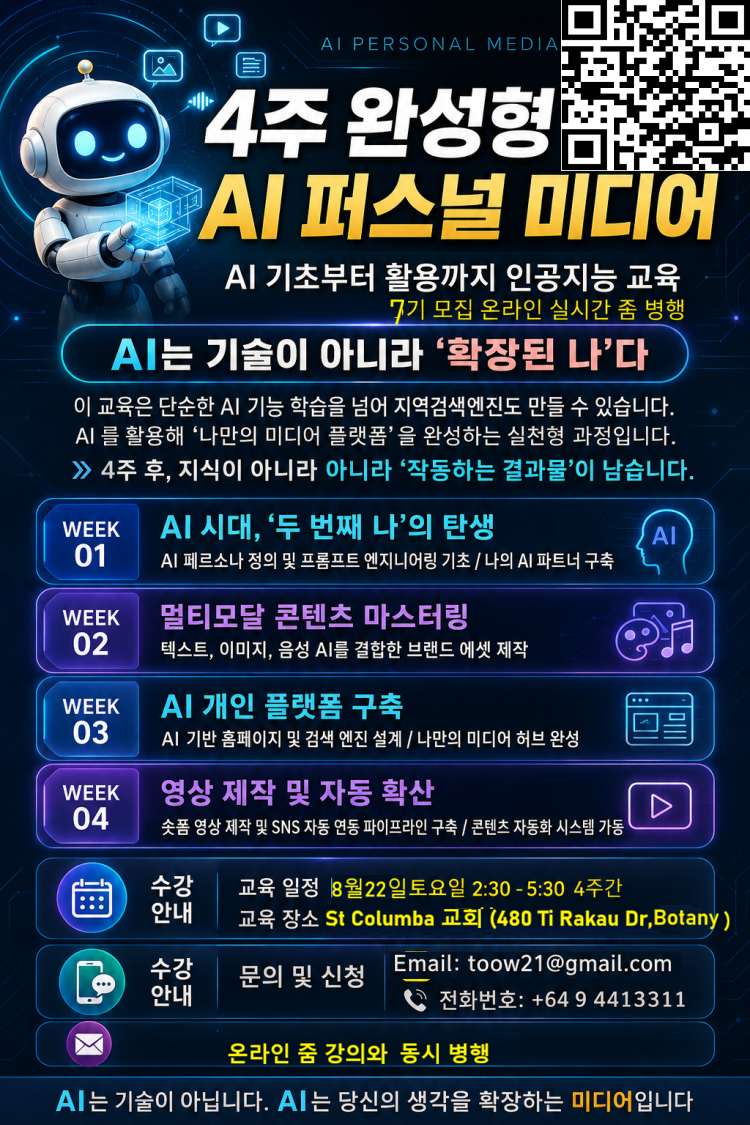
AI Portal 4-Week Course main poster image
AI Portal 4-Week Course information poster
4
Weeks to completion
3 hours every Saturday
70%
Hands-on curriculum
You build it yourself
$80
Full 4-week tuition
Group discounts available
30+
Years of instructor experience
in IT, ERP, ESG & AI
Instructor

Meet Your Instructor

Learn from 30+ years of real-world IT and AI leadership — not theory.
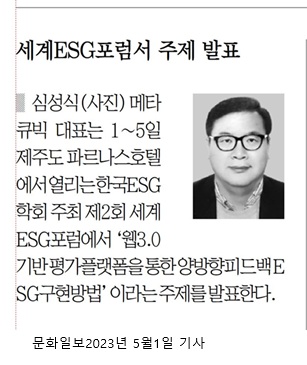
Instructor Vincent Sim (Sungsik Sim) photo

Vincent Sim (심성식)

AI · Semantic AI · Digital Platform Education Specialist
Globaliz Founder & CEO

Master's degree, Graduate School of Information Science, Kookmin University
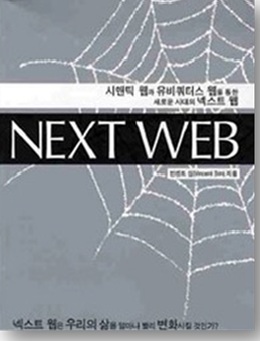
Author of "NEXT WEB"
Bachelor's degree, Alphacrucis College, New Zealand

Former Education Team Lead at SAS SOFTWARE, the US statistics and IT company
30+ years of hands-on and leadership experience across IT, ERP, ESG, AI and digital platforms

Keynote speaker at the World ESG Forum; featured in Munhwa Ilbo and other media
Drawing on real project experience in generative AI, semantic AI and personal platform development,
he trains you to be "not just someone who uses AI, but someone who applies it to life, business and ministry."

Curriculum

4-Week Hands-On Curriculum [70% Practice]

You finish one real deliverable every week. In 4 weeks, your own revenue-ready AI platform is complete.

01

Your "Second Self" Is Born

Prompt engineering & building your own AI partner for the AI era

02

Master Multimodal Content

Create brand content by combining text, image, voice and video AI

03

Build Your Local Search AI Site

Design and optimize your own homepage + local search engine
Design a revenue model with your local community and small businesses

04

Automated Video & Distribution

Auto-generate short-form videos + complete your local-search-linked SNS auto-promotion system
Finalize your local revenue engine

Schedule

Schedule & Venue

Join in person in Auckland or online via Zoom — wherever you are.

Start date: Saturday, 22 August 2026, 2:30 PM to 5:30 PM (NZ time) / 11:30 AM to 2:30 PM (Korea time)

Same time every Saturday (Aug 22, Aug 29, Sep 5, Sep 12)

Venue: St Columba church (480 Ti Rakau Dr, Botany Downs, Auckland) — in person, bring your laptop / online via Zoom also available

Tuition: $80 for the full 4 weeks / KRW 70,000 (Korea) — group discounts available

Enquiries: +64 9 441 3311 | toow21@gmail.com

Registration

How to Register & Pay

New Zealand participants: sign up and pay on the All in Auckland website, https://allinauckland.com/
Korean participants: sign up and pay on the All in Seoul website, https://allinseoul.net/

1

Create Your Account

New Zealand participants: at https://allinauckland.com/member/form, click the 'Sign Up' button at the top right, then enter your ID, password, email, name, gender and phone number.

Korean participants: at https://allinseoul.net/member/form, click the 'Sign Up' button at the top right, then enter your ID, password, email, name, gender and phone number.

2

Verify Your Email & Complete Your Profile

Fill in your organisation (company/church) and role (position/ministry title), generate your thumbnail QR code, agree to the terms and submit. You will receive a confirmation link by email (check your spam folder too).

3

Pay by Bank Transfer

After payment, email your transfer receipt to toow21@gmail.com and you will receive your Zoom link.

Bank: BANK OF NEW ZEALAND (BNZ) Account number: 02-0272-0164025-000 Account name: GLOBALIZ LIMITED For overseas transfers, SWIFT CODE (BIC): BKNZNZ22 Bank transfer within Korea: Globaliz - Korea personal agent IBK Industrial Bank / Account name: Sim Kyung-sik / Account number: 01093024842 Transfer from Australia: Sung ki Park, Commonwealth Bank, BSB - 062181, Account number - 11143989
4

Pay by Card (PayPal)

New Zealand: log in at https://allinauckland.com/member/login, click the icon at the top left, then select the "Payment History" menu.

Click "Add" at the bottom right, enter [your ID + registration fee] in the payment description, enter $80 as the amount, then click the PAYPAL button.

Korea: log in at https://allinseoul.net/member/login, click the icon at the top left, then select the "Payment History" menu.

Click "Add" at the bottom right, enter [your ID + registration fee] in the payment description, enter $80 as the amount, then click the PAYPAL button.

No PayPal account? You can still pay by card with just your email. Once payment is confirmed, your Zoom link will be emailed to you.

Enquiries: +64 9 441 3311 | toow21@gmail.com

Why This Course

What Makes This Course Different

Application-first AI education, built on 30 years of real-world delivery.

"We teach AI we have actually used — not theory."

Real consulting and development experience in ERP, POS, logistics and distribution systems

AI, big data and cloud taught from a real-world problem-solving perspective

Lectures that show you "what you can do with AI" — not just "what AI is"

Teaching that connects technology + education + faith + life

Youth and young-adult ministry experience across New Zealand and international churches

Developed and taught a digital Bible education platform for young people

AI and digital literacy training for churches, mission organisations, seminaries, schools and the general public

From generative AI to semantic AI, all the way to personal, group and local platforms

Not just ChatGPT usage training — meaning-based AI (semantic AI) and a scalable digital platform structure

A structural understanding of how AI use expands from the individual to the group, the church and the region

"An educator who makes you use AI in your life — not just know about it."
"AI education that teaches meaning beyond technology."

This course aims for 'understanding' over technical explanation, 'application' over tool usage, and 'transformation' over knowledge transfer.
In an age when AI feels intimidating, it shows you a way to learn AI together and use it together.

Practice-First

Real application, not theory

For Everyone

From young adults to business owners

Real Growth

Complete a revenue-ready platform built on your local community

4 Weeks to Your Own AI Platform

Your Local Search AI Website — in Just 4 Weeks!

A revenue-ready AI homepage, built together with your local community and small businesses.
Build it yourself now, rank high in local search, and turn automated SNS into local income.

Register Now · $80 Check the Schedule

$80 for the full 4 weeks (KRW 70,000 in Korea) · Group discounts available · Zoom option included

AI PORTAL 4W 4-WEEK REVENUE AI HOMEPAGE COURSE

Go beyond asking AI questions. Build your own personal portal and search AI platform in a hands-on course — the start of local revenue AI with your community and small businesses.

Course

  • Instructor
  • Curriculum
  • Schedule & Venue
  • Why This Course

Register

  • All in Auckland
  • All in Seoul
  • Registration & Payment

Contact

toow21@gmail.com +64 9 441 3311 St Columba church, Botany Downs, Auckland

Copyright © 2026 All Rights Reserved.

Terms of Service Privacy Policy Cookie Policy
AI PORTAL 4W

..


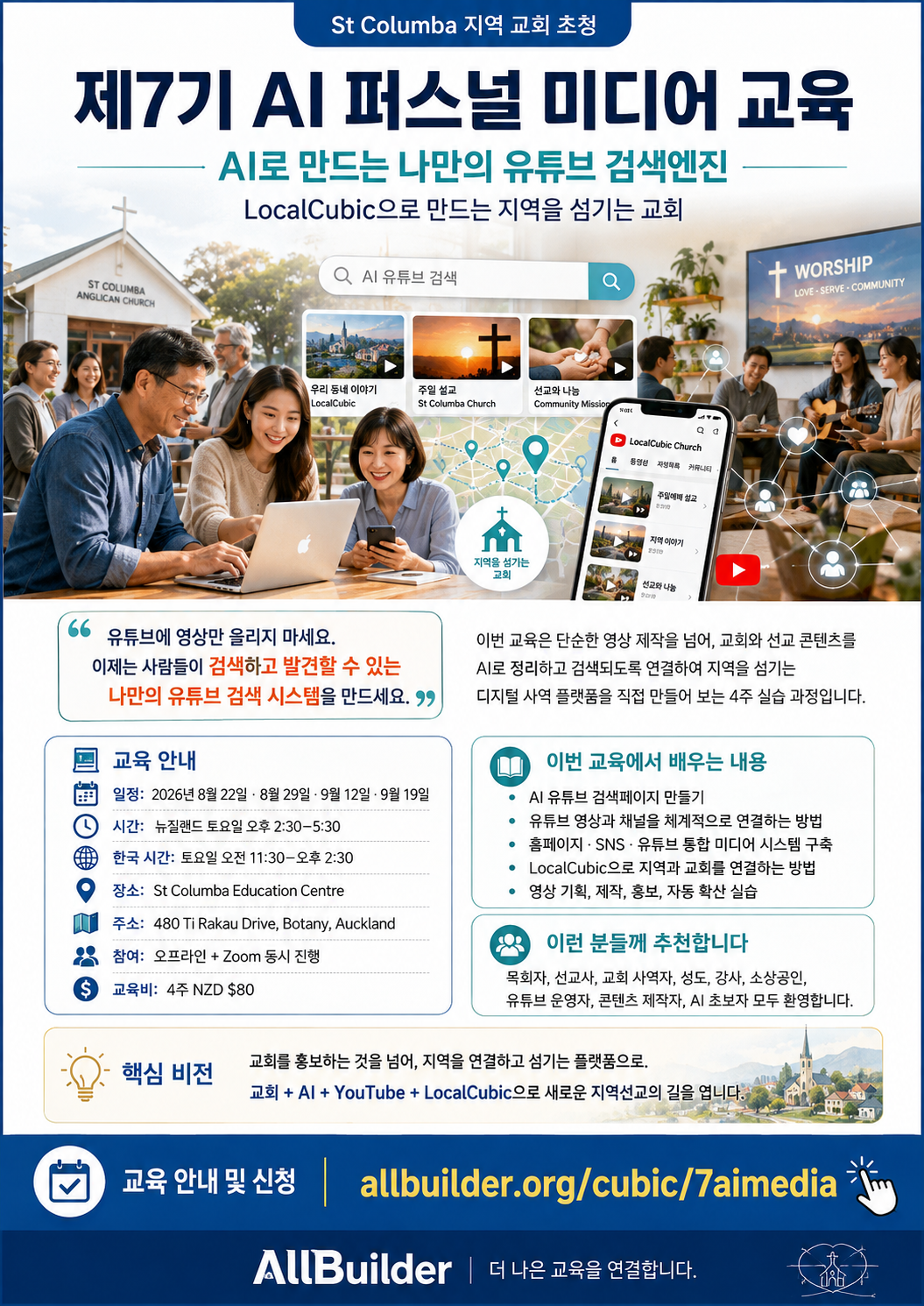
Churches Serving Local Communities | AI YouTube Search × LocalCubic × 7th AI Personal Media
LOCAL CHURCH
LOCALCUBIC × AI × YOUTUBE
Local MissionLocalCubicAI Search4-Week CourseGlobal CitiesKOApply / Enquire
CHURCHES SERVING CITIES & LOCAL COMMUNITIES

Instead of the church searching for the community,
help the community discover the church.

Connect an AI YouTube search engine, LocalCubic, a church website and useful local content so the church can become a digital doorway for service, discovery and real relationships.

Explore the 7th CohortUnderstand the Local Mission Model
Future SmartCubic city illustrating connected local and global digital networks
LOCAL CHURCH × LOCALCUBIC × AI × YOUTUBE
01 / MISSION REFRAMED

Before promoting the church, show how the church serves the neighbourhood.

A local resident does not first need another church advertisement. They often need a trustworthy door to useful information, help and relationships close to home.

Move from “How do we promote our church?” to “How can our church help the people who live here?”

A church sits among families, migrants, young people, older residents, small businesses, schools, clinics, welfare services and community groups. People may live nearby and still have no idea what the church contributes to local life.

This page therefore frames the church less like a billboard and more like a helpful local desk: a place that listens, points people toward good resources, tells local stories and creates pathways into genuine community.

Service comes before promotion.

When a church shares helpful local information, introduces trustworthy organisations and gives attention to the stories of its neighbours, people can discover the church naturally through usefulness and relationship.

FamiliesCare & relationship
Next GenerationYouth & children
Small BusinessLocal economy
EducationSchools & courses
HealthClinics & care
WelfareSupport services
EventsLocal programmes
CommunityPeople & groups
02 / LOCALCUBIC BRIDGE

Connect people, churches, businesses and services through one local context.

LocalCubic can be used as a local digital layer that helps people discover useful information around where they actually live. A church can become one trusted node within that larger community picture.

01

Church & Ministry

Organise worship, care, volunteering, education, youth and newcomer information in a clear local context.

02

Everyday Local Information

Connect dining, health, schools, welfare, events and other information residents actually search for.

03

Local Video Stories

Turn local people, places and events into useful YouTube content that can be searched again later.

04

Next Actions

Move beyond views toward enquiries, registrations, visits, volunteering and real community participation.
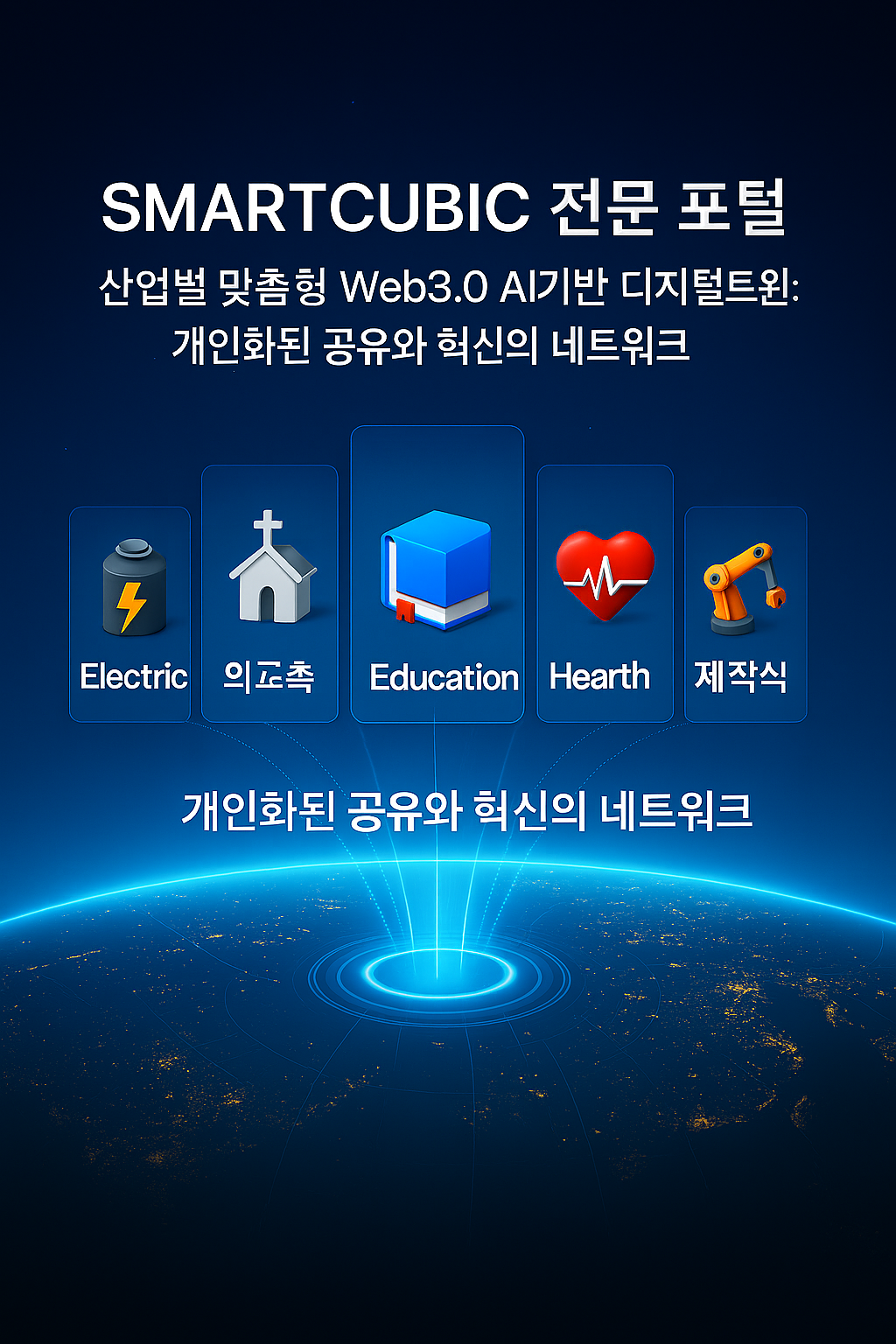
SmartCubic network linking specialised and local portals
LocalCubic can help position the church as part of a useful local discovery network rather than as an isolated page.
03 / DIGITAL DOOR

Turn the church website into a digital doorway for the neighbourhood.

Keep the essentials such as worship times, sermons and directions, then add practical local information so the site helps a resident understand both the church and the community around it.

SmartCubic local portal network visual connecting community information
A premium information structure makes church and local information understandable on the same screen.
Know Our Area

Useful local information and key places in one simple guide.

Local Events

Church and community events, seminars and programmes.

Local Business

Restaurants, cafes, shops and services worth discovering.

Local Welfare

Services and agencies that can assist people who need help.

Local Education

Schools, courses, seminars and next-generation programmes.

Local Health

Clinics, healthcare information and community health events.

Local Service

Practical opportunities for the church and residents to serve together.

Local Video

Searchable stories about people, places and events.

04 / AI YOUTUBE SEARCH

Move from a channel full of videos to a video library people can actually search.

Sermons, worship, testimonies, mission reports, events and teaching can become hard to find once they accumulate. An AI-assisted search structure organises videos around topics, audiences, questions and local needs.
Example: children's programmes near me
Church programmes for familiesFamily · Care · Local Church
Local volunteering opportunitiesVolunteer · Community · Service
Youth programmes and teachingYouth · Education · Next Generation
Faith care and newcomer informationCare · Welcome · Faith
Mobile search connecting content, websites and communication networks
Search is not about producing more video. It is about creating a path so existing content can reach the right person again.
05 / THREE CONNECTED HUBS

Do not run three disconnected sites. Build three connected entrances.

The church site builds trust, LocalCubic supports local discovery, and the AI YouTube search page supports content discovery. They have different jobs but should feel like one journey to the visitor.

CHURCH HUB

Church Website

The trusted home for worship, care, volunteering, local guides, newcomer information and next-generation ministry.

See the digital doorway
LOCALCUBIC HUB

Local Discovery Layer

A local entrance for food, health, education, events, welfare, churches and community services.

View the city network
YOUTUBE SEARCH HUB

AI Video Search Page

Organise video by topic, audience, question and location so the right sermon, event, class or local story can be found quickly.

Explore the search-engine course
06 / LOCAL MEDIA CHURCH

Let the church become a media voice that tells the neighbourhood's good stories.

One way to serve locally is to give attention to people, organisations and small businesses doing good work. Content should not exploit the community for promotion; it should document and strengthen the community with care.

SmartCubic network connecting local and specialised content across portal entrances
One useful local story can be discovered through church, local, professional and video-search entrances.
Meet a good local restaurant.Tell the story of the people, food and contribution behind the business.
Here is a service that can help people in need.Explain what a welfare agency does and how residents can access support.
Discover programmes for local young people.Connect education, care, experiences and safe activities.
Here is what is happening in our area this week.Turn event previews, coverage and follow-up stories into searchable assets.
Meet people who serve our neighbourhood.Tell stories beyond the church walls and honour people already contributing locally.
07 / SERVICE BEFORE PROMOTION

Local mission can become clearer when the advertising becomes quieter.

Frame the work like a studio case study: show the problem, the design decision and the behaviour you want to test. The goal is not more promotional material but more useful local touchpoints.

OLD APPROACH
Repeat only church programmes and internal notices.
Let videos accumulate on YouTube with no search structure.
Put church schedules before the questions residents are asking.
Run website, social media and video like separate islands.
VS
SERVICE-FIRST PLATFORM
Lead with useful information residents are already seeking.
Organise local stories and videos so they can be searched again.
Create real paths into care, volunteering, classes and events.
Make Church, LocalCubic and YouTube work as one connected flow.
PROBLEM

The Problem

A church may have substantial content, but it is hard to discover when it does not match the questions local people are asking.

DECISION

The Design Decision

Start with local needs and connect church, community and video content around those questions.

RESULT TO TEST

What to Measure

Do not promise rankings. Observe local searches, enquiries, event participation, service connections and real visits.

08 / 7TH AI PERSONAL MEDIA COURSE

Build a working local-mission media structure over four practical weeks.

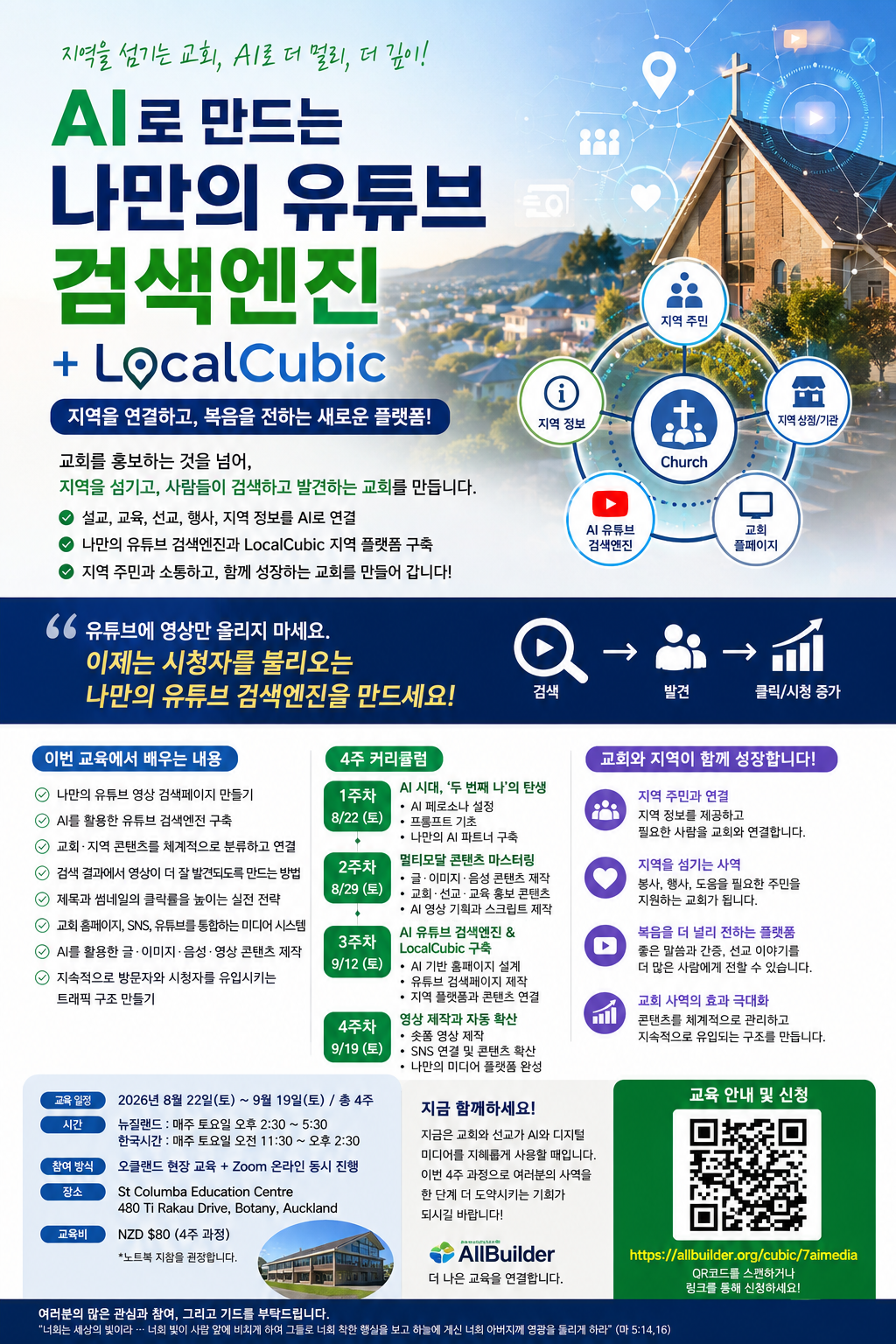
Beginning 22 August 2026, the 7th cohort moves beyond AI basics and connects content, a website, a YouTube search page and local distribution into one practical system.

WEEK01
Saturday, 22 August

Build Your AI Partner

AI persona, prompt foundations, a ministry-aware AI partner, local information collection and content planning.

WEEK02
Saturday, 29 August

Create Multimodal Local Content

Use writing, images, voice and video for church communication, local introductions and community event content.

WEEK03
Saturday, 12 September

AI YouTube Search Engine + LocalCubic

Build a searchable YouTube page, AI search structure, church homepage and connected LocalCubic media hub.

WEEK04
Saturday, 19 September

Video Production and Local Distribution

Connect short-form video, YouTube, social media, the website and LocalCubic into a repeatable distribution path.
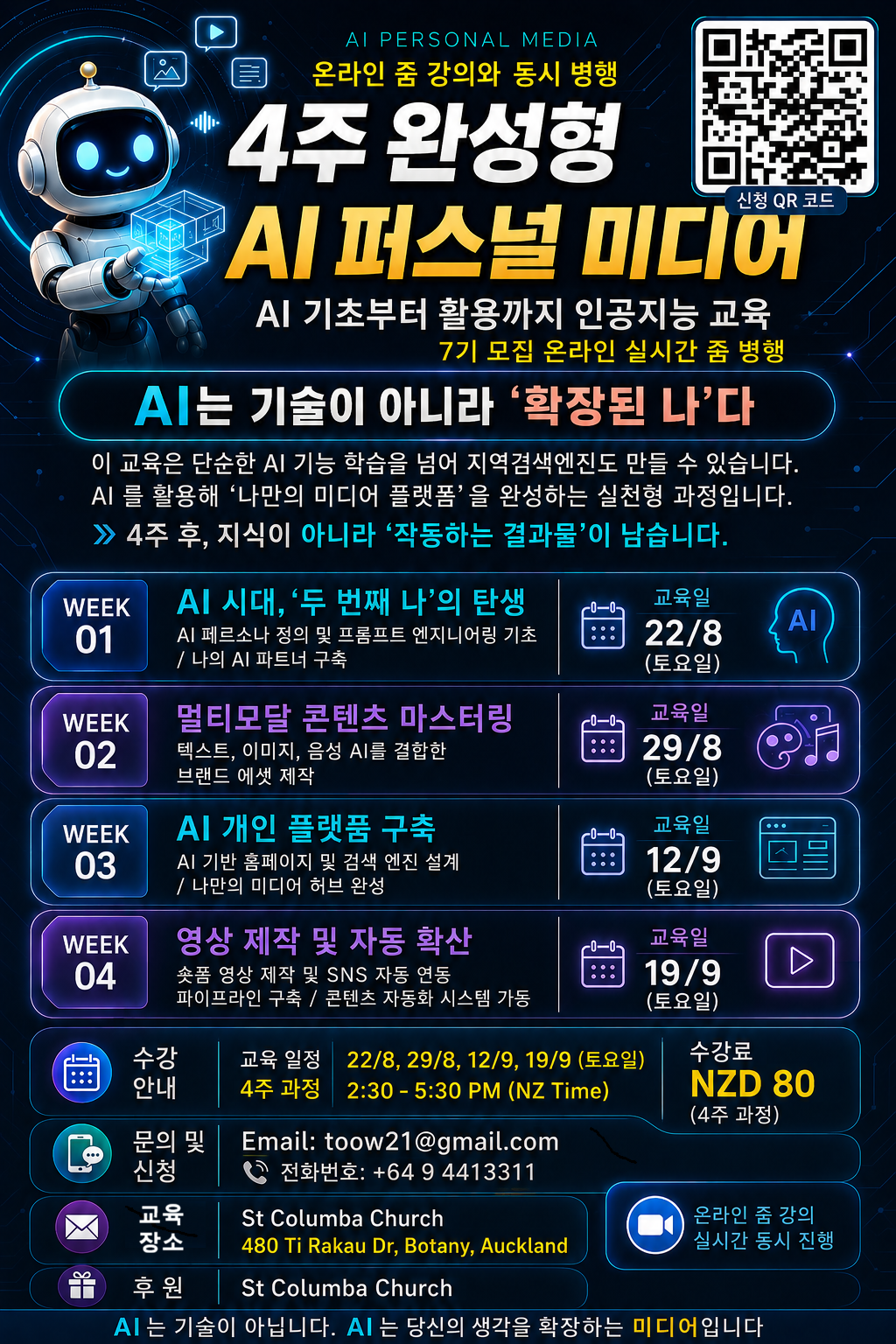
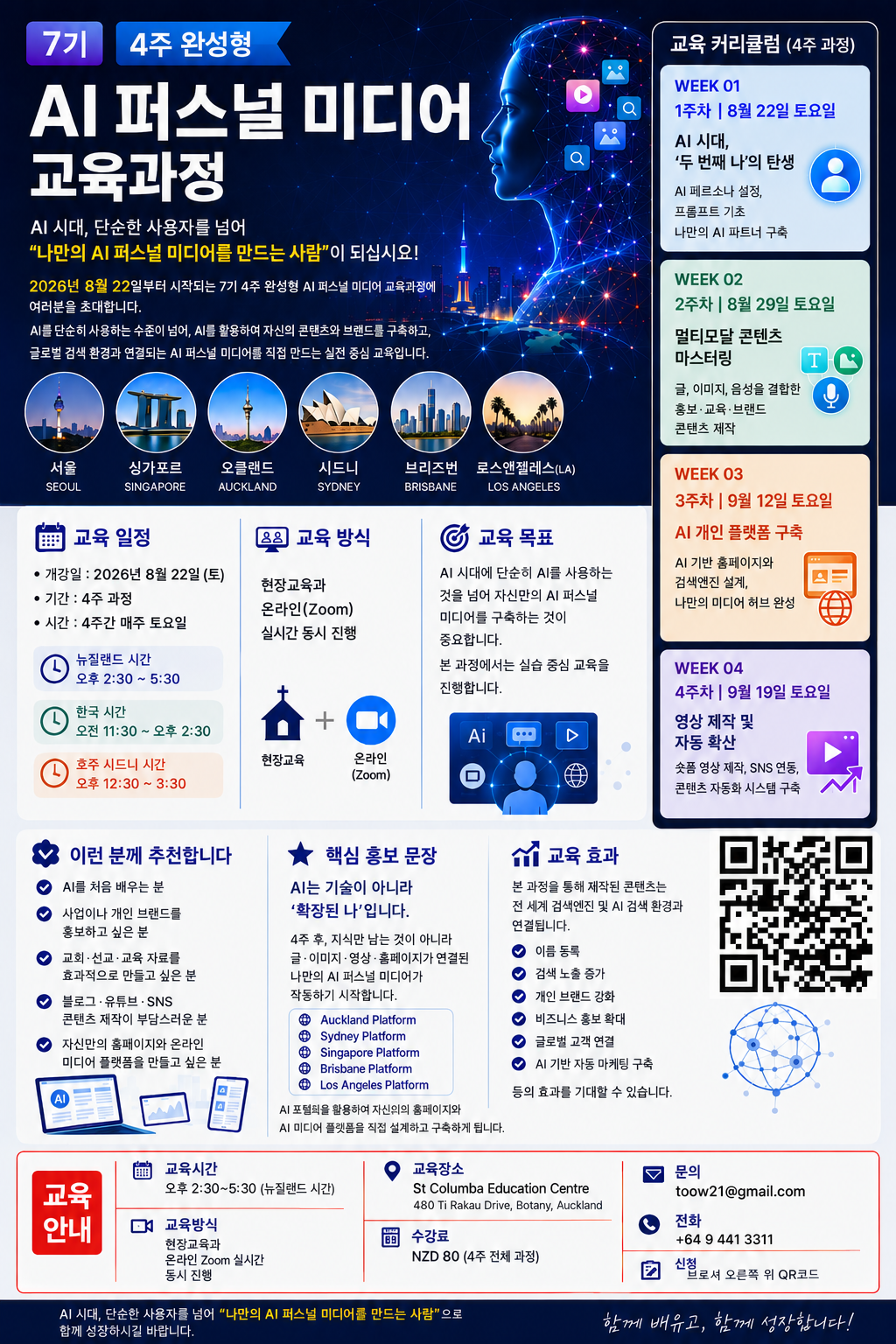
Course Information

  • 22 Aug · 29 Aug · 12 Sep · 19 Sep 2026
  • New Zealand: Saturday 2:30–5:30 PM
  • Korea: Saturday 11:30 AM–2:30 PM
  • Auckland in-person + live Zoom simultaneously
  • See the official AllBuilder page for current course details
Open Course & Registration Page
Official 7th cohort AI Personal Media reference image
Korean brochure for the four-week 7th AI Personal Media course
Four-week AI Personal Media schedule and curriculum
Reference image for connected city, local and AI media training
Brochure showing global-city timing and curriculum for the 7th AI Personal Media course
Global learning connection across Seoul, Singapore, Auckland, Sydney, Brisbane and Los Angeles
09 / CHURCH APPLICATIONS

Six small projects a local church can start immediately.

Do not start by building a huge platform. Start with one neighbourhood, one question and one audience, then repeat a simple pattern of useful content, search and connection.

Local Life Guide

Connect healthcare, dining, education, events and welfare information in a resident-friendly format.

Searchable Church Events

Make seminars, worship events, children's programmes and classes easier to discover.

Support Local Business

Create respectful stories about good local businesses and services that residents can find.

Mission & Volunteering

Connect the purpose, participation details and real stories of local service projects through video and search.

Next Generation

Provide useful youth and children's content through AI, video, search and a clear website experience.

Newcomers & Migrants

Help people settle into a new area with both church information and practical local guidance.

10 / GLOBAL CITY CHURCH NETWORK

A local church may be small while its city network can still connect globally.

SmartCubic's public City Network connects multiple city and local portals. The same principle can help churches serve their own neighbourhood faithfully while learning from useful local models across other cities.

LOCAL INFORMATION. GLOBAL CONNECTION.

Local churches keep their own identity and local focus while useful information can connect across a wider city network.

New YorkLos AngelesChicagoHoustonBrisbaneSydneySeoulBusanGangnamYangpyeongAucklandNorth ShoreSingaporeParisTokyo
The objective is not a larger city count. The first priority is for each church to understand real local needs, publish useful content and build trusted relationships where it actually serves.
View SmartCubic Global City Network
SmartCubic local portal network visual
Global connection only becomes meaningful when the local story is clear first.
SmartCubic network linking specialised and city portals
Church, education, health, event and business information can be rediscovered through different specialist entrances.
COURSE & NETWORK SNAPSHOT

Start small and repeat the connection.

The core units used in this model.

4
WEEK PRACTICAL COURSE
3
CONNECTED HUBS
15
CITY & LOCAL PORTALS
1
LOCAL SERVICE MISSION
COURSE & CHURCH CONTACT

Choose the first practical project for your church and area.

If you are unsure whether to begin with a church website, LocalCubic information, an AI YouTube search page or local content, tell us where you are now and what you want to build.

Helpful questions before you enquire

  • Which city and neighbourhood does your church serve?
  • What information do local residents repeatedly need?
  • What sermon, event or service videos do you already have?
  • What usable result would you like to have after four weeks?
info@smartcubic.com

We will review your enquiry and reply by email.

Your enquiry has been sent.
We will get back to you after review.
WHAT IF YOUR CHURCH BECAME A LOCAL DISCOVERY DOOR?

Move beyond promoting the church and build a church that serves its locality.

Connect LocalCubic for local discovery, AI for searchable information, YouTube for local stories and the church website for real relationships. Build the practical structure with us over four weeks.
Open 7th Cohort RegistrationDiscuss Your Church Use Case
ALLBUILDERCONNECTING BETTER EDUCATION

A practical model connecting AI, YouTube, LocalCubic and a church website so local churches can know, connect with and serve their communities.

LOCAL CHURCH

  • Local Mission
  • Digital Doorway
  • Use Cases

AI & LOCAL

  • LocalCubic
  • AI YouTube Search
  • Global City Network

CONTACT

info@smartcubic.com
allbuilder.org/cubic/7aimedia

© 2026 AllBuilder · SmartCubic. All rights reserved.

TermsPrivacyCookies
LOCAL CHURCH


Google Map
© Allbuilder ^